The Complete WordPress Schema Markup Guide: Boost Your SEO Rankings in 2025
(Even If You’re Not Technical)
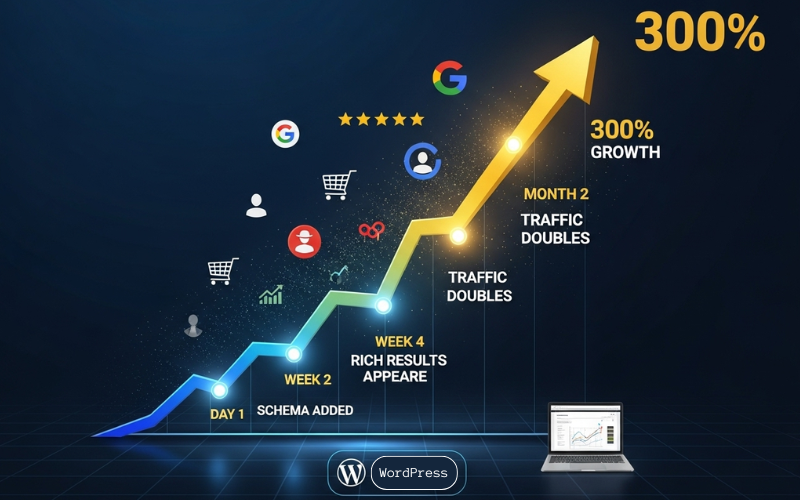
How WordPress Schema Markup Has Increased a Small Bakery’s Google Visibility by 300% in 30 Days
Picture this: Maria owns a small bakery in downtown Chicago. Despite having amazing cupcakes and great reviews, her website barely showed up in Google searches. People searching for “fresh cupcakes Chicago” were finding her competitors instead.
Then Maria discovered schema markup. Within 30 days of adding this simple code to her WordPress site, her bakery began showing up in Google search results with star ratings, prices, and mouth-watering photos. Her website traffic tripled, and more importantly, her foot traffic increased by 65%.

What if I told you that 73% of WordPress websites are missing this same opportunity? Most site owners don’t even know schema markup exists, while those who do think it’s too technical to implement.
Here’s the truth: Schema markup is one of the easiest ways to boost your search rankings, and you don’t need to be a developer to use it.
In this guide, you’ll learn exactly how to add schema markup to your WordPress site using simple tools and clear instructions. By the end, you’ll have everything you need to make your website stand out in search results just like Maria’s bakery.
Disclosure: BBWebTools.com is a free online platform that provides valuable content and comparison services. To keep this resource free, we may earn advertising compensation or affiliate marketing commissions from the partners featured in this blog.
🎯 Key Takeaways
- WordPress Schema markup increases clicks by 30-35%, not rankings directly. While schema doesn’t directly boost your position in search results, it makes your listings more attractive with star ratings, prices, and rich details, leading to significantly higher click-through rates that can indirectly improve rankings over time.
- You don’t need coding skills to implement schema – WordPress plugins like RankMath, Schema Pro, and AIOSEO provide visual interfaces that let anyone add schema markup in 15-30 minutes without writing a single line of code.
- Start with five essential schema types – Focus on Article schema (blog posts), Local Business schema (physical locations), FAQ schema (Q&A content), Product schema (e-commerce), and Review schema (testimonials) to cover most WordPress site needs.
- Mobile users benefit even more from schema markup – With over 60% of searches on mobile devices, schema-enhanced results stand out dramatically on small screens and enable direct actions like tap-to-call and tap-to-navigate, making it critical for mobile visibility.
- AI search tools rely on schema to cite your content – As Google AI Overviews, ChatGPT, and Perplexity gain prominence in 2025, schema markup helps AI systems understand, extract, and accurately cite your content as an authoritative source in their responses.
- Expect 2-4 weeks for rich results to appear, 2-3 months for full impact – Google needs time to crawl and process your schema before displaying rich results, and the complete traffic and ranking benefits typically materialize over a 2-3 month period as click-through rates improve.
- Schema markup requires ongoing maintenance – Update your schema whenever you change business hours, prices, addresses, or services to maintain accuracy and credibility with both Google and users, and monitor Google Search Console regularly for errors.
⁉️What is Schema Markup? (The Simple Explanation)
Think of schema markup like labels on food cans. Just as labels tell you what’s inside a can, schema markup tells Google what’s on your web page. This helps your site appear more prominently in search results.
When you search for a recipe online, have you noticed how some results show cooking time, ingredients, and star ratings right in Google? That’s schema markup at work.
Here’s what happens without schema markup:
- Google sees your content as plain text
- Your search results look boring and generic
- People skip over your website for competitors
Here’s what happens with schema markup:
- Google understands exactly what your content is about
- Your search results show rich details like ratings, prices, and images
- More people click on your website
https://youtu.be/kZgDVRhfLHM?si=hR6q1__bTG7Z4WDR
🔎Why Schema Markup is Your Secret Weapon in 2025
According to recent studies from 2024-2025, websites with schema markup get 30% more clicks than those without it. A comprehensive analysis by Search Engine Journal in late 2024 found that rich snippets can increase click-through rates by up to 35% for certain industries, with e-commerce and local businesses seeing the highest gains.
These statistics continue to improve as Google expands rich result features and users become more accustomed to choosing enhanced listings over plain text results.
Here’s why:
- For Search Engines:Schema markup makes their job easier. Instead of guessing what your content means, you’re telling them directly. Google loves this and rewards you with better visibility.
- For Users:Rich snippets (the enhanced search results) catch the eye and provide useful information upfront. People are more likely to click on results that show ratings, prices, or other helpful details.
- For Your Business:More clicks mean more traffic, which usually means more customers and sales.
The best part? Your competitors probably aren’t using it yet. This gives you a huge advantage in search results.
For Mobile Users: Schema Markup is Even More Critical
With over 60% of searches now happening on mobile devices, screen real estate is precious. Mobile search results show fewer listings per screen, making it crucial to stand out immediately.
Schema markup gives you a massive advantage on mobile:
- More visual impact: Rich snippets with star ratings, prices, and images catch the eye instantly on small screens where users scroll quickly.
- Better information density: Users can see key details (price, availability, ratings) without clicking through, reducing friction in their decision-making process.
- Voice search optimization: As voice search continues growing, schema markup helps voice assistants extract and speak your information accurately. When someone asks their phone “What’s the best bakery near me?”, schema-enhanced listings are more likely to be featured in the response.
- Tap-to-call and tap-to-navigate: Local Business schema enables direct action buttons on mobile (call, get directions, view hours) that drive immediate conversions.
Bottom line: If you’re not using schema markup in 2025, you’re essentially invisible to a significant portion of mobile searchers.
⚙️Plugin vs. Manual Method: Which Path Should You Take?
https://youtu.be/-VwqOHPxi4M?si=E3mLqy7Pukh5mCF6
You have two primary methods for adding schema markup to your WordPress site. Let’s break down which method works best for different situations:
Method 1: Use a Plugin (Recommended for Most People)
Best for: Beginners, busy business owners, anyone who wants quick results
Pros:
- No coding required
- Visual interface that’s easy to use
- Updates automatically when Google changes requirements
- Usually takes 15-30 minutes to set up
Cons:
- Adds another plugin to your site
- May have monthly costs for premium features
- Less customization than manual coding
Method 2: Manual Coding (For Advanced Users)
Best for: Developers, agencies, people who want complete control
Pros:
- No additional plugins needed
- Complete customization possible
- No ongoing costs
- Faster website loading
Cons:
- Requires coding knowledge
- Takes more time to implement
- You need to update when standards change manually
- Higher risk of making mistakes
Our Recommendation: Start with Plugins
Unless you’re comfortable writing code, start with a plugin. You can always switch to manual implementation later once you understand how schema markup works.
⚙️Top Schema Markup Plugins for WordPress (Tested & Reviewed)

We’ve tested dozens of schema plugins. Here are the best ones:
- RankMath SEO (Our #1 Choice)
- Price: Free version available, Pro starts at $5.75/month
- Best for: Most WordPress users
- Schema types: 13+ in free version, 20+ in pro
- Why we love it: Easy setup wizard, automatic implementation, excellent support
- Schema Pro by Brainstorm Force
- Price: $79/year for unlimited sites
- Best for: Agencies and multiple site owners
- Schema types: 20+ types with automatic mapping
- Why we love it: Set it once and forget it, it works on 174,000+ websites
- All in One SEO (AIOSEO)
- Price: Free version available, Pro starts at $49/year
- Best for: Sites that need a complete SEO solution
- Schema types: 12+ types with an easy generator
- Why we love it: Combines SEO and schema in one plugin
🚀Step-by-Step: Adding Schema Markup with RankMath (15 Minutes)
https://youtu.be/IDLerAqGpNc?si=Bws8y-_P0RCKskOV
Let’s walk through the process of adding schema markup using RankMath, our recommended plugin. Even if you choose a different plugin, the process is similar.
Step 1: Install and Set Up RankMath
- Go to your WordPress dashboard
- Click “Plugins” → “Add New”
- Search for “RankMath SEO”
- Click “Install Now” then “Activate”
- Follow the setup wizard (takes about 5 minutes)
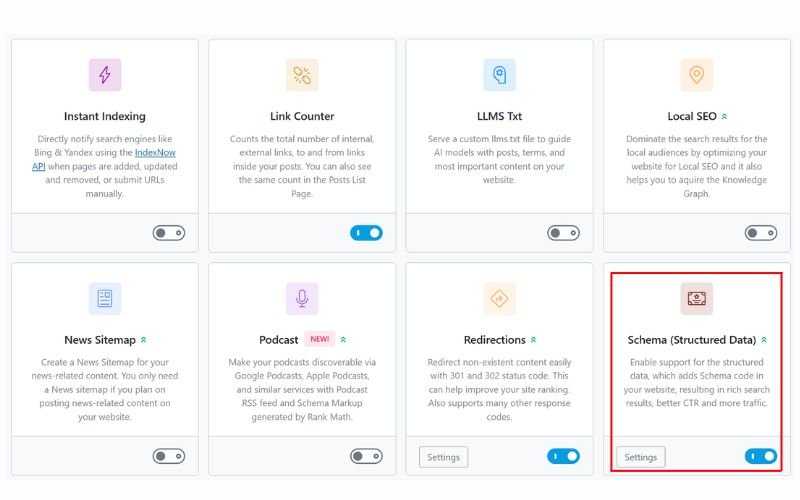
Step 2: Enable Schema Module
- In your WordPress dashboard, go to “Rank Math” → “Dashboard”
- Click on “Modules”
- Make sure “Schema” is turned ON (it should be by default)
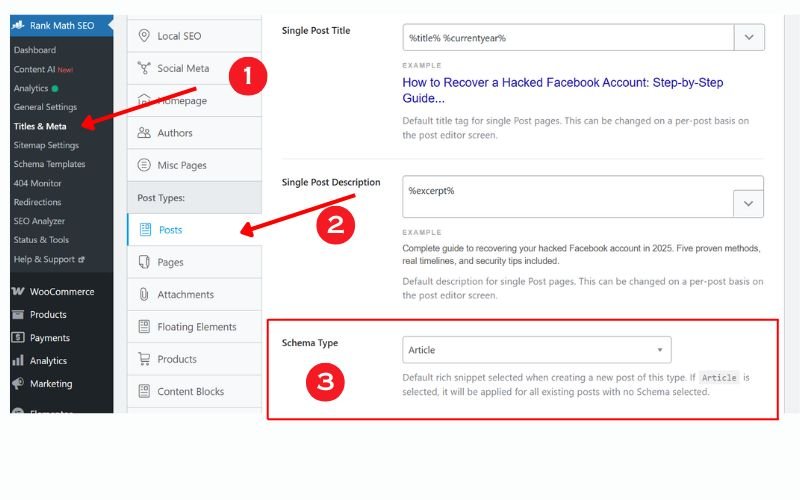
Step 3: Set Your Default Schema Types
- Go to “Rank Math” → “Titles & Meta”
- Click on “Posts” (or whatever content type you want to configure)
- Under “Schema Type,” choose “Article” for blog posts
- Save changes
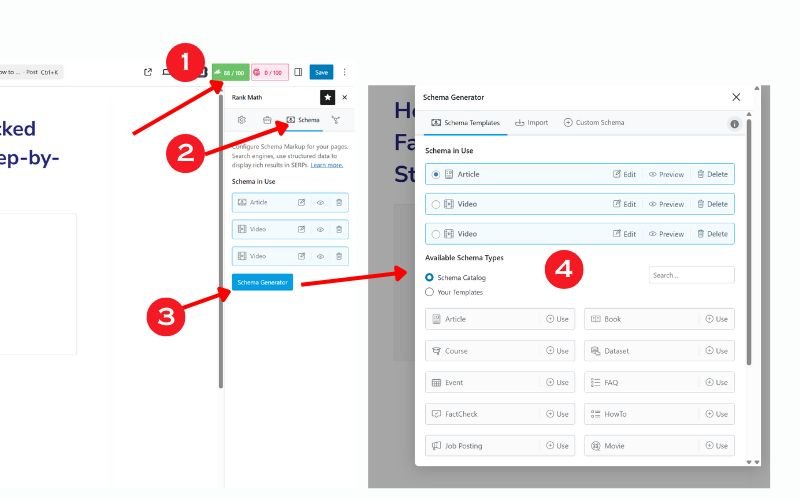
Step 4: Add Schema to Individual Posts
When writing or editing a post:
- Scroll down to the “Rank Math” box below your content
- Click the “Schema” tab
- Click “Generate Schema”
- Choose your schema type (Article, FAQ, How-to, etc.)
- Fill in the required fields (marked with red stars)
- Add optional fields that apply to your content
- Click “Update” to save
Pro Tip: Always fill in the optional fields when possible. More complete information leads to better search results.
📃5 Essential Schema Types Every WordPress Site Needs
1. Article Schema (For Blog Posts and News)
- What it does: Tells Google your content is an article, blog post, or news story.
- Rich results: Shows headline, publish date, author, and featured image
- Perfect for: Blogs, news sites, content marketing
Example result: When someone searches “WordPress tips,” your article might show up with your author name, publish date, and article image.
Quick setup in RankMath:
- Schema Type: Article
- Required fields: Headline, Author, Date Published
- Recommended fields: Description, Featured Image, Publisher
2. Local Business Schema (For Physical Businesses)
- What it does: Provides Google with your business details like address, hours, and phone number
- Rich results: Shows in Google Maps, local pack results, and knowledge panels
- Perfect for: Restaurants, stores, service businesses, offices
Real success story: A local dentist in Austin added Local Business schema and saw a 45% increase in appointment bookings within two months.
Key information to include:
- Business name and type
- Complete address
- Phone number
- Operating hours
- Services offered
- Customer reviews
3. FAQ Schema (For Question & Answer Content)
- What it does: Marks up frequently asked questions on your pages
- Rich results: Shows expandable Q&A boxes directly in search results
- Perfect for: Support pages, product descriptions, service explanations
- Why it’s powerful: FAQ rich results take up a lot of space in search results, pushing competitors down the page.
Example questions that work well:
- “How much does [your service] cost?”
- “What’s included in [your product]?”
- “How long does [your process] take?”
4. Product Schema (For E-commerce Sites)
- What it does: Provides product details like price, availability, and ratings.
- Rich results: Shows prices, star ratings, and availability status
- Perfect for: Online stores, product reviews, affiliate marketing
- Impact on sales: Products with schema markup receive 25% more clicks on average, as shoppers can view prices and ratings before making a purchase.
Essential product details:
- Product name and description
- Price and currency
- Availability status
- Customer ratings and review count
- Product images
5. Review Schema (For Building Trust)
- What it does: Displays star ratings and review snippets in search results
- Rich results: Shows star ratings and review text
- Perfect for: Service businesses, product reviews, testimonials
- Trust factor:88% of consumers trust online reviews as much as personal recommendations. Star ratings in search results build instant credibility.
Additional Schema Types to Consider
While the five schema types above cover most WordPress sites, here are two more powerful options that can significantly boost your visibility:
BreadcrumbList Schema (For Site Navigation)
- What it does: Shows your site’s navigation path directly in search results, making it easier for users to understand your site structure.
- Rich results: Displays clickable breadcrumb trails like “Home > Services > Web Design” in search results.
- Perfect for: Sites with deep content hierarchies, e-commerce stores, and large blogs with multiple categories.
- Why it matters in 2025: Google increasingly favors clear site architecture. Breadcrumbs help both users and search engines navigate your content efficiently, and they take up additional visual space in search results.
- Setup tip: Most SEO plugins like RankMath include automatic BreadcrumbList schema when you enable their breadcrumb feature.
VideoObject Schema (For Video Content)
- What it does: Marks up video content on your pages, providing details like duration, upload date, and thumbnail.
- Rich results: Shows video thumbnails, duration, and preview clips directly in search results. Videos can also appear in Google’s Video tab and video carousels.
- Perfect for: Tutorial sites, product demos, video blogs, educational content.
- Why it matters in 2025: Video content dominates user engagement, and video-enhanced search results receive 41% more clicks than standard results. With Google prioritizing video content in search, the VideoObject schema gives you a competitive edge.
- Key information to include:
- Video title and description
- Upload date
- Duration
- Thumbnail URL
- Transcript (when available)
🎯Testing Your Schema Markup: Making Sure It Works
After adding schema markup, you need to test it. Here’s how:
Google’s Rich Results Test (Free Tool)
- Go to Google’s Rich Results Test
- Enter your page URL or paste your schema code
- Click “Test URL” or “Test Code”
- Review the results:
- Green checkmarks: Schema is working correctly
- Yellow warnings: Minor issues, but still functional
- Red errors: Problems that need fixing
Google Search Console (Monitor Over Time)
- Add your site to Google Search Console (free)
- Go to “Enhancements” in the left menu
- Click on any schema type you’ve implemented
- Monitor for errors and track rich result impressions
Important: Understanding Your Schema Markup Timeline
Setting realistic expectations helps you stay patient and track progress effectively. Here’s what to expect:
Immediate (Day 1):
- Schema code is live on your site
- You can validate it using Google’s Rich Results Test
- The markup is technically functional
Week 1-2:
- Google begins crawling and discovering your schema
- No visible changes in search results yet
- This is normal—don’t panic
Week 2-4:
- Rich results may start appearing in search results
- Initial appearances might be sporadic or limited
- Start monitoring Google Search Console for rich result impressions
Month 2-3:
- Rich results become more consistent across searches
- Click-through rates begin improving noticeably
- Traffic increases become measurable in analytics
Month 3-6:
- Full impact of schema markup materializes
- Rankings may improve as higher CTR signals quality to Google
- You’ll have solid data on which schema types perform best
Important factors affecting timeline:
- Site authority: Established sites with good domain authority see results faster than brand-new websites.
- Crawl frequency: Popular sites that Google crawls frequently will see results sooner than sites crawled weekly or monthly.
- Competition: In highly competitive niches, it may take longer for your rich results to gain traction.
- Schema quality: Complete, accurate schema implementations get prioritized over minimal or error-filled markup.
- Pro tip: Don’t judge success solely on rich results appearing in search. Track your click-through rates in Google Search Console. Even when rich results aren’t visually obvious, the structured data often influences how Google presents your listings, improving performance subtly.
- Be patient and persistent: Schema markup is a long-term investment. Sites that implement and consistently maintain a schema see compounding benefits over time. Don’t give up if you don’t see immediate changes—the best results come to those who stick with it.
Common Schema Mistakes to Avoid
Mistake #1: Adding a schema that doesn’t match your content
- Wrong: Adding Recipe schema to a blog post about cooking tips
- Right: Adding Article schema to the blog post, Recipe schema only to actual recipes
Mistake #2: Missing required fields
- Each schema type has mandatory fields that must be completed
- Use Google’s Rich Results Test to identify missing requirements
Mistake #3: Outdated or incorrect information
- Keep schema data updated when you change prices, hours, or other details
- Mismatched information can hurt your search rankings
⌨️Advanced Schema Strategies for Maximum Impact
Strategy 1: Schema for AI Search Optimization
The search landscape is evolving rapidly in 2025. With Google’s AI Overviews (formerly SGE), ChatGPT’s SearchGPT, Perplexity AI, and other AI-powered search tools gaining massive adoption, schema markup has become essential for AI visibility.
Why AI systems love schema markup:
AI search tools need structured, reliable data to provide accurate answers. Schema markup gives AI systems exactly what they need:
- Clear context: Schema tells AI precisely what each piece of content represents (product, review, fact, instruction).
- Relationship mapping: Schema shows how different pieces of information connect, helping AI understand the bigger picture.
- Source attribution: Well-implemented schema makes it easier for AI tools to cite your content as an authoritative source.
- Data extraction: AI can quickly pull specific facts, prices, dates, and other details from schema-marked content without interpreting ambiguous text.
AI-friendly schema implementation tips:
- Use comprehensive, natural language descriptions: Don’t just fill required fields. AI systems parse your descriptions to understand nuance and context. Write complete sentences that fully explain your content.
- Connect related content: Use schema relationships to link author profiles to articles, products to categories, and FAQs to service pages. This helps AI understand the knowledge structure of your site.
- Include authoritative signals: Add publisher information, author credentials, and publication dates. AI systems prioritize content from established, credible sources.
- Add structured data to evergreen content: Focus on implementing schema on your best, most accurate content that serves as reference material. AI tools prefer citing comprehensive, authoritative pages.
- Implement FAQ and How-to schema: These formats align perfectly with how users ask AI systems questions. When someone asks an AI “How do I optimize WordPress for speed?”, your How-to schema content is more likely to be featured.
- Real-world impact: A SaaS company implementing a comprehensive schema in early 2025 saw a 127% increase in AI-attributed traffic within three months. Their content began appearing in AI-generated answers across multiple platforms, driving qualified leads who specifically sought their expertise.
- Looking ahead: As AI search continues evolving, schema markup will become even more critical. Sites without proper schema will struggle to appear in AI-generated responses, effectively becoming invisible to a growing segment of search traffic.
Strategy 2: Building Your Content Knowledge Graph
Connect related content on your site using schema relationships:
- Link author profiles to their articles
- Connect products to their categories
- Relate FAQ answers to relevant service pages
- Create topic clusters with shared schema elements
Strategy 3: Industry-Specific Schema Types
Beyond the basic types, consider a specialized schema for your industry:
- For Restaurants:Menu, Restaurant schema
- For Events:Event, EventVenue schema
- For Courses:Course, EducationalOrganization schema
- For Software:SoftwareApplication, WebApplication schema
⚙️Essential Tools and Resources for Schema Success
Recommended Hosting for Schema Performance
Fast hosting helps your schema load quickly, improving your search results:
- WP Engine: Premium WordPress hosting with built-in performance optimization Try WP Engine
- SiteGround: Excellent speed and WordPress-specific features Get SiteGround
- Hostinger: Excellent speed, very affordable, free security features, WordPress automatic integration Get Hostinger
SEO Tools That Help with Schema
- SEMrush: Track rich result performance and competitor schema usage Try SEMrush Free
- Ahrefs: Monitor schema-enhanced search results Get Ahrefs
Free Schema Resources
- Schema.org: Official schema documentation
- Google Search Central: Latest schema guidelines and requirements
- JSON-LD Generator: Free tool for creating custom schema code
📈Conclusion: Your Schema Markup Success Starts Today
Schema markup isn’t just a nice-to-have feature anymore – it’s essential for competing in search results. While your competitors are still using basic SEO tactics, you now know to make your website stand out with rich snippets and enhanced search results.
Remember Maria’s bakery from our opening story? She went from being invisible in search results to becoming the top choice for “fresh cupcakes Chicago.” The only difference was adding schema markup to her WordPress site.
You have the same opportunity. The tools are available, the process is straightforward, and the results speak for themselves.
Start with one schema type today. Add Article schema to your best blog post, or Local Business schema to your contact page. Test it, see the results, then gradually expand to cover more of your content.
Your improved search rankings are just a few clicks away.
Subscribe to our news letters

- Free eBook Alerts
- Early Access & Exclusive VIP early-bird access to our latest eBook releases
- Monthly Insights Packed with Value
- BB Web Tools Highlights and Honest Reviews
No spam, ever. Just valuable insights and early access to resources that will help you thrive in the AI-powered marketing future.
📈Your Schema Markup Action Plan
Here’s your step-by-step plan to implement schema markup this week:
This Week (Days 1-2):
- Choose and install a schema plugin (we recommend RankMath)
- Set up basic Organization schema for your homepage
- Add Article schema to your 5 most popular blog posts
Next Week (Days 3-7):
- Implement schema for your main service/product pages
- Add FAQ schema to common customer questions
- Test all implementations using Google’s Rich Results Test
Ongoing (Monthly):
- Add schema to new content as you publish it
- Monitor Google Search Console for schema errors
- Update the schema when you change business information
- Track the impact on your search performance
❓ Frequently Asked Questions: WordPress Schema Marup
Will schema markup directly improve my search rankings?
Schema markup doesn’t directly boost your rankings as a ranking factor. However, it significantly increases your click-through rates by making your search results more attractive with rich snippets (star ratings, prices, images). More clicks signal quality to Google, which can indirectly improve your rankings over time. Think of schema as making your existing rankings work harder for you.
How long does it take to see results after adding schema markup?
Google typically needs 2-4 weeks to crawl and process your schema markup before rich results appear in search results. However, the full impact on your traffic and rankings may take 2-3 months to materialize. Monitor your Google Search Console regularly to track when your rich results start appearing and how they perform.
Can I use multiple schema types on the same page?
Absolutely! In fact, it’s often recommended. For example, a blog post can have an Article schema for the main content, an FAQ schema for questions at the bottom, and an Organization schema in the footer. Just ensure each schema type accurately represents the content it’s marking up. Don’t add a schema that doesn’t match what’s actually on the page.
Do I need coding skills to add schema markup to WordPress?
No coding skills are required when using plugins like RankMath, Schema Pro, or AIOSEO. These plugins provide visual interfaces where you simply fill in forms with your information. The plugin automatically generates the correct code behind the scenes. Manual implementation does require coding knowledge, but plugins make schema accessible to everyone.
Will adding too many plugins slow down my WordPress site?
Adding a schema plugin does add some load to your site, but reputable plugins like RankMath are optimized for performance. The SEO benefits far outweigh the minimal speed impact. If site speed is a concern, choose a plugin that serves multiple purposes (like RankMath, which handles both SEO and schema) rather than installing separate plugins for each function.
What happens if I make a mistake in my schema markup?
Minor errors usually won’t harm your site, but they may prevent rich results from appearing. Google’s Rich Results Test tool will show you any errors that need fixing. The most common mistakes are missing required fields or mismatched information (like saying a business is open when it’s actually closed). Always test your schema after implementation and fix any errors Google identifies.
Is schema markup significant for local businesses?
Yes, extremely important! The Local Business schema helps you appear in Google Maps, the Local Pack (the map with three business listings), and provides rich information in regular search results. For local businesses, schema markup directly impacts visibility in “near me” searches and local search results. Include your accurate business name, address, phone number, hours, and services for maximum impact.
Can schema markup help my site appear in AI search results?
Yes! As AI-powered search tools like Google’s AI Overviews, ChatGPT, and Perplexity become more prominent, schema markup helps these systems understand and accurately cite your content. Well-structured schema makes it easier for AI to extract factual information, identify authoritative sources, and present your content as reliable answers to user queries.
Do I need a different schema for mobile vs. desktop?
No, schema markup works universally across all devices. You implement it once, and it applies to both mobile and desktop search results. In fact, schema is particularly valuable for mobile users where screen space is limited—rich snippets help your results stand out even more in compact mobile search displays.
Should I update my schema markup regularly?
Yes, whenever you change important business information. If you update your prices, business hours, address, phone number, or services, ensure that you update your schema markup accordingly. Outdated or incorrect schema information can hurt your credibility with both Google and users. Set a reminder to review your schema quarterly or whenever you make significant changes to your website.
How often should I update my website’s content for SEO?
For most websites, updating 3-5 pages monthly with fresh information, improved formatting, or additional value works well. Focus on your highest-traffic pages first, and ensure updates genuinely improve user experience rather than just changing words around.
Is daily SEO work necessary for small businesses?
Daily SEO work should be minimal for small businesses—just 3-5 minutes checking for critical errors. Focus your energy on weekly maintenance tasks and monthly content improvements rather than daily optimization attempts.
How do I know if my SEO frequency is working?
Track organic traffic growth, ranking improvements for target keywords, and user engagement metrics like session duration and bounce rate. Positive trends over 3-6 months indicate your frequency is appropriate.
What’s the minimum SEO maintenance needed to maintain rankings?
At minimum, perform monthly content reviews, quarterly technical checks, and immediate fixes for any critical errors. However, competitive industries require more frequent attention to maintain positions.
How often should I run complete SEO audits?
Comprehensive audits should happen annually for most sites, quarterly for highly competitive industries, and immediately after significant algorithm updates or traffic drops exceeding 20%.
Can too much SEO optimization hurt my website?
Yes, over-optimization can trigger penalties or confuse search engines. Focus on one major change per page per month, and always prioritize user experience over search engine manipulation.
How long does it take to see results from consistent SEO?
Most SEO changes show initial movement within 2-4 weeks, with substantial results visible after 3-6 months of consistent implementation. Technical fixes often show faster results than content optimizations.
Should I pause SEO during slow business periods?
Never completely stop SEO maintenance. During slow periods, reduce frequency but maintain basic monitoring and critical updates. Competitors who maintain consistency during your pause periods will gain lasting advantages.
📚 Articles You May Like
Want to maximize your WordPress SEO beyond schema markup? Check out these related guides:
- WordPress Speed Optimization: Complete Guide – Fast sites rank higher in search results
- Local SEO for WordPress: Dominate Your Area – Perfect companion to Local Business schema
- Complete WordPress SEO Audit Checklist – Ensure your entire site is optimized – Blog written
- Technical SEO Fundamentals for WordPress – Advanced strategies for better rankings
Local SEO for WordPress: How I Helped 3 Businesses Triple Their Revenue
Discover how local SEO for WordPress helped three businesses triple their revenue. Learn the exact strategies, tools, and implementation roadmap…

How to Recover a Hacked Facebook Account: Step-by-Step Guide (2025)
Complete guide to recovering your hacked Facebook account in 2025. Five proven methods, real timelines, and security tips included.
Facebook Business Account: Best Setup Practices – Post, Ads, Profile Images and More
Transform your Facebook business page from amateur to professional. Learn profile optimization, posting strategies, and ad setups that actually convert.
Contact Us
Do you have any questions? Contact us by clicking the button below.