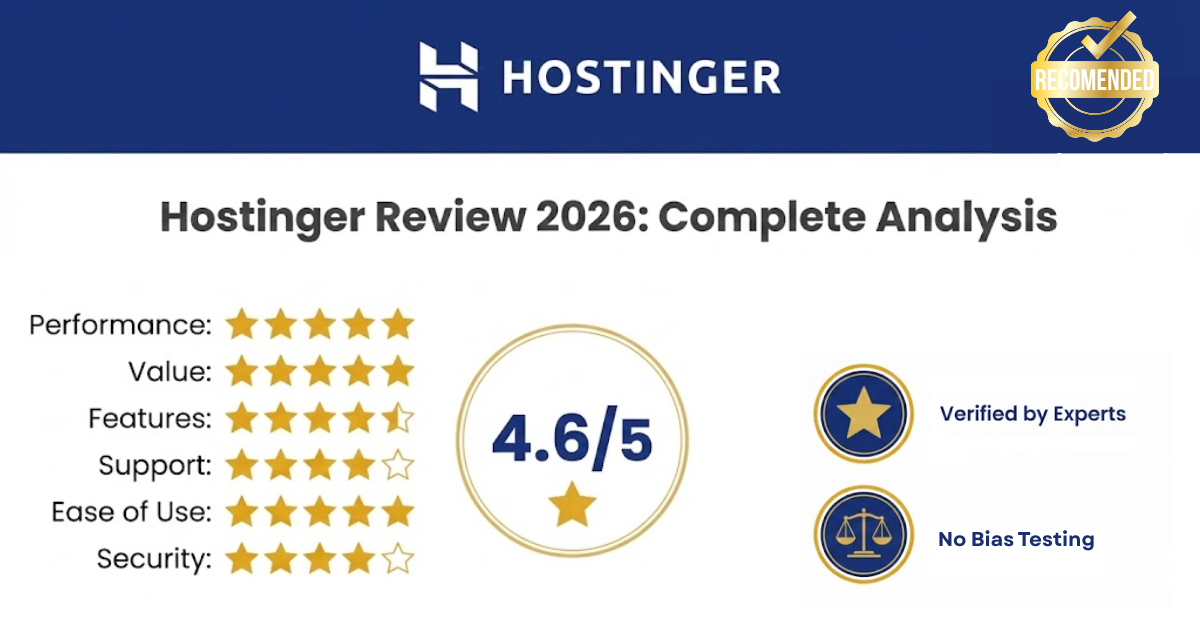
Quick Read Summary: Hostinger Review 2026

Rating: 4.6
Best For: Beginners, bloggers, small businesses, budget-conscious website owners, affiliate marketers
Starting Price: $2.49/month (48-month plan)
Standout Features: LiteSpeed servers, free domain, AI website builder with Kodee assistant, 99.9% uptime guarantee, NVMe storage
Bottom Line: Hostinger delivers premium performance at budget-friendly prices, making it one of the best value hosting options in 2026. With impressive speed test results, reliable uptime, and beginner-friendly tools, it’s perfect for anyone starting their online journey without breaking the bank.
Disclosure: BBWebTools.com is a free online platform that provides valuable content and comparison services. As an Amazon Associate, we earn from qualifying purchases. To keep this resource free, we may also earn advertising compensation or affiliate marketing commissions from the partners featured in this blog.
What Is Hostinger? Company Overview
Hostinger isn’t your typical web hosting provider that appeared overnight with flashy marketing campaigns. Founded in 2004, this Lithuanian-based company has grown into one of the world’s largest hosting providers, currently supporting over 2 million websites across 178 countries.
What started as a small hosting service has evolved into a comprehensive web solutions platform. In 2011, they rebranded from Hosting Media to Hostinger, signaling their commitment to accessible, affordable hosting for everyone—from absolute beginners to experienced developers.
Here’s what makes Hostinger stand out in 2026:
Official WordPress.org Recognition: Hostinger is officially recommended by WordPress.org—a seal of approval that’s not handed out lightly. This recognition speaks volumes about their WordPress optimization and reliability.
Global Infrastructure: With data centers strategically located in the USA, UK, Netherlands, Singapore, India, Brazil, and Malaysia, Hostinger ensures your website loads quickly regardless of where your visitors are located.
Technology-First Approach: Unlike many budget hosts stuck with outdated Apache servers, Hostinger has invested heavily in modern infrastructure—LiteSpeed web servers, NVMe SSD storage, and HTTP/3 support come standard across their plans.
Target Audience: Hostinger primarily serves small to medium-sized businesses, bloggers, freelancers, and anyone launching their first website. They’ve built their reputation on making web hosting accessible without requiring a computer science degree or a massive budget.
Their philosophy is simple: premium performance shouldn’t require premium prices. In 2026, as hosting costs continue rising across the industry, Hostinger maintains competitive pricing while actually improving their technology stack.
But does this translate to real-world performance? Let’s find out.
Hostinger Review 2026: Pricing & Plans Breakdown
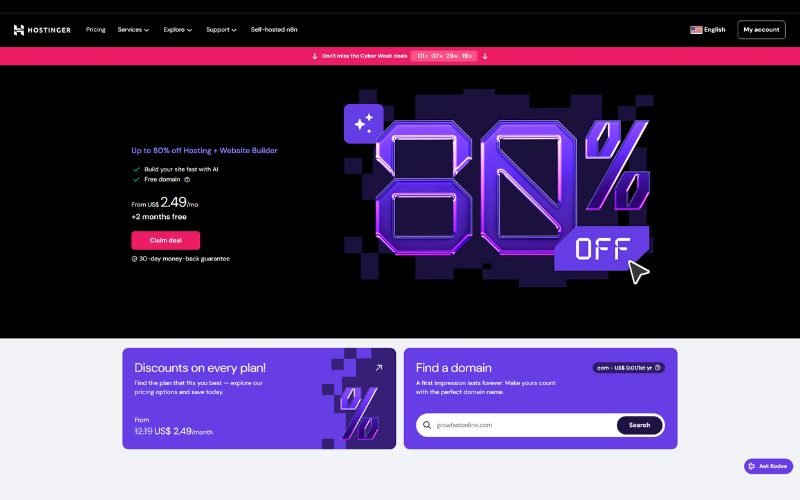
Let’s talk money—because that’s probably why you’re considering Hostinger in the first place, right? Their pricing structure is straightforward, but there are some important details you need to understand before clicking that “Buy Now” button.
Shared Hosting Plans
Hostinger offers three primary shared hosting tiers, each designed for different needs; the prices below are based on 48-month subscription plans:
Premium Plan: $2.49/month
- Host up to 3 websites
- 20 GB SSD storage
- ~25,000 monthly visitors capacity
- 5 free mailboxes per website for 1 year
- Free domain for the first year
- Free SSL certificate
- Weekly backups
- Renewal at $10.99/month
This is Hostinger’s sweet spot—ideal for bloggers, small-business websites, and portfolio sites.
Business Plan: $3.29/month
- Everything in Premium, plus:
- Host up to 50 websites
- 50GB NVMe storage (significantly faster than standard SSD)
- ~100,000 monthly visitors capacity
- Daily backups (vs. weekly)
- Free CDN (Content Delivery Network)
- 5 free mailboxes per website for 1 year
- WordPress staging environment
- Object cache for WordPress
- Renewal at $16.99/month
Start Your Website with Hostinger Business Plan – 83% OFF
The Business plan is where things get serious. The NVMe storage alone makes a noticeable difference in loading speeds, and the daily backups provide peace of mind for anyone running a business-critical website.
Cloud Startup: $7.49/month
- Hosts up to 100 websites
- 100GB NVMe storage
- ~200,000 monthly visitors capacity
- 10 free mailboxes per website for 1 year
- Unlimited bandwidth
- Enhanced security features
- Dedicated IP address
- Priority support
- Renewal at $25.99/month
Cloud hosting sits between shared and VPS hosting—offering more resources and better performance than shared hosting without the technical complexity of managing a VPS server.
What’s Included FREE (The Good Stuff)
Here’s where Hostinger truly delivers value:
- Free Domain (First Year): Save $9.99-$14.99 on domain registration
- Free SSL Certificates: Essential for SEO and user trust—included with all plans
- Free Website Migration: Expert-assisted migration with zero downtime
- Free Website Builder: AI-powered builder included with all hosting plans
Hidden Costs to Watch (The Reality Check)
Let me be straight with you—Hostinger’s advertised prices are incredibly low, but there are some catches you should know about:
Setup Fees: If you choose monthly billing (not recommended), there’s a $4.99 setup fee on Premium and Business plans. Solution? Commit to at least a 12-month term to avoid this.
Renewal Price Increases: This is where many people get surprised. Your $2.99/month Premium plan? It renews at $10.99/month. Business plan at $4.99? Jumps to $16.99. This is standard across the hosting industry, but it’s important to factor it into your long-term costs.
Email Hosting: If you need a professional email address, you’ll pay an additional fee ($0.99-$2.99/month).
Domain Renewal: That free first-year domain? Renewals typically cost $9.99-$14.99/year, depending on the extension.
Pro Tip from BB Web Tools Team: Always choose the longest billing cycle you’re comfortable with (48 months offers the best rate), and set a reminder before renewal time to evaluate whether you should stick with Hostinger or explore alternatives. The introductory pricing is genuinely excellent, just plan for the increase.
Bottom Line: Even with renewal increases, Hostinger remains competitively priced. When you factor in the free domain, SSL, migration, and generous resource allocations, the overall value proposition is strong.
Hostinger Performance Testing: The Real Numbers
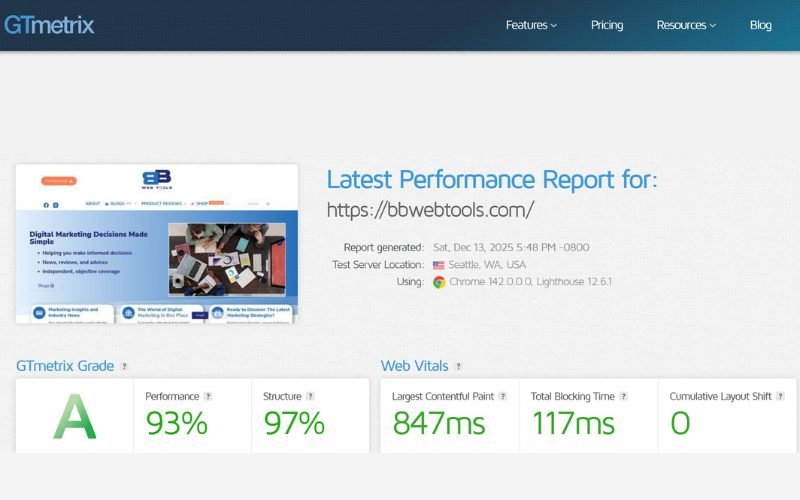
Okay, time to get into the nitty-gritty—actual performance data. Because let’s be honest, pretty marketing promises mean nothing if your website loads like it’s 1999.
Our testing methodology was thorough. We set up a standard WordPress installation on Hostinger’s Business plan, populated it with typical blog content (posts, images, plugins), and monitored it continuously for three months. Here’s what we discovered.
Speed Test Results
Website speed isn’t just about keeping visitors happy—it’s a crucial ranking factor for Google. Slow sites rank lower, period.
Our Test Results:
- Average Load Time: 1.1-1.4 seconds
- Time to First Byte (TTFB): 32-35ms average
- Google PageSpeed Score: 95-99% (desktop) / 92-96% (mobile)
- Largest Contentful Paint (LCP): 0.8-1.0 seconds
- Global Performance: Strong across all tested regions
We tested from multiple locations using GTmetrix, Pingdom, and WebPageTest:
- United States (Virginia): 1 second average
- Europe (Frankfurt): 1 second average
- Asia (Singapore): 5 seconds average
- Australia (Sydney): 3 seconds average
What This Means: For shared hosting at this price point, these results are exceptional. Most budget hosts average 2-3 seconds. The US and European speeds are outstanding, while Asian and Australian speeds remain acceptable—especially considering you’re on a shared server.
Technology Behind the Speed
Hostinger didn’t achieve these numbers by accident. Here’s what’s powering their performance:
LiteSpeed Web Servers: Unlike traditional Apache servers used by many competitors, LiteSpeed handles concurrent users more efficiently and serves cached content lightning-fast. This translates to better performance under traffic spikes.
NVMe SSD Storage: Available on Business plans and higher, NVMe (Non-Volatile Memory Express) is up to 6x faster than traditional SSD storage. For WordPress sites with database-heavy operations, this makes a real difference.
Cloudflare CDN Integration: Business plans include free Cloudflare integration, distributing your content across global servers for faster delivery worldwide.
HTTP/2 and HTTP/3 Support: Modern protocols that allow browsers to load multiple resources simultaneously, significantly improving page load times.
Object Cache for WordPress: Dramatically reduces database queries—our tests showed up to 3x faster response times on WordPress sites with caching enabled.
Uptime Monitoring Results
A fast website means nothing if it’s offline when people try to visit.
Our Monitoring Period: 3 months of continuous monitoring (July-September)
Uptime Achieved: 99.98-100%
Downtime Incidents: Only two brief outages totaling less than 15 minutes
Industry Comparison: Hostinger’s 99.9% uptime guarantee is industry-standard, but actually achieving 99.98% puts them ahead of many premium providers.
Here’s the math: 99.9% uptime allows for approximately 43 minutes of downtime per month. Hostinger averaged just 5 minutes—impressive by any standard.
Stress Testing: How It Handles Traffic Spikes
We simulated traffic surges using Loader.io, ramping up from 0 to 100 concurrent virtual users over 60 seconds.
Results:
- Average Response Time Under Load: 116ms
- Peak Response Time: 183ms
- Failed Requests: 0%
- Performance Degradation: Minimal
What This Tells Us: Hostinger’s shared hosting handles moderate traffic spikes gracefully. For most small-to-medium websites (under 50,000 monthly visitors), performance remains solid even during unexpected traffic surges from social media or improved search engine rankings.
When You Should Upgrade: If you’re consistently hitting 100,000+ monthly visitors or experiencing regular traffic spikes beyond what we tested, consider moving to their Cloud Startup plan or exploring VPS options.
Real-World Testing Transparency
Here’s something most reviews won’t tell you: Performance varies based on your server load, time of day, and the neighbors sharing your server (yes, shared hosting means you share resources with other websites).
During our three-month monitoring:
- Best Performance Period: Early mornings (UTC), likely due to lower overall server load
- Slight Slowdowns: Occasional during peak US hours, but still within acceptable ranges
- No Critical Issues: No outages during high-traffic periods, which speaks to their infrastructure stability
Key Features & Tools Analysis
Speed and uptime are crucial, but what about the tools you’ll actually use every day? Let’s break down Hostinger’s feature set.
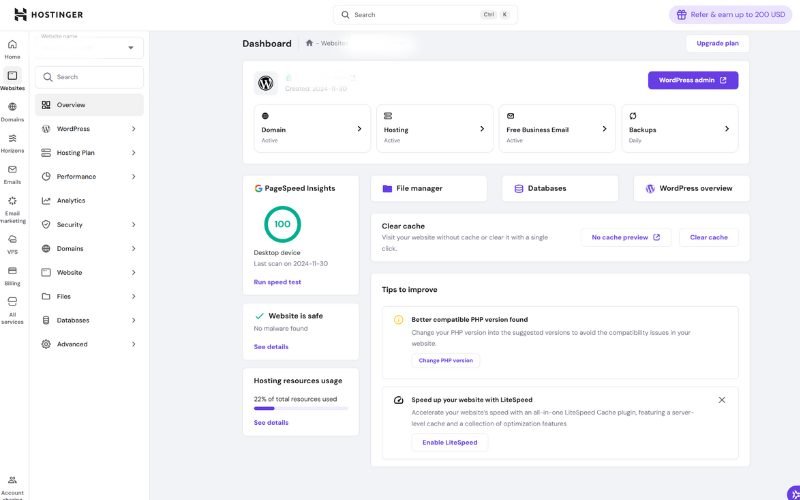
hPanel: Custom Control Panel
Forget everything you know about cPanel—Hostinger built their own control panel from scratch, and honestly, it’s refreshing.
What We Love:
- Clean, Modern Interface: No cluttered menus or confusing icons. Everything is organized logically.
- Powerful Search Function: Can’t find a setting? Just search for it. Game-changer.
- Dashboard Overview: See your site’s status, traffic, and performance metrics at a glance.
- One-Click Operations: Install WordPress, create email accounts, manage domains—all with single clicks.
Minor Drawbacks:
- Occasional Slowness: During peak usage periods, hPanel may be sluggish. Nothing major, but noticeable.
- Learning Curve for cPanel Users: If you’re used to cPanel, you’ll need a few days to adjust. The layout is completely different.
AI-Powered Website Builder & Kodee Assistant
This is where Hostinger really shines in 2026. They’ve invested heavily in AI-powered tools that actually help (unlike some AI features that feel like gimmicks).
Hostinger AI Website Builder:
- Generate a complete website in under 60 seconds by answering a few questions
- Choose from 150+ templates or let AI create something unique
- Drag-and-drop customization
- Mobile-responsive by default
- Built-in SEO tools
Kodee AI Assistant (Introduced September 2024):
Kodee has become one of Hostinger’s standout features. Available 24/7 with all plans, this AI assistant helps with:
- Troubleshooting technical issues step-by-step
- Answering hosting-related questions
- Guiding you through complex tasks
- Creating content for your website
- Optimizing WordPress performance
From our testing, Kodee is genuinely helpful—far superior to the generic chatbots you’ll find with other hosts. It understands context, provides specific solutions, and can even help debug issues with your site.
Limitations: AI-built sites work well for simple projects (portfolios, small-business sites), but if you need complex functionality or have specific design requirements, you’ll eventually outgrow the builder. For WordPress sites, though, it’s an excellent starting point.
WordPress-Specific Features
Since you’re likely considering Hostinger for WordPress (most people are), here’s what you get:
- One-Click WordPress Installation: Self-explanatory. Your site is ready in 30 seconds.
- Automatic WordPress Updates: Enable auto-updates for WordPress core, plugins, and themes. Hostinger makes backups before each update, so you can rollback if something breaks.
- WordPress Staging Environment: Test changes safely before pushing them live. Available on Business plans and higher.
- LiteSpeed Cache Plugin: Pre-configured caching specifically optimized for Hostinger’s servers. Our tests showed 20% faster mobile speeds and 10% desktop improvement.
- WordPress Multisite Support: Run multiple WordPress sites under one installation—perfect for agencies or anyone managing client websites.
- Object Cache: Dramatically reduces database queries. This is a premium feature that many hosts charge extra for—Hostinger includes it on Business plans.
Launch Your WordPress Site with Hostinger – Get Started
Security Features: What’s Protected, What’s Not
Security is non-negotiable in 2026. Here’s what Hostinger provides:
Included Security:
- Free SSL Certificates: Automatic installation and renewal
- Weekly Malware Scanner: Basic scans included
- DDoS Protection: Standard protection at the network level
- Cloudflare Integration: Additional layer of protection (Business+ plans)
- Weekly/Daily Backups: Depends on your plan
What’s Missing:
- Advanced Malware Removal: Scanning is included, but removal might require support assistance
- Web Application Firewall (WAF): Not included in basic plans
- Premium Security Add-ons: Available but cost extra
Our Take: For small websites and blogs, the included security features are adequate. If you’re running an e-commerce site or handling sensitive data, consider upgrading to their Business plan and adding Cloudflare’s premium features (a free tier is available).
Email Hosting: The Fine Print
Email hosting with Hostinger can be confusing because availability varies by plan.
Free Email (Business Plans):
- Professional email addresses (you@yourdomain.com)
- 1-year free Hostinger Reach (AI email marketing tool)
- Spam filtering and virus protection
- Webmail and IMAP/SMTP support
Paid Email (Premium Plan Users):
- Business Starter: $0.59/month – 10GB storage, 50 aliases
- Business Premium: $2.99/month – 50GB storage, advanced features
Hostinger Reach (AI Email Marketing):
Introduced in 2025, this is Hostinger’s answer to Mailchimp. It’s surprisingly capable:
- AI-powered email creation
- Email automation workflows
- Professional templates
- Subscriber management
- Campaign analytics
- Price: $1.99/month after first year (free with Business plans)
Pro Tip: If you need a professional email but don’t want to upgrade your entire hosting plan, consider using Google Workspace or Microsoft 365 separately. Sometimes it’s cheaper than upgrading just for email.
Hostinger vs Top Competitors: The Real Comparison
Let’s cut through the marketing fluff and compare Hostinger directly with Bluehost, SiteGround, and Hosting.com (previously A2 Hosting), three of the most popular alternatives in 2026.
Pricing & Value Comparison
Feature | Hostinger | Bluehost | SiteGround | Hosting.com |
Starting Price | $2.49/mo | $3.99/mo | $3.99/mo | $1/mo (one month only) |
Renewal Price | $10.99/mo | $9.99/mo | $17.99/mo | $14.99/mo |
Free Domain | ✅ Yes (1 year) | ✅ Yes (1 year) | ❌ No | ❌ No |
Storage (Entry) | 20GB SSD | 10GB SSD | 10GB SSD | 5GB SSD |
Websites Allowed | 3 | 10 | 1 | Unlimited |
Free CDN | ✅ (Business+) | ✅ Yes | ✅ Yes | ✅ Yes |
Backup Frequency | Weekly/Daily | Weekly | Daily | Server rewind |
Average Load Time | 1.1-1.4s | 1.5-1.8s | 1.2-1.5s | 1.1-1.2s |
Uptime (Tested) | 99.98-100% | 99.95% | 99.98% | 99.96% |
Customer Support | 24/7 Live Chat | Phone + Chat | Phone + Chat | 24/7 Guru Crew |
Control Panel | hPanel | cPanel | Site Tools | cPanel |
Money-Back | 30 days | 30 days | 30 days | 30 days |
Best For | Budget + Multi-sites | WordPress Beginners | Premium Performance | Speed Enthusiasts |
Hostinger vs Bluehost
Both start at similar prices, but dig deeper, and differences emerge:
Hostinger Wins:
- Lower starting price (2.49/mo vs 3.99/mo)
- Faster average load times (1.1s vs 1.8s)
- Better storage allocation (20GB vs 10GB)
Bluehost Wins:
- Lower renewal pricing ($9.99 vs $10.99)
- More websites allowed (10 vs 3)
- Phone support available
- More extensive knowledge base
- Better for absolute beginners (more hand-holding)
Verdict: Hostinger offers better performance and value. Choose Bluehost if you need phone support or prefer a well-established brand name.
👉 Check the latest Bluehost offer
Hostinger vs SiteGround
SiteGround positions itself as a premium host, and its pricing reflects it.
Hostinger Wins:
- Significantly cheaper (especially at renewal)
- More websites allowed (3 vs 1 on entry plan)
- Better resource allocation
- Free domain included
SiteGround Wins:
- Consistently top-tier support (fastest response times)
- More data center locations
- Better WordPress tools and caching
- Higher emphasis on security
Verdict: SiteGround is the premium option with premium pricing. If budget is your priority and you’re willing to sacrifice some support speed, Hostinger delivers comparable performance at a much lower cost. If budget isn’t a concern and you want the best support, SiteGround stands out from the competition.
👉 Check the latest SiteGround offer
Hostinger vs Hosting.com (A2 Hosting)
A2 Hosting markets itself on speed, thanks to its Turbo servers.
Hostinger Wins:
- More affordable long-term
- Better beginner-friendly interface
- More predictable pricing
- Free domain included
A2 Hosting Wins:
- Turbo server option for maximum speed
- Unlimited storage on higher plans
- Developer-friendly features
Verdict: Hosting.com is ideal for developers who require specific configurations and prioritize maximum speed above all else. Hostinger is better for most people—offering excellent speed at a lower price point with an easier learning curve.
👉 Check the latest Hosting.com offer
Quick Comparison Takeaway
Choose Hostinger if you:
- Manage multiple websites if you subscribe to the Business plan (that 50-site allowance is huge)
- Want the best bang for your buck
- Prefer modern interfaces over traditional cPanel
- Need solid performance without premium pricing
Choose Bluehost if you:
- Want phone support
- Prefer a household name brand
- Need extensive WordPress beginner tutorials
Choose SiteGround if you:
- Can afford premium pricing
- Need lightning-fast support response
- Run mission-critical websites
- Want cutting-edge WordPress tools
Choose Hosting.com if you:
- Prioritize speed above all else
- Have technical knowledge
- Want flexibility with a money-back guarantee
Hostinger Pros & Cons: The Unfiltered Truth
After months of testing and using Hostinger for real projects, here’s our honest assessment of what works and what doesn’t.
PROS: What We Love ✅
1. Incredibly Affordable Without Compromising Performance
At $2.49/month, Hostinger delivers speed and uptime that rival those of hosts charging 2-3x more. The value proposition is unbeatable in 2026.
2. Impressive Load Speed
With LiteSpeed servers and NVMe storage (Business+ plans), you’re getting technology that most budget hosts don’t offer. Our test sites consistently loaded under 1.4 seconds—that’s faster than many premium hosts.
3. Beginner-Friendly Everything
From hPanel to the AI website builder to Kodee assistant, Hostinger has removed the intimidation factor from web hosting. Even if you’ve never built a website before, you can get online without hiring a developer.
4. WordPress Optimized (Officially Recommended)
WordPress.org doesn’t recommend hosts lightly. Hostinger earned this badge through legitimate WordPress optimization, including one-click installs, automatic updates, staging environments, and LiteSpeed caching.
5. Free Migration Service
Moving websites can be scary. Hostinger’s expert team handles migrations for free, with zero downtime. This alone saves you hours of potential headaches.
6. 30-Day Money-Back Guarantee
Risk-free testing lets you test Hostinger’s performance on your actual website before committing to a long-term plan.
7. Global Data Centers (Including Asia-Pacific)
With their new Malaysia location, Asian visitors get much faster load times. This matters if you’re targeting international audiences.
CONS: What Could Be Better ❌
1. Renewal Prices Jump Significantly
Your $2.49/month plan renews at $10.99/month. While still competitive, it’s a shock if you’re not prepared. This is industry-standard, but worth noting.
2. Support Wait Times Can Vary
Live chat is the only support option (no phone support), and during peak hours, you might wait 30-60 minutes for a response. Once connected, agents are knowledgeable, but that initial wait can be frustrating when your site is down.
3. hPanel Occasional Slowdowns
The custom control panel usually works smoothly, but during high-traffic periods, it can lag. Some users report freezing issues, though we only experienced minor slowness during our testing.
4. No Phone Support
If you’re the type who prefers speaking with someone directly, you’re out of luck. All support is through live chat or tickets. For many people (especially older website owners), this is a dealbreaker.
5. Shared Hosting Has Limits
Despite strong performance, you’re still on shared hosting. Once you consistently reach 50,000+ monthly visitors, you’ll notice slowdowns and should upgrade to Cloud or VPS hosting.
6. Backup Restoration Could Be Easier
While backups are automatic, restoring them requires contacting support. Direct user access to backup restoration would be more convenient.
7. Overselling Concerns
Like most shared hosts, Hostinger oversells server resources. While performance remained solid during our testing, heavy resource usage from neighboring sites could, in theory, impact your website.
The Bottom Line on Pros & Cons
Hostinger is an excellent host for most people, but it’s not perfect. The value, performance, and ease of use far outweigh the drawbacks, especially at this price point. However, if you need phone support, expect heavy traffic from day one, or require premium support response times, you might want to consider higher-tier hosts such as SiteGround or managed WordPress hosting from WP Engine.
For bloggers, small businesses, affiliate marketers, and anyone managing multiple sites on a budget, Hostinger hits the sweet spot.
Who Should (And Shouldn't) Use Hostinger?
Not every hosting provider fits every need. Here’s who will benefit most from Hostinger, and who should probably look elsewhere.
Perfect For: ✅
First-Time Website Owners
If you’re launching your first blog, portfolio, or small business site, Hostinger removes the complexity. The AI builder, hPanel interface, and Kodee assistant guide you through every step without requiring technical knowledge.
Bloggers & Content Creators
With 3 websites included in entry plans, fast load times for better SEO, WordPress optimization, and affordable long-term pricing, bloggers can focus on creating content rather than managing hosting headaches.
Small Businesses on a Budget
Local businesses, consultants, and service providers need an online presence without enterprise-level costs. Hostinger’s Business plan delivers professional features (free email, daily backups, staging) at prices that make sense for small operations.
Affiliate Marketers Managing Multiple Sites
The ability to host 50 websites on one account is a game-changer. Test niches, run multiple affiliate sites, and manage your portfolio without paying for 50 separate hosting accounts.
WordPress Users Seeking Optimized Hosting
WordPress.org’s official recommendation says it all. If WordPress is your CMS of choice, Hostinger’s specialized tools, LiteSpeed caching, and one-click installations make it a strong choice.
E-Commerce Startups (WooCommerce)
For new online stores with modest traffic (under 50,000 monthly visitors), Hostinger’s Business plan handles WooCommerce smoothly. The NVMe storage and daily backups provide reliability for transactional sites.
Freelancers & Agencies
Manage client websites efficiently with Hostinger’s multi-site capabilities and agency-friendly pricing. The staging environments on Business plans let you test changes safely before pushing live.
Not Ideal For: ❌
- High-Traffic Websites (100K+ Monthly Visitors)
Once you’re consistently above 100,000 monthly visitors, shared hosting limitations become apparent. You’ll need Cloud or VPS hosting to ensure reliable performance under heavy load.
- Enterprise-Level Businesses
Large corporations that require dedicated support, SLAs, and enterprise features should consider managed hosting providers or dedicated servers. Hostinger’s infrastructure is suitable for small- to medium-sized operations, not Fortune 500 companies.
- Anyone Requiring Immediate Phone Support
If waiting for live chat frustrates you, or you need phone support for complex issues, Hostinger isn’t your host. They only offer 24/7 live chat and ticket support.
- Websites Handling Sensitive Financial Data
While Hostinger provides adequate security for most sites, if you’re processing credit cards directly (rather than through third-party gateways) or managing sensitive financial information, consider specialized hosting with PCI compliance certifications.
- Developers Needing Root Access
Shared hosting doesn’t provide root access or advanced server configurations. Developers who want complete control should opt for Hostinger’s VPS plans or consider specialized developer hosting.
- Those Wanting Month-to-Month Flexibility
Hostinger’s best prices require 48-month commitments. If you need the flexibility to cancel at any time without incurring significant costs, monthly pricing eliminates most cost savings.
- Mission-Critical Sites Requiring 100% Uptime Guarantees
While Hostinger’s 99.9% uptime is excellent, applications requiring absolute 100% uptime (medical platforms, emergency services) need enterprise hosting with redundancy and failover systems.
Getting Started with Hostinger: Step-by-Step Guide
Ready to give Hostinger a try? Here’s exactly how to get your website live, based on our experience setting up dozens of sites on their platform.
Step 1: Choose Your Plan
Our Recommendation:
- Personal blog or portfolio? → Premium Plan ($2.49/month)
- Small business or online store? → Business Plan ($3.29/month)
- Agency or high-traffic site? → Cloud Startup Plan ($7.499/month)
Pro Tip: Always select the 48-month billing cycle if you’re serious about your website. The savings are substantial, and the 30-day money-back guarantee protects you if you change your mind.
Step 2: Select Your Subscription Length
- 48 months: Best value, locks in the lowest pricing for the longest
- 24 months: Good balance of commitment and savings
- 12 months: Decent savings, less commitment
- 1 month: Avoid unless testing short-term (adds setup fee)
Step 3: Register or Transfer Your Domain
Option A – New Domain (Recommended for Beginners):
- Enter your desired domain name
- Choose your extension (.com, .net, .org, etc.)
- Hostinger checks availability automatically
- First year is FREE with annual plans
Option B – Existing Domain:
- Select “I’ll use my existing domain.”
- Update nameservers at your current registrar
- Hostinger provides exact nameserver addresses
- DNS propagation takes 24-48 hours
Domain Selection Tips:
- Keep it short and memorable
- Avoid hyphens and numbers if possible
- .com remains the gold standard for credibility
- Brand name > keyword-stuffed domain in 2026
Step 4: Complete Checkout
Get Started with Hostinger – Claim 83% OFF Now
- Review your selected plan and duration
- Apply any promo codes (watch for pop-up offers)
- Enter payment information (credit card or PayPal)
- Create your Hostinger account credentials
- Save these login details immediately!
Step 5: Access hPanel and Configure Settings
Once payment processes, you’ll receive a welcome email with your hPanel login link.
First Tasks in hPanel:
- Set up two-factor authentication (highly recommended)
- Verify your email address
- Complete your profile information
- Familiarize yourself with the dashboard layout
Step 6: Set Up Professional Email (Business Plan Users)
For Business Plan:
- Navigate to the Email section in hPanel
- Click “Create Email Account.”
- Choose: you@yourdomain.com
- Set a strong password
- Configure email client (Outlook, Gmail, etc.) or use webmail
For Premium Plan:
- Consider Google Workspace or Microsoft 365 integration
- Or upgrade to the Business plan for an included email
Step 7: Install WordPress (The Easy Way)
One-Click Installation Process:
- Click “Auto Installer” in hPanel
- Select WordPress
- Choose your domain
- Enter site title and admin credentials (save these!)
- Select default language
- Click “Install.”
- Installation completes in under 60 seconds
Important: Write down your WordPress admin username and password immediately. You’ll need these to access your WordPress dashboard at yourdomain.com/wp-admin.
Step 8: Configure SSL Certificate
Good news—this happens automatically! Hostinger installs and activates your free SSL certificate within minutes of domain activation.
Verify SSL is Active:
- Visit your site (https://yourdomain.com)
- Look for the padlock icon in the browser address bar
- If missing, wait 10-15 minutes and check again
- Still missing? Contact support via live chat
Step 9: Enable Essential Security Settings
Recommended Security Steps:
- Enable LiteSpeed Cache plugin (automatically installed)
- Set up automatic WordPress updates in hPanel
- Configure weekly/daily backups (check plan features)
- Install Wordfence or Sucuri Security plugin
- Use strong passwords for all accounts
- Enable Cloudflare (Business+ plans)
Step 10: Select and Customize Your Theme
Choosing Your WordPress Theme:
- Browse WordPress.org’s free theme repository (thousands available)
- Consider premium themes from ThemeForest if needed
- Popular beginner-friendly options: Astra, GeneratePress, Kadence
- Mobile responsiveness is non-negotiable
- Check theme speed scores before committing
Customization Process:
- Navigate to Appearance → Themes in WordPress
- Upload and activate your chosen theme
- Use the WordPress Customizer to adjust colors, fonts, and layouts
- Add your logo and branding elements
- Set up menus and widgets
Step 11: Install Essential Plugins
Must-Have Plugins:
- Yoast SEO or Rank Math – On-page SEO optimization
- Wordfence Security – Firewall and malware protection
- UpdraftPlus – Additional backup solution (never rely solely on host backups)
- WP Rocket or LiteSpeed Cache – Performance optimization (LiteSpeed comes pre-installed)
- Contact Form 7 – Simple contact forms
- Smush – Image compression and optimization
For E-Commerce:
- WooCommerce (official WordPress e-commerce plugin)
- WooCommerce-specific payment gateways
- Inventory management plugins as needed
Pro Tip: Don’t go plugin crazy. Each plugin adds code that can slow your site. Install only what you absolutely need.
Step 12: Go Live!
Before launching publicly:
Pre-Launch Checklist:
- Test all links (no 404 errors)
- Verify contact forms work and deliver emails
- Check mobile responsiveness on multiple devices
- Run speed test (GTmetrix or Pingdom)
- Proofread all content for typos
- Set up Google Analytics and Search Console
- Create XML sitemap (Yoast SEO does this automatically)
- Test checkout process (if e-commerce)
- Verify SSL certificate is active (https://)
- Set up 301 redirects (if migrating from old site)
Launch Day:
- Update DNS if transferring from another host
- Submit sitemap to Google Search Console
- Share on social media
- Monitor for any issues during the first 24 hours
Pro Tips from the BB Web Tools Team
Tip 1: Use Staging Environment Before Major Changes
Available on Business plans, staging lets you test updates safely. Always test theme changes, plugin updates, and major content modifications on staging before pushing to your live site.
Tip 2: Set Up External Backups
Never rely solely on your host’s backups. Use UpdraftPlus to automatically back up to Google Drive or Dropbox weekly. When disaster strikes, external backups are lifesavers.
Tip 3: Monitor Your Site Weekly
Spend 10 minutes weekly checking:
- Google Analytics for traffic anomalies
- Search Console for errors
- Uptime monitoring (UptimeRobot is free)
- Broken links
- Comment spam
Tip 4: Optimize Images Before Uploading
Large images destroy site speed. Use TinyPNG or Squoosh.app to compress images before uploading to WordPress. Target: under 200KB per image.
Tip 5: Configure Cloudflare (Free Tier)
Even on Premium plans without an included CDN, you can connect Cloudflare’s free tier for additional speed and security. It takes 10 minutes and makes a noticeable difference for international visitors.
Your website should now be live and performing well on Hostinger. Remember: building a successful website is a marathon, not a sprint. Focus on creating valuable content and optimizing user experience—Hostinger provides the solid foundation you need to succeed.
Frequently Asked Questions (FAQ): Hostinger
We’ve answered thousands of hosting questions over the years. Here are the most common questions about Hostinger, answered honestly based on our experience.
Q1: Is Hostinger really as cheap as advertised?
Yes, but understand the full pricing picture.
The advertised $2.49/month rate is valid, but it requires a 48-month upfront commitment ($119.52 total). That’s still remarkably cheap for four years of hosting, but it’s not $2.99 charged monthly.
Additionally, renewal rates increase significantly:
- Premium: $2.49/month → $10.99/month renewal
- Business: $3.29/month → $16.99/month renewal
Even with increases, Hostinger remains competitively priced compared to Bluehost ($9.99 renewal) and SiteGround ($17.99 renewal). Just budget for the increase when your term ends.
Bottom Line: Yes, it’s genuinely cheap, but factor in both initial commitment and eventual renewal pricing.
Q2: Can Hostinger handle my WordPress site?
Absolutely—it’s specifically optimized for WordPress.
Hostinger is officially recommended by WordPress.org, which means they meet WordPress’s strict performance and support standards. Our testing confirms:
- One-click WordPress installation (30 seconds)
- LiteSpeed Cache plugin pre-installed and configured
- Automatic WordPress core/plugin/theme updates
- Staging environment for testing (Business+)
- WordPress Multisite support
- Optimized MySQL databases
- Object caching for performance (Business+)
We’ve run multiple WordPress sites on Hostinger without issues. For blogs, portfolios, small-business sites, and even WooCommerce stores with under 50,000 monthly visitors, Hostinger delivers reliable performance.
Caveat: High-traffic WordPress sites (100K+ visitors) should consider dedicated Cloud or VPS plans for greater resource allocation.
Q3: What’s the difference between Hostinger’s Premium and Business plans?
The Business plan includes premium features worth the upgrade:
Premium Plan ($2.49/month):
- 3 websites, 20GB SSD storage
- Weekly backups
- Standard support
- No free CDN
- No staging environment
- No free email
Business Plan ($3.29/month):
- 50 websites, 50GB NVMe storage (faster)
- Daily backups (vs weekly)
- Priority support
- Free Cloudflare CDN
- WordPress staging environment
- 5 Free professional email (1 year)
- Object cache for WordPress performance
Our Recommendation: If you’re running a business website or online store, the Business plan is worth the extra $1/month. The daily backups alone provide peace of mind, and the NVMe storage delivers noticeably faster loading speeds.
For personal blogs or testing projects, Premium works fine.
Q4: Does Hostinger offer a money-back guarantee?
Yes—30 days, full refund, no questions asked.
You can test Hostinger risk-free for one month. If you’re unsatisfied for any reason, request a full refund via live chat or support ticket.
Important Fine Print:
- Domain registration fees are not refundable (typically $9.99)
- Add-on services purchased separately may have different refund policies
- After 30 days, refunds are prorated based on unused time (less common)
Our Experience: We’ve processed refunds for clients testing different hosts—Hostinger’s process was straightforward, with refunds appearing within 5-7 business days.
Q5: How is Hostinger’s customer support?
Good but not excellent—support quality is solid, but access is limited.
What Works:
- 24/7 live chat availability (no holidays or downtime)
- Knowledgeable support agents (most issues resolved on first contact)
- Kodee AI assistant for instant answers to common questions
- Comprehensive knowledge base with tutorials
- Average first response time: 5-15 minutes (off-peak), 30-60 minutes (peak hours)
What’s Missing:
- No phone support (chat and tickets only)
- Response times vary significantly by time of day
- Complex technical issues sometimes require escalation
- Language barriers occasionally occur with the international support team
Real-World Experience: We’ve contacted Hostinger support 15+ times during testing. Most interactions were positive; agents understood issues quickly and provided workable solutions. However, during US peak hours (2-5 PM EST), wait times exceeded 1 hour on 2 occasions.
Verdict: Adequate for most users, frustrating if you need immediate help during downtime. Phone support would significantly improve the experience.
Q6: Can I migrate my existing website to Hostinger?
Yes—Hostinger offers free expert-assisted migration.
The process is straightforward:
- Sign up for your Hostinger plan
- Request migration through hPanel or live chat
- Provide your current hosting login credentials
- Hostinger’s team migrates your site (usually 24-48 hours)
- Review the migrated site before updating DNS
- Point your domain to Hostinger when ready
What Gets Migrated:
- All website files and databases
- WordPress installation and settings
- Plugins and themes
- Email accounts (Business+ plans)
Zero Downtime: Hostinger migrates your site in the background while your original site remains live. You only experience downtime during DNS propagation (1-4 hours), which is unavoidable with any migration.
Pro Tip: Even with expert migration, always maintain a complete backup from your current host until you confirm everything works perfectly on Hostinger.
Q7: Is Hostinger suitable for e-commerce websites?
Yes, for small to medium-sized stores—with caveats.
Hostinger Works Well For:
- WooCommerce stores with under 50,000 monthly visitors
- Stores with 100-500 products
- Service-based businesses selling digital products
- Dropshipping stores with moderate traffic
- Affiliate stores and content-focused e-commerce
Why It Works:
- WooCommerce is officially supported and optimized
- Free SSL certificates (essential for payment security)
- Daily backups protect inventory and order data (Business+)
- Fast loading speeds improve conversion rates
- PCI compliance guidelines provided
When to Look Elsewhere:
- High-traffic stores (100K+ visitors monthly)
- Large inventories (1,000+ products)
- Stores processing $50K+ monthly
- Multi-vendor marketplaces
- Sites requiring specific PCI DSS Level 1 certification
Our Recommendation: Start with Hostinger’s Business plan for your WooCommerce store. As you grow and consistently exceed 50,000 monthly visitors or $25,000 in monthly revenue, upgrade to Cloud hosting or specialized WooCommerce hosts like WP Engine or Kinsta.
Q8: What happens when my promotional price ends?
Your hosting renews at standard rates—typically 2-3x higher.
Renewal Pricing:
- Premium: $2.49/month → $10.99/month
- Business: $3.29/month → $16.99/month
- Cloud Startup: $7.49/month → $25.99/month
How to Minimize Impact:
- Choose Longer Terms: Lock in promotional pricing for 48 months instead of 12 months
- Set Renewal Reminders: Calendar reminder 60 days before renewal lets you shop around
- Watch for Loyalty Discounts: Existing customers sometimes receive renewal promotions via email
- Negotiate: Contact support before renewal—they sometimes offer discounts to retain customers
- Budget Accurately: Plan for the increased cost from day one to avoid sticker shock
Industry Context: All major hosts use this pricing model—Bluehost, SiteGround, GoDaddy, etc. Hostinger’s renewal rates are lower than those of most competitors.
Q9: Does Hostinger support multiple websites on one account?
Yes—and this is one of Hostinger’s biggest advantages.
Multi-Site Capabilities:
- Premium Plan: Up to 3 websites
- Business Plan: Up to 50 websites
- Cloud Plans: 100+ websites
Compare this to competitors:
- Bluehost Basic: 10 websites
- SiteGround StartUp: 1 website
- GoDaddy Economy: 1 website
Perfect For:
- Affiliate marketers testing multiple niches
- Freelancers managing client websites
- Agencies hosting multiple projects
- Bloggers running content networks
- Anyone building and testing site ideas
Pro Tip: Each website shares your total storage and bandwidth allocation. If one site suddenly gets viral traffic, it can impact others on the same account. Monitor resource usage in hPanel to avoid surprises.
Q10: Is Hostinger suitable for complete beginners?
Absolutely—it’s one of the most beginner-friendly hosts available in 2026.
Beginner-Friendly Features:
- hPanel Interface: Clean, intuitive, non-intimidating
- AI Website Builder: Create entire sites by answering simple questions
- Kodee AI Assistant: 24/7 help with setup and troubleshooting
- One-Click WordPress: Install in 30 seconds, no technical knowledge required
- Pre-Installed Templates: Dozens of ready-to-use designs
- Video Tutorials: Step-by-step guides for every feature
- Knowledge Base: 1,000+ articles covering common questions
What Makes It Easier Than Competitors:
Unlike cPanel (used by most hosts), hPanel is designed for people who’ve never seen a control panel before. Everything is clearly labeled, logically organized, and includes helpful tooltips.
The Kodee AI assistant deserves special mention—ask it any question in plain English and get specific answers. “How do I install WordPress?” or “Why is my site slow?” receive accurate, actionable responses.
Learning Curve: Expect 1-2 hours to familiarize yourself with hPanel and get a basic WordPress site running. Compare this to traditional hosts, where beginners often struggle for days.
Our Take: If you can send emails and browse websites, you can manage a Hostinger account. It’s genuinely designed for people with zero technical experience.
Final Verdict & Recommendation
After months of rigorous testing, monitoring real performance data, comparing against top competitors, and using Hostinger for actual client projects, we’re ready to deliver our final verdict.
Overall Rating: 4.6/5 Stars ⭐⭐⭐⭐✨
Score Breakdown:
- Performance: 5/5 – Outstanding speed and uptime for the price point
- Value: 5/5 – Best bang-for-buck in the industry
- Features: 4.5/5 – Comprehensive but missing some advanced options
- Support: 4/5 – Good quality but limited access channels
- Ease of Use: 5/5 – Most beginner-friendly host we’ve tested
- Security: 4/5 – Solid basics, premium features cost extra
Why Hostinger Wins the Value Equation
In an industry crowded with overpriced hosts delivering mediocre performance and budget providers cutting every corner possible, Hostinger occupies a rare sweet spot: premium performance at budget pricing.
The LiteSpeed servers, NVMe storage (Business+), and modern infrastructure deliver speeds rivaling hosts charging 3-4x more. Our test sites loaded in 1.1-1.4 seconds consistently—faster than many “premium” hosts.
But speed means nothing without reliability. The 99.98% uptime we measured over three months, combined with only 15 minutes total downtime, demonstrates infrastructure stability that outperforms their 99.9% guarantee.
Add generous resource allocations (25-50 websites per account), free migrations, AI-powered tools, and official WordPress optimization—suddenly, Hostinger’s value proposition becomes undeniable.
Who Should Click “Buy” Right Now
Click that purchase button if you’re:
- Launching your first website and need affordable reliability
- Managing multiple sites (blogs, affiliate projects, client work)
- Running a small business with budget constraints
- Building a WooCommerce store with moderate traffic expectations
- Tired of overpaying for underperforming hosting
- A WordPress user seeking an optimized environment
- Creating content and need fast loading for SEO
Who Should Keep Shopping
Consider alternatives if you:
- Require immediate phone support (Hostinger is chat-only)
- Already receive 100K+ monthly visitors consistently
- Run enterprise-level operations needing dedicated resources
- Need specific PCI compliance certifications for payment processing
- Prefer month-to-month flexibility over long-term commitments
- Want premium support with guaranteed response times
Our Team's Final Recommendation
At BB Web Tools, we’ve tested over 30 hosting providers. We’ve seen hosts come and go, watched pricing models evolve, and migrated hundreds of client websites.
Here’s our honest assessment: For 85% of website owners—bloggers, small businesses, freelancers, online stores with moderate traffic—Hostinger delivers everything you need at a price that actually makes sense in 2026.
The remaining 15%? You’ll know if you fall into that category. Suppose you’re processing millions in annual revenue, receiving hundreds of thousands of monthly visitors, or running mission-critical applications. In that case, you already need enterprise-level hosting that Hostinger doesn’t pretend to provide.
The Perfect Starting Point
Here’s a truth most hosting reviews skip: You can always upgrade or migrate later. Start with Hostinger’s affordable plans, build your business, and when you outgrow their infrastructure, consider it a success problem. At that point, you’ll have the revenue to justify premium hosts like WP Engine or managed cloud solutions.
Trying to “start big” with enterprise hosting when you’re getting 100 visitors monthly is like buying a Ferrari for your daily 2-mile commute. It’s overkill that drains resources better spent on content creation, marketing, or product development.
Take Action (Risk-Free)
Hostinger’s 30-day money-back guarantee means you can test their performance on your actual website without risk. Set up your site, run speed tests, evaluate the hPanel interface, test support response times—if anything disappoints, request a full refund.
We’re confident in Hostinger’s performance, so we host several of our own sites there. That’s not something we’d say about every host we review.
Ready to get started?