Disclosure: BBWebTools.com is a free online platform that provides valuable content and comparison services. As an Amazon Associate, we earn from qualifying purchases. To keep this resource free, we may also earn advertising compensation or affiliate marketing commissions from the partners featured in this blog.
Did you know that companies using seven or more channels are 72% more likely to grow their market share than those with fewer touchpoints? I’ve seen this success in four online businesses over a couple of decades.
Managing campaigns across search, social, email, and other platforms can be tough. When we first tried coordinating efforts across multiple channels, it was chaotic.
But here’s what I’ve learned: effective multi-channel marketing management isn’t about being perfect. It’s about using smart systems that work in the real world. After helping many businesses improve their omnichannel strategy, I’m sharing proven methods that turned our scattered efforts into cohesive growth engines.
This guide will show you practical solutions to reduce overwhelm and deliver results you can see.
🎯Key Takeaways
- Companies with 7+ channels achieve 72% better market share growth than competitors
- Smart systems matter more than perfect execution across all touchpoints
- Cross channel marketing coordination drives measurable business results
- Practical approaches outperform complex theoretical frameworks
- Real-world experience beats academic theories in channel orchestration
Why I Believe Multi Channel Marketing Will Make or Break Your Business in 2026
Building four successful businesses taught me a harsh truth. Your channel strategy is key to survival. Over the years, I’ve seen great products fail due to poor integrated marketing communications. Yet, average products thrive with smart multi-channel strategies.
What keeps me up at night is that B2B customers use many channels to interact with suppliers. This number has doubled in recent years. Prospects jump between LinkedIn, email, your website, and more before buying.
Our second business launched in the early 2000s. We thought a website and print ads were enough. But we nearly failed because we couldn’t track our leads.
The data is alarming. 80% of B2B sales interactions will occur in digital channels by 2026. If you’re not ready, you’ll lose market share to competitors.
In my third business, we mastered cross-platform marketing. We treated every channel as part of one experience. Our email and social media messages matched our website and sales pitches. We tripled our revenue in 18 months.
But many businesses fail here. They try to be everywhere at once. This makes their message meaningless.
| Business Approach | Channel Strategy | Customer Experience | Typical Results |
|---|---|---|---|
| Traditional Single-Channel | Focus on one primary channel | Limited touchpoints | Declining market share |
| Scattered Multi-Channel | Present everywhere without strategy | Confusing and inconsistent | Wasted resources |
| Integrated Multi-Channel | Connected, strategic approach | Seamless and cohesive | Sustainable growth |
| Advanced Omnichannel | Unified customer data and experience | Personalized and predictive | Market leadership |
Companies thriving in 2026 will master integrated marketing communications. They’ll know how customers move from awareness to purchase. They’ll deliver consistent messages that build trust and drive action.
I’ve shared these strategies and more on www.bbwebtools.com. The techniques that saved my businesses and helped hundreds of clients can help you too.
The question isn’t whether you need a multi-channel strategy. It’s whether you’ll implement one before your competitors do. In 2026, there won’t be participation trophies for businesses that can’t adapt.
🧠1. Build Your Customer Data Foundation Like a Pro
After starting four online businesses, I learned that clean customer data is key. I’ve made many data mistakes, but each one taught me something important.
Poor data quality can cost companies $12.9 million a year. I learned this the hard way when our third business lost a major client due to bad emails. This mistake changed how I handle data forever.
“Data is the new oil, but like oil, it’s valuable only when it’s refined and ready to use.”
Your customer data foundation is critical for success. Without clean data, you’re lost in your marketing efforts.
Creating a Single Source of Truth for Customer Data
I spent three years trying to manage customer data. I used spreadsheets, email platforms, and CRM systems. The result was chaos and missed opportunities.
Your single source of truth is your command center. It helps you understand your customers and how they interact with your brand.
Start by auditing where customer information lives in your business. In my second business, I found data on 12 platforms. This included email lists, social media, website analytics, and purchase histories.
Connecting these platforms reveals a complete picture of your customers. For example, Sarah from Instagram is the same person who bought from your email campaign and left a review on your website. This complete picture changes your digital marketing strategy.
I recommend starting with these essential data points:
- Contact information and communication preferences
- Purchase history and transaction values
- Website behavior and engagement patterns
- Channel preferences and interaction history
- Customer lifecycle stage and segment classification
Essential Tools I Recommend for Data Integration
I’ve tested many data integration tools across my businesses. Some were failures, others were game-changers. Let me save you the trouble.
The best tools are user-friendly, integrate well with your systems, and offer actionable insights. They’re not just about pretty dashboards.
| Tool Category | Best For | Price Range | Key Benefit |
|---|---|---|---|
| Customer Data Platforms | Enterprise businesses | $1,000-$5,000/month | Complete customer profiles |
| CRM Integration Tools | Growing businesses | $50-$500/month | Seamless data sync |
| Marketing Automation | Multi-channel campaigns | $100-$1,500/month | Automated data collection |
| Analytics Platforms | Data-driven decisions | $200-$2,000/month | Actionable insights |
My top choice for most businesses is HubSpot’s CRM platform. It’s free to start and grows with your business. I’ve used it in two of my recent ventures with great results.
For more advanced needs, Segment is a lifesaver. It connects everything to everything, simplifying your data flow. The setup requires some technical know-how, but it’s worth it.
My advice is to start small. Connect your two most important data sources first. Master that connection, then add more.
I made the mistake of trying to integrate eight platforms at once in my first business. It took three months of confusion and a system no one trusted. Start simple, build confidence, then expand.
Remember, your data foundation supports your entire strategy. Get it right, and every marketing effort improves. Get it wrong, and you’ll struggle with every campaign.
🧠2. Map Your Customer Journey Like You're Following a Treasure Map
Imagine you’re a treasure hunter with an ancient map. Your treasure is customer conversions, and your map shows every touchpoint. After four decades in business, I’ve learned that successful customer journey mapping requires patience and attention to detail, just like following a real treasure map.
Research shows that 80% of deals need 5-12 touchpoints before closing. This means customers take a winding path to purchase, not a straight line.
Today’s buyers don’t follow the old linear funnel anymore. They jump between channels, research on mobile, compare on desktop, and might even visit your physical location before buying online. This complex dance makes creating a unified customer experience more challenging than ever.
Understanding How Modern Customers Really Move
I’ve seen customer behavior change a lot over my career. Today’s buyers act more like detectives than traditional shoppers. They gather clues from multiple sources before making decisions.
B2B buyers have adopted habits from the consumer side. They expect personalized outreach and rich omnichannel experiences. Your prospects might discover you through LinkedIn, research on your website, download a whitepaper, attend a webinar, and then schedule a sales call.
Each touchpoint creates an opportunity to either move them closer to conversion or lose them entirely. Understanding these movement patterns helps you optimize channel performance metrics and identify where customers typically drop off.
The key insight I share with clients is this: customers don’t care about your internal department structure. They want a seamless experience whether they’re interacting with your website, sales team, or customer service.
My Proven Framework for Journey Mapping
Here’s the framework I’ve refined across my four businesses. I call it the “Treasure Map Method” because it helps you mark every important spot along your customer’s path.
Start with your end goal clearly defined. What does success look like? Is it a purchase, a subscription, or a qualified lead? Your treasure is your conversion point.
Next, work backwards from that conversion. List every possible touchpoint where customers interact with your brand. Include obvious ones like your website and social media, but don’t forget indirect touchpoints like review sites or word-of-mouth referrals.
Then map the emotional journey alongside the practical steps. How do customers feel at each stage? Are they excited, confused, or skeptical? Understanding emotions helps you craft better messaging for each touchpoint.
Lastly, identify the gaps and friction points. Where do customers get stuck? Which transitions between channels feel clunky? These friction points are where you’ll see the biggest improvements in your unified customer experience.
I use this framework with every client because it reveals the hidden patterns in customer behavior. Once you see the complete map, optimizing individual touchpoints becomes much more strategic and effective.
🧠3. Master Brand Consistency Across Every Single Touchpoint
Once, we almost lost a $50,000 client because of mixed messages. Our emails, social media, and website didn’t match. The client felt confused and was about to leave.
This experience taught us that brand consistency across touchpoints is essential. When customers see your brand, they should feel like they’re talking to the same person. This is true whether they’re reading emails, browsing your website, or seeing social posts.
I’ve set up systems in four businesses to avoid this mess. The key is having solid processes that keep everyone on the same page.
Building Bulletproof Brand Guidelines
Most brand guidelines are forgotten. I create living documents that teams use every day.
Start by defining your brand’s voice. Write it as if you’re describing a real person. Is your brand friendly, wise, or energetic? Decide on specific words your brand uses and never uses.
Make message templates for common situations. I keep templates for:
- Customer service responses
- Social media posts
- Email subject lines
- Product descriptions
- Crisis communications
Include rules for visual consistency too. Specify exact colors, fonts, logo usage, and image styles. I learned this when our team used three logo versions in one campaign.
Make your guidelines easy to find and update. Store them where your team works. Update them every quarter based on your marketing.
Tools That Keep Your Brand Voice Consistent
The right tools make consistency easy. After trying many, these are the ones that work.
Frontify manages brand assets well. It stores everything from logos to voice guidelines in one place. Your team can find approved assets quickly.
For content creation, Grammarly Business does more than check grammar. It has custom style guides to catch brand voice mistakes. It works well with most marketing automation platforms.
Canva for Teams keeps visual consistency. Upload your brand kit once, and designs use your colors, fonts, and logos. No more off-brand posts.
Content planning is easier with CoSchedule. Their headline analyzer keeps your messaging consistent. You can also see all your content in one calendar view.
For big teams, Brandfolder offers advanced brand management. It tracks asset usage, sends approval workflows, and integrates with marketing platforms.
My tip is to start with one tool and master it. I see teams using five platforms poorly instead of two well.
Set up approval workflows to catch mistakes early. Every piece of content should pass through someone who knows your brand voice well. This prevents costly fixes later.
Track your consistency with simple metrics. Look at customer feedback for confusion about your messaging. Check if your team asks the same brand questions repeatedly. This shows gaps in your guidelines.
Remember, perfect consistency isn’t the goal. Recognizable consistency builds trust and drives results across every touchpoint.
🧠4. Choose Marketing Automation Platforms That Actually Work
The marketing automation world often makes things too complicated. But, after running businesses for four decades, I know what sets good tools apart from the rest. I’ve tested over thirty marketing automation platforms across my four companies. Some saved us thousands of hours and greatly improved our results, while others left us more frustrated than when we started.
Most business owners pick automation software based on flashy demos and feature lists. They end up with powerful tools they can’t use effectively. I learned this lesson the hard way when I spent $15,000 on a platform that promised everything but delivered confusion.
Let me share what I wish someone had told me before I made those expensive mistakes. The right platform should make your life easier, not harder.
What to Look for in Automation Software
After years of trial and error, I’ve developed a simple framework for evaluating marketing automation platforms. These criteria have saved me from countless bad decisions and helped my clients choose tools that actually work.
Ease of setup matters more than you think. If you can’t get the platform running smoothly within two weeks, it’s probably too complex for your team. I’ve seen businesses abandon expensive software because the learning curve was too steep.
Look for platforms that offer native integrations with your existing tools. Digital marketing integration shouldn’t require a computer science degree. The best platforms connect seamlessly with your CRM, email service, social media accounts, and analytics tools.
Pay attention to customer support quality. When automation breaks down at 2 AM before a big campaign launch, you need real humans who can help quickly. I always test support response times before committing to any platform.
Scalability is key if you plan to grow. Choose platforms that can handle increased email volume, more complex workflows, and additional team members without breaking your budget. I made the mistake of outgrowing two different platforms within six months.
Lastly, consider the learning resources available. The best platforms provide extensive training, active communities, and regular webinars. Your team needs ongoing education to maximize your investment.
My Top Platform Recommendations for 2026
Based on my extensive testing and real-world experience, here are the marketing automation platforms I actually recommend to friends and clients. Each has strengths and weaknesses, so I’ll give you the honest truth about all of them.
HubSpot remains my top choice for businesses serious about growth. Yes, it’s expensive, but the all-in-one approach eliminates integration headaches. I’ve used HubSpot across three of my businesses with excellent results. The learning curve is manageable, and their support team actually knows what they’re talking about.
ActiveCampaign offers the best value for small to medium businesses. Their email automation is incredibly powerful, and the pricing stays reasonable as you scale. I recommend this platform to most of my consulting clients who need robust features without enterprise costs.
Mailchimp works well for beginners who need basic automation. While not as powerful as other options, it’s user-friendly and affordable. I started one of my businesses with Mailchimp before graduating to more advanced platforms.
| Platform | Best For | Starting Price | Key Strength | Main Weakness |
|---|---|---|---|---|
| HubSpot | Growing businesses | $45/month | All-in-one solution | Expensive at scale |
| ActiveCampaign | Small-medium business | $29/month | Advanced automation | Complex interface |
| Mailchimp | Beginners | Free tier available | User-friendly | Limited advanced features |
| Kit | Content creators | $25/month | Creator-focused tools | Limited CRM features |
The key to successful digital marketing integration is starting simple and growing into complexity. Don’t try to automate everything on day one. Pick one or two processes, master them, then expand gradually.
I always recommend testing platforms with their free trials or money-back guarantees. Set up a simple welcome email sequence and see how intuitive the process feels. If you’re struggling with basic tasks during the trial, imagine the frustration when you’re paying monthly fees.
Remember, the most expensive platform isn’t always the best choice. I’ve seen small businesses thrive with simple tools while larger companies struggle with overcomplicated systems. Choose based on your actual needs, not impressive feature lists.
🧠5. Perfect Your Multi-Channel Marketing Management Strategy
I’ve seen many businesses struggle with marketing until they found the right strategy. After years of work, I know that a good plan is key to success. Having a solid strategic framework makes the difference between marketing success and expensive chaos.
Many companies start marketing without a plan. They try to use every platform, hoping something works. This approach quickly drains their budgets.
Instead, you need a clear plan. My framework has saved my clients millions and hours of frustration.
The Strategic Framework I Use with Clients
My framework is called the “Foundation-First Approach.” It has three main parts that work every time.
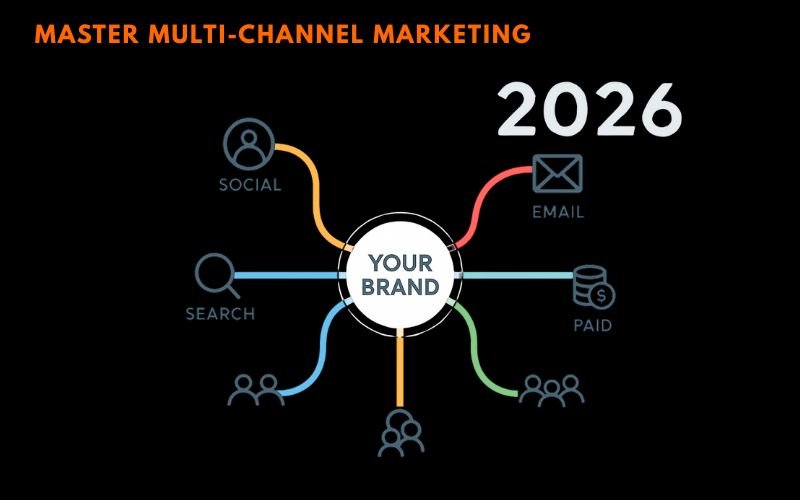
First, establish your channel hierarchy. Not all channels are the same for your business. I rank channels based on where your customers are and buy things. It’s about following your data, not trends.
Here’s how I prioritize channels with my clients:
- Primary channels: Where 60-70% of your qualified leads come from
- Secondary channels: Supporting platforms that nurture and convert
- Experimental channels: New opportunities worth testing with limited resources
Second, create channel-specific objectives that ladder up to your main goal. Each platform should have a clear purpose. Email might focus on keeping customers, while social media increases awareness. LinkedIn could be your lead generator, and your website converts visitors.
Trying to make every channel do everything leads to mediocre results. Instead, let each channel focus on its strengths while supporting your message.
Third, establish clear handoff points between channels. This is where most strategies fail. Your customer’s journey should be seamless, even as they move between platforms. I map out every transition to ensure a connected experience.
How to Allocate Resources Without Going Crazy
Resource allocation is where strategy meets reality. It’s often the most stressful part. I’ve developed a system to make budget decisions easier and keep teams focused.
My go-to framework is the 70/20/10 budget allocation rule, but with important nuances I’ve learned through trial and error:
- 70% goes to proven tactics that consistently deliver results
- 20% funds innovative strategies with strong promise
- 10% supports experimental initiatives and new channel testing
But these percentages aren’t set in stone. Early on, I made the mistake of treating them as gospel. I learned that market conditions, trends, and business growth stages all affect the ideal allocation.
For example, if you’re launching a new product, you might shift to 60/30/10 to invest more in new approaches. If you’re in a competitive market, 80/15/5 might be better to focus on what works.
The key is tracking performance religiously and adjusting quarterly. I review allocation with my clients every 90 days, looking at both results and team feedback.
Resource allocation isn’t just about money – it’s about time, talent, and attention too. I’ve seen great strategies fail because teams were stretched too thin. That’s why I always consider team capacity when making decisions.
One practical tip that’s saved my sanity: create a simple spreadsheet to track your spend versus planned allocation. Review it monthly, not daily. This prevents constant second-guessing that can freeze decision-making.
Remember, perfect allocation doesn’t exist. The goal is to make informed decisions, measure results, and adjust when needed. After managing hundreds of campaigns, I can tell you that flexibility beats perfection every time.
🧠6. Set Up Attribution and Analytics That Tell the Real Story
I’ve seen many marketing budgets wasted. This is because teams couldn’t track what really works. Most attribution systems are like broken compasses, leading you astray.
I’ve made every mistake in the book with attribution. I trusted last-click attribution, giving all credit to the end of the funnel. I used first-click models, ignoring the middle of the customer journey. These mistakes cost me hundreds of thousands of dollars.
But I learned something important: the right attribution setup changes how you see your customers. When you understand how people find and buy from you, everything changes.
Tracking Systems That Actually Make Sense
Let’s simplify this. I use specific tracking systems in my businesses today. After trying dozens, I found a core stack that gives me the data I need without overwhelming me.
Google Analytics 4 is the base of my work. It has a learning curve, but its event-based tracking offers insights into customer behavior. I set up custom events for every important interaction across my channels.
For deeper insights, I rely on Amplitude. It shows how users move through your marketing funnel across different touchpoints. The cohort analysis features have helped me identify which metrics predict long-term customer value.
Twilio Segment is my customer data platform. It connects all my marketing tools, giving a unified view of each customer’s journey. This integration eliminates data silos that used to drive me crazy.
Here’s how I set up:
- Install GA4 with enhanced ecommerce tracking on every digital touchpoint
- Set up UTM parameters that actually make sense (I use a simple naming convention)
- Connect your CRM to track offline conversions and phone calls
- Implement server-side tracking to capture data that ad blockers miss
Attribution Models I Trust After Over 20 Years in This Space
Most marketers get stuck trying to choose the “perfect” attribution model. After four decades, I’ll save you the trouble: there is no perfect model, but some are definitely more useful than others.
I use three attribution models that give me different views of my channel performance metrics. First-click shows which channels create awareness. Last-click reveals which touchpoints close deals. But the real magic is data-driven attribution.
Data-driven attribution uses machine learning to assign credit based on actual conversion patterns. Google Analytics 4 includes this model, and it’s my primary lens for budget allocation. It’s not perfect, but it’s based on your real customer data.
For customer journey optimization, I also track assisted conversions. These show which channels contribute to sales, even if they don’t get the final click. Email marketing often looks weak in last-click models but shines when you see its role in nurturing prospects.
Here’s my attribution framework:
- Use data-driven attribution for budget allocation decisions
- Check first-click reports monthly to evaluate top-of-funnel performance
- Review assisted conversion data to identify undervalued channels
- Run incrementality tests quarterly to validate your attribution insights
The biggest lesson from my decades with attribution models? Don’t let perfect be the enemy of good. Start with basic tracking, then improve over time. A simple attribution system you actually use beats a complex one that sits ignored.
Remember, attribution isn’t about finding the one true answer. It’s about getting better insights than you had yesterday so you can make smarter decisions tomorrow.
🧠7. Optimize Channel Performance Using Data, Not Guesswork
I learned a hard truth after wasting thousands on bad channels: guesswork hurts profits. For my first two years, I made decisions based on what felt right. This led to mediocre returns and frustration.
Everything changed when I started using channel performance metrics like a GPS. I could see where my money was working best, instead of guessing.
The big change was realizing that data from one channel isn’t enough. To really optimize, you need to mix data from different sources. This creates a unified customer experience view.
The Metrics That Matter Most
After analyzing four businesses, I found the metrics that really matter. Forget about vanity metrics like impressions or likes. These numbers drive real growth.
Customer Acquisition Cost (CAC) by channel shows your most efficient sources. I check this weekly because it changes fast. When Instagram ads became 40% more expensive than Google ads, I quickly changed my budget.
The Customer Lifetime Value to CAC ratio shows channel health over time. Any channel with a ratio below 3:1 gets my attention. Channels above 5:1 get more budget.
Attribution windows are more important than many think. I use 7-day click and 1-day view windows. This captures immediate responses without counting accidental conversions.
Cross-channel influence metrics show how channels work together. When I found that customers who saw both Facebook ads and email campaigns converted 60% more, I changed my whole approach.
My Performance Optimization Playbook
Here’s how I turn bad channels into profit centers. I’ve used this system to save failing campaigns in retail, SaaS, and service businesses.
Step 1: Establish baseline performance for each channel over 30 days. Don’t make any changes during this time. Just collect data. I learned this after making too many changes too fast.
Step 2: Use marketing mix modeling to understand channel contribution. This method showed me that my “worst performing” email channel was actually driving 25% of my social media conversions.
Step 3: Create dashboards that show customer journeys across touchpoints. I connect Instagram Ads data with Shopify analytics to see the whole picture. This showed that customers often research on social but buy directly.
Step 4: Test budget reallocation in 10% increments. When data showed Google Ads outperforming Facebook by 30%, I didn’t shift everything at once. Gradual changes protect against seasonal changes and data anomalies.
Real-world example: One of my e-commerce businesses was spending 40% of budget on Facebook ads with declining returns. Blended data analysis showed that Facebook users were converting through email sequences triggered by website visits.
Instead of cutting Facebook spend, I optimized for website traffic. The result? Facebook CAC dropped 35% while maintaining the same conversion volume through the email funnel.
Step 5: Monitor performance weekly and adjust monthly. Daily optimization creates chaos. Monthly reviews catch trends before they become problems. I use automated alerts when any channel’s performance drops 20% below baseline.
The key insight that changed my approach: channels don’t work in isolation. Your highest-converting channel might depend on awareness built by your “lowest-performing” channel.
This data-driven approach got rid of the guesswork that was draining my marketing budgets. Now, I make decisions based on clear evidence. The result? 40% better ROI across all channels and a unified customer experience that actually converts.
🧠8. Create Content Strategies That Work Across All Platforms
After starting four successful businesses, I learned a key secret. It’s about smart content adaptation that most marketers miss. The trick is to see each platform as part of a bigger integrated marketing communications plan.
In my second business, we made content for every channel separately. This wasted our team’s energy and budget. But then, we started repurposing content, and everything changed.
The goal is to make smarter content that works well on all platforms. This content keeps your main message strong. Here are the techniques that changed our content creation.
Smart Content Adaptation Techniques
Adapting content is more than just changing a few words. It’s about knowing how your audience uses each platform. Then, you tailor your message for each one.
Here’s how to adapt content across channels:
- Core Message Extraction: Begin with your main message. Identify the 3-5 key points that must stay the same.
- Platform Psychology: Know how users act on LinkedIn, Instagram, and email.
- Format Transformation: Turn long content into short pieces without losing impact.
- Voice Adjustment: Keep your brand’s personality while changing tone for each platform.
In my third business, we took a 2,000-word blog post on customer retention. We turned it into 12 different content pieces. We made LinkedIn carousel posts, Instagram stories, email segments, and podcast talking points.
The secret was keeping brand consistency across touchpoints while fitting each platform’s needs. Our engagement rates jumped by 340% because the content felt right for each channel.
One great technique is the “content pyramid.” Start with a detailed piece at the top. Then, break it down into smaller pieces for each platform. All these pieces support your main message.
Repurposing Secrets from My 4 Successful Businesses
Let’s look at the exact repurposing strategies that made millions in revenue. These are real, tested techniques that work.
The 1-to-10 Rule: Every content piece must be repurposable into at least 10 formats. If it can’t, we don’t make it. This rule doubled our content while cutting production time in half.
Here’s how we applied this in my fourth business:
- Started with a detailed case study (original content)
- Used key statistics for social media graphics
- Made a video summary for YouTube and LinkedIn
- Created an email series highlighting different aspects
- Built infographics showing the process
- Wrote Twitter threads with key takeaways
- Created podcast episodes for deeper insights
- Developed presentation slides for speaking
- Made interactive tools based on the methodology
- Created downloadable templates and checklists
This approach makes each piece support your integrated marketing communications strategy. It also meets different audience preferences and habits.
The Content DNA System: We created “content DNA”—core elements in every piece of content. These include specific phrases, visual elements, and value propositions for instant brand recognition.
In my consulting business, every content piece includes our signature framework, specific colors, and consistent messaging. This creates seamless brand consistency across touchpoints without feeling repetitive.
The Platform-First Adaptation: We create content based on platform requirements. We ask, “What would make this content irresistible on Instagram?” Then, we adapt our core message for that format.
This approach boosted our content engagement by 280%. Every piece felt right for its platform while keeping our brand message strong.
The biggest mistake businesses make is not thinking about content repurposing early on. Make it part of your planning, and you’ll see big improvements in efficiency and results.
🧠9. Build Team Workflows That Prevent Marketing Chaos
Nothing kills a great marketing campaign like a team that’s confused. I learned this the hard way during my second business launch. We accidentally sent three different email campaigns to the same list in one day. The customer complaints were overwhelming, showing us we had a big workflow problem.
Managing teams across multiple businesses taught me that successful digital marketing integration relies on clear processes, not just creativity. When everyone knows their role and follows the workflow, even complex campaigns run smoothly.
Creating systems that prevent confusion is key. I’ve seen teams waste time playing email tag and blaming each other when things go wrong. Smart workflow design solves these problems.
Clear Roles That Eliminate Confusion
I use a simple framework called the RACI matrix for every campaign. It stands for Responsible, Accountable, Consulted, and Informed. Each team member knows their role and who they need to work with.
For example, when we launch a campaign, our content creator is Responsible for writing copy. The marketing manager is Accountable for results. The design team is Consulted on visuals, and executives are Informed of progress.
Here’s what I assign to each role:
- Campaign strategist: Overall planning and goal setting
- Content team: Copy creation and adaptation across channels
- Design team: Visual assets and brand consistency
- Analytics specialist: Performance tracking and reporting
- Channel managers: Platform-specific execution and optimization
This structure works with or without marketing automation platforms. Clear ownership stops the “I thought you were handling that” problems that derail campaigns.
Collaboration Tools That Keep Everyone Aligned
I’ve tested dozens of collaboration platforms. Monday.com is great for project management, Slack for communication, and Asana for tracking progress.
The biggest mistake teams make is using too many tools. I stick to one for each purpose. More tools lead to more confusion, not less.
My current workflow uses Monday.com for planning, Slack for updates, and Google Workspace for documents. This setup works well with most marketing automation platforms and keeps everyone in sync.
I also create campaign briefs in one place. Every team member can access the brief, see their tasks, and understand their role in the campaign. This stops the miscommunication that can kill momentum.
🧠10. Scale Your Efforts Without Burning Out Your Team
I’ve seen talented team members burn out in three of my four businesses. I learned that growing sustainably is better than expanding fast. The rush to grow often overlooks the human cost.
Scaling smartly means creating systems that work without needing constant human help. This lets your team focus on strategy, not just keeping up with tasks.
Your team is your most valuable asset. Losing them to burnout means losing years of knowledge, relationships, and momentum.
Smart Automation for Sustainable Growth
The best marketing automation platforms save time and keep your team sane. I learned this when our email specialist quit from sending 200+ emails weekly. We could have automated 80% of that.
Here’s how to choose good automation:
- Start with repetitive tasks that drain energy without adding value
- Focus on customer touchpoints that happen at predictable moments
- Automate data collection before you automate responses
- Test small before rolling out company-wide
The best automation creates a unified customer experience across all channels. When a customer interacts with your brand, your email system should know. When they download a resource, your sales team should be notified automatically.
Smart automation handles routine tasks. This lets your team focus on building relationships and solving problems creatively. In my consulting business, we automated client onboarding. This freed up 15 hours a week for strategy sessions.
The best marketing automation platforms work with your existing tools. Don’t choose software that requires your team to learn new systems. Use what they already know and use.
Warning Signs of Team Overwhelm to Watch For
I wish I knew these warning signs before I lost good people to burnout. Here are the red flags I watch for now:
Communication changes happen first. Team members who usually contribute ideas in meetings become quiet. Response times to emails and messages get longer. These subtle shifts often precede bigger problems.
Quality starts slipping in small ways. Typos increase in usually careful work. Deadlines that were never missed before start getting pushed back. Creative solutions become rare as people default to “just get it done” mode.
Here’s my checklist for spotting overwhelm early:
- Monitor workload distribution – Is one person handling too many channels?
- Track response times – Are internal communications slowing down?
- Watch for isolation – Is someone skipping team meetings or lunch breaks?
- Notice energy levels – Are usually enthusiastic team members becoming withdrawn?
- Check work quality – Are small mistakes becoming more frequent?
The most dangerous sign is when team members stop asking questions or suggesting improvements. This usually means they’re in survival mode, just trying to keep up with existing demands.
I’ve learned to have monthly one-on-ones focused on workload and stress levels. Not project updates—actual conversations about how people are feeling. These conversations have saved several valuable team members from burning out.
Sustainable scaling means saying no to opportunities that would overwhelm your current team. I’ve turned down lucrative projects because I knew they would push us past our healthy capacity. Short-term revenue isn’t worth long-term team stability.
Remember, a unified customer experience depends on having a unified, healthy team delivering it. Take care of your people, and they’ll take care of your customers.
🎯Conclusion
After exploring these ten essential strategies, you now have a roadmap for your business. Multi-channel marketing management is no longer optional. It’s key to success in 2026.
Businesses that excel in their omnichannel strategy will win customers at every touchpoint. Those who fail will see their competitors gain ground. They’ll struggle with campaigns that don’t connect and messages that confuse.
I’ve shared my years of experience in building successful multi-channel systems. My guide, “The Multi-Channel Marketing Maze,” goes beyond what we’ve discussed. It includes step-by-step guides, templates, and troubleshooting tips my team uses daily.
This ebook turns the strategies we talked about into systems you can start using right away. No more confusion or scattered efforts. Just proven methods that work.
Ready to manage your marketing channels without feeling overwhelmed? Get your copy and join thousands of business owners who’ve simplified their marketing. Your future self will thank you for taking action today.
⁉️FAQ
What exactly is multi-channel marketing management and why do I need it?
Multi-channel marketing management means using many platforms, like search, social media, and email, to reach customers. It’s essential for businesses today. With customers using many channels before buying, being seen is key.
Companies using more channels grow their market share by 72%. This shows how important it is to be seen across different platforms.
How do I create a single source of truth for my customer data without breaking the bank?
Start with a customer data platform (CDP) that works with your tools. Don’t try to change everything at once. This approach avoids chaos.
Begin with your CRM, email platform, and website analytics. Tools like HubSpot or Salesforce are good starting points. Segment offers great integration capabilities.
Ensure all touchpoints feed into a single system. This lets you track the whole customer journey.
What’s the biggest mistake businesses make with omnichannel strategy?
The biggest mistake is treating each channel as separate. This wastes money and confuses customers. Your messages should be consistent across all platforms.
Brand consistency is vital. It builds trust and turns prospects into customers.
How many marketing channels should I be using simultaneously?
Start with 3-4 channels you can handle well. For established businesses, 5-7 channels are best. This approach leads to better market share growth.
Choose channels you can manage well. Quality is more important than quantity.
What marketing automation platforms do you actually recommend for multi-channel management?
I recommend HubSpot for small to medium businesses. It’s easy to use and integrates well. For larger businesses, Marketo and Pardot offer advanced features.
ActiveCampaign is great for email strategies. Zapier connects different tools. Choose a platform that grows with your business.
How do I track attribution across multiple marketing channels effectively?
Use the right tools and mindset for tracking attribution. Google Analytics 4 is a good start. Tools like Attribution or HubSpot’s reports offer deeper analysis.
No single model tells the whole story. Look at data from different angles. 80% of deals need 5-12 touchpoints to convert.
What are the most important channel performance metrics I should be tracking?
Focus on metrics that relate to revenue. Track Customer Acquisition Cost (CAC) by channel, Customer Lifetime Value (CLV), and conversion rates. Attribution-weighted revenue is also key.
Understanding how channels work together is vital. An email might not get the last click, but it helps in conversion.
How do I maintain brand consistency across different marketing channels?
Create detailed brand guidelines. Include voice, tone, messaging, and platform-specific adaptations. Use tools like Canva or Adobe Creative Cloud for visual consistency.
Platforms like Hootsuite or Buffer help with posting schedules. Create templates and workflows to maintain consistency. Train your team on the “why” behind your brand.
What’s the best way to allocate budget across multiple marketing channels?
Use a modified 70/20/10 rule. Allocate 70% to proven channels, 20% to scaling, and 10% to testing. Adjust based on your business and industry.
Start by analyzing your current performance. Shift budget to your best channels while keeping a presence in key touchpoints. Don’t put all your eggs in one basket.
How do I prevent my team from burning out while managing multiple channels?
Use smart systems, not just hard work. Watch for signs like declining quality and missed deadlines. Use content batching and scheduling tools.
Define clear roles to avoid stepping on toes. Automate repetitive tasks. Invest in experts for specific platforms.
What tools do you recommend for managing team workflows across multiple channels?
Use Asana or Monday.com to organize campaigns. Slack or Microsoft Teams handles communication. Tools like CoSchedule or Hootsuite coordinate content publishing.
A centralized content calendar is a game-changer. It prevents conflicts and ensures consistency across touchpoints.
How long does it typically take to see results from a multi-channel marketing strategy?
You’ll see initial data in 30-60 days. But meaningful insights take 90-120 days. Customer journey optimization is ongoing.
Some channels, like paid search, show quick results. Others, like content marketing, take 6-12 months. Success comes from consistent execution and data-driven optimization.