
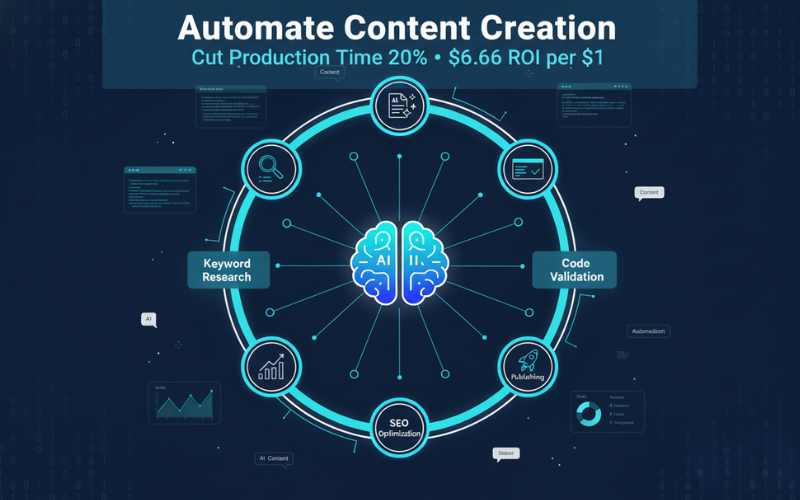
Quick Read: Master Content Automation in 60 Seconds
Automate content creation strategically to slash research and production time for technical blog posts without sacrificing accuracy or reader trust. This actionable guide shows digital marketers and technical bloggers exactly how to deploy AI-powered tools that deliver measurable ROI—$6.66 returned for every dollar invested—while maintaining the code quality and EEAT signals that Google rewards.
What You’ll Learn in This Guide
🚀 5 Essential Tools for Technical Content Teams
Discover the exact automation stack that handles everything from keyword clustering to social distribution. You’ll see why Surfer dominates SEO optimization, how Grammarly catches errors before they damage credibility, and when Filestage’s approval workflows cut review cycles by 33%.
📈 Data-Backed Business Case for Stakeholders
Arm yourself with compelling statistics: 98% of marketers call automation extremely important, 76% of creative professionals already use AI tools, and first-time users consistently report 20% productivity gains. These aren’t aspirational numbers—they’re real-world results you can replicate.
⚖️ The Automation Decision Framework
Learn the critical difference between full automation (perfect for routine how-tos and updates) and partial automation (essential for complex frameworks, security topics, and high-risk technical guides). You’ll get a simple checklist that protects accuracy while maximizing speed.
💰 Transparent Pricing for Every Team Size
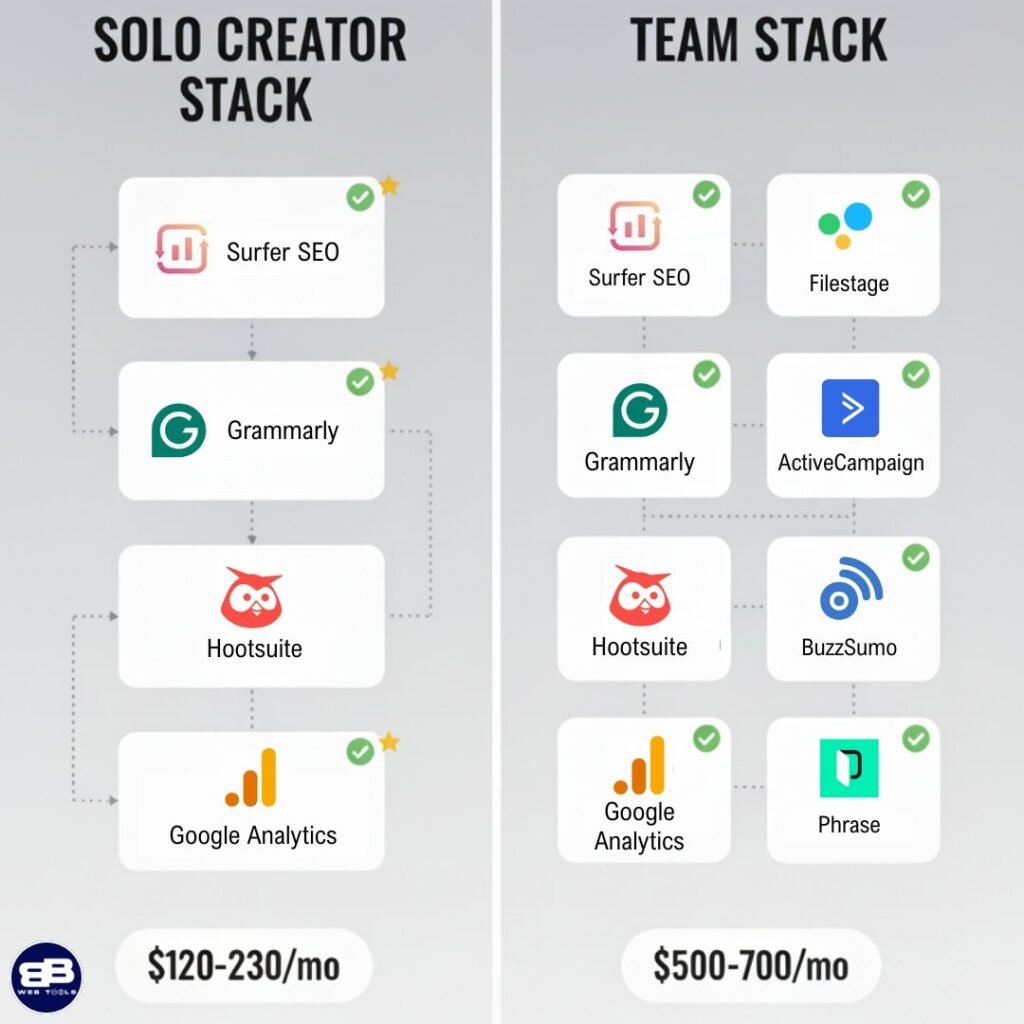
Solo creators: Complete stack for $120-230/month
Technical teams: Full collaboration setup for $500-700/month
Every tool recommendation includes pricing tiers, must-have features, and the exact metrics that justify the investment to your CFO.
🎯 End-to-End Workflow You Can Implement Today
Follow a proven process from keyword discovery through post-publish analytics. You’ll get prompt templates, on-page SEO checklists, repurposing frameworks, and a GSC/GA dashboard setup that turns data into actionable content updates.
🔒 Quality Guardrails That Protect Your Brand
Understand the non-negotiable rules: verify every code snippet, cite authoritative sources, flag compliance risks, and enforce the rule-of-two for high-stakes topics. These guardrails preserve EEAT while automation handles the heavy lifting.
Your Immediate Action Plan
This isn’t generic advice, it’s a battle-tested playbook from someone managing multiple content operations. You’ll walk away knowing:
- Which tool combinations prevent workflow chaos and tool overlap
- How to prevent AI tone drift across multi-author teams
- The weekly 15-minute ritual that fixed internal linking and closed content gaps
- Exactly when automation pays for itself (hint: around 4-8 posts per month)
Bottom line: Automate the research, outlining, optimization, and distribution. Keep humans focused on what matters—code validation, expert insights, and the trust signals that convert readers into customers.
Time investment: 15-minute read
ROI timeline: See measurable gains within 30 days
Skill level: Beginner to advanced (step-by-step guidance for all levels)

Automate Content Creation is my pick for a practical plan to cut research and production time for code-heavy posts without losing accuracy.
I’ll define scope and show how the right mix of strategy and tools maps to the writing process. You’ll see a clear plan from keyword discovery to publishing and iteration for each blog post.
I use industry data to set expectations: 98% of marketers rate automation as very or extremely important, first-time users see about 20% more productivity, and ROI often hits $6.66 per $1 invested. I’ll explain partial versus full automation and when you must keep a human in the loop for code validity and citations.
Quick personal tip: batch outlines for how-to and troubleshooting posts, then verify every code snippet before publishing to scale reliably.
Disclosure: BBWebTools.com is a free online platform that provides valuable content and comparison services. As an Amazon Associate, we earn from qualifying purchases. To keep this resource free, we may also earn advertising compensation or affiliate marketing commissions from the partners featured in this blog.
🎯 Key Takeaways
- I’ll preview five specific tools and why each matters for technical authors.
- You’ll get a plan that covers keyword work, drafting, review, and republishing.
- Data shows strong ROI and real productivity gains for teams and solo devs.
- Regulated niches benefit from automated review features to lower risk.
- Expect pricing transparency, concise FAQs, and practical setup advice.
📘Automate Content Creation for Technical Blogs in The Present: What It Really Means
I outline an end-to-end approach that keeps runnable code and clear SEO priorities in sync. My goal is to speed up the writing lifecycle while protecting accuracy and trust.
How I define the content creation process for code-heavy topics: I start with topic selection, keyword clustering, and a brief that lists inputs/outputs, environment, version pins, and error handling.
- I map where AI helps: outlines, SERP analysis, readability tuning, and entity coverage.
- My review gates are simple: run code locally, cite sources, and have an engineer sign off.
- I use a style guide for code formatting, security notes, and example outputs.
Balancing speed with EEAT: partial automation reduces manual work but keeps humans in control. Once, an AI suggested a plausible but wrong CLI flag; a quick test caught it and saved the post.
I own the outcomes: the tools give insights and drafts, the team ensures correctness, and I publish only after verification.
⚠️Why Automation Tools Matter: Productivity, Compliance, And ROI
My goal here is to show the hard numbers that justify an automation plan to stakeholders. Clear stats help you win budget and trust fast.
Adoption is high: 76% of creatives use AI, 98% of marketers say automation is very or extremely important, and 91% call it essential. First-time users see ~20% productivity gains and a typical ROI of $6.66 per $1 invested.
Reduce errors and prove compliance
Online proofing and AI editing flag typos, tone drift, and compliance gaps. Some platforms add checks for FDA 21 CFR Part 11 and EU Annex 11, which matters in regulated niches.
Personalization, analytics, and better ROI
Personalization delivers results: 89% of marketers report positive ROI from tailored messaging. Use segmentation and analytics inside software to convert and retain users.
- I package the business case with adoption, productivity, and ROI.
- I link time saved on routine tasks to more research and higher-quality content.
- I recommend a phased pilot: test, measure metrics, then expand.
Quick procurement talking point: present these metrics, map them to time-to-publish, revisions per draft, and conversion signals, and propose a tight pilot so stakeholders can see measurable gains before expanding the plan.
Metric | Source | Impact |
Adoption (creatives) | Industry survey | 76% use AI — faster ideation |
Marketers valuing automation | Marketing reports | 98% say it’s important; 91% essential |
Productivity gain (new users) | Case studies | ~20% faster task completion |
ROI | ROI analyses | $6.66 return per $1 invested |
Personalization ROI | Marketer surveys | 89% report positive returns |
🧠From Idea To Post: Mapping The Content Automation Workflow
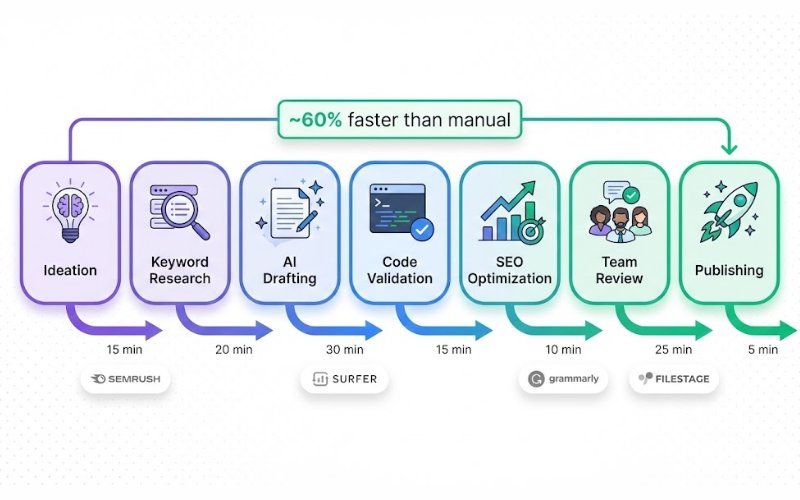
My workflow turns scattered content ideas into prioritized posts with measurable checkpoints. I start by clustering topics from keyword research and competitor search to build a backlog that aligns to user intent.
Drafting happens inside an editor that enforces on-page seo, readability, and coverage. I layer in runnable code and expert notes, then freeze dependencies to keep examples reproducible.
Reviews use a clear team flow: automated reminders, version control, and verified approvals so sign-offs are fast and auditable. Filestage helps with diffs and compliance checks when needed.
- Publish checklist: meta, schema, screenshots, and links.
- Social: repurpose hooks for different social media and bulk-schedule with Hootsuite.
- Post-launch: combine GSC, GA, and Surfer audit insights to pick updates or next topics.
Tip: write section by section, batch outlines and metadata, then use the dashboard to measure rank movement, CTR, and engagement for the next blog post idea.
Step | Tool | Checkpoint benefit |
Ideation | Surfer Keyword Research | Prioritized content ideas and keywords |
Review | Filestage | Verified approvals and versioning |
Publish & Monitor | Hootsuite + GSC/GA | Scheduled posts and actionable insights |
✅The Criteria I Use To Pick The Best Content Automation Tools
My selection starts with a simple test: can the platform handle long technical drafts with code and citations? I want a tool that preserves syntax, keeps track of versions, and makes review fast for a team.
Must-have features for technical blogging
Checklist:
- Code blocks with syntax highlighting and export to HTML/Markdown.
- Citation support and an easy way to add source links.
- Real-time editing, a plagiarism checker, and document history for trust.
- AI-driven SERP analysis, coverage suggestions, and internal linking hints.
- Collaboration: comments, roles, approvals, and audit trails for multi-author workflows.
Pricing, integrations, and team usability
Watch for seat limits, project caps, and gated features that block a team. I test stability on long drafts with many code blocks and run a 14–30 day pilot across two workflows before buying.
Platform | Entry plan | Notes |
Grammarly | $12/month | Real-time edit + plagiarism |
Filestage | $109/month | Unlimited users, review automation |
Hootsuite | $99/month | Social scheduling, team tools |
Semrush Pro | $117/month | Research and writing guidance |
Surfer: End-To-End Content Automation For SEO-First Technical Posts
Surfer ties keyword discovery to drafting so I can focus on accurate code and clear explanations. It reduces guesswork by turning SERP signals into a practical outline and coverage map for each post.
Why it’s great for technical bloggers
Surfer keeps structure, readability, and entity coverage in one place. The Content Editor nudges me on headings, length, and on-page seo while I validate code samples.
Notable features
- Keyword Research with clustering to spot related keywords and user intent.
- Content Editor plus Auto-Optimize and Coverage Booster for missing topics and entities.
- Rank Tracker and reports to prioritize updates and measure impact.
- Internal linking suggestions, AI Humanizer (Surfy) for repurposing, and GSC/Zapier integrations for audits and workflows.
Pricing snapshot and when the investment pays off
Surfer starts to pay when you publish and iterate regularly—roughly 4–8 posts per month. The biggest gains come from faster briefs, fewer revision cycles, and prioritized audits.
Feature | Benefit | Best use | ROI trigger |
Keyword Research | Clustered keywords and intent | Topic planning for tutorials | 4+ posts/month |
Content Editor | Structure, length, and on-page guidance | Drafting technical how-tos | Fewer revision cycles |
Auto-Optimize & Coverage Booster | Adds missing entities and gaps | Improving factual completeness | Better rankings after audits |
Rank Tracker & Integrations | Monitor performance and automate audits | Prioritizing updates | Measure lift vs. subscription |
Semrush: Research Powerhouse For Keywords, Competitors, and Content Ideas
SEMrush gives me a fast, data-rich starting point for planning which topics will move the needle.
How I begin: I run a quick Keyword Overview to gather volume, intent, and related terms. Then I expand into Keyword Magic to build clusters that map to user intent and editorial themes.
Keyword overview and Keyword Magic for cluster-driven creation
I use Keyword Overview to validate an idea’s search potential. Keyword Magic then helps me group related keyword sets into tight clusters.
Those clusters become my editorial briefs and lists of content ideas. I export the lists and assign themes to my calendar.
SEO Writing Assistant to guide on-page optimization
During drafting I use the SEO Writing Assistant to catch readability issues and on-page SEO signals early. It flags tone, suggestions, and basic optimization so drafts require fewer rounds of edits.
Pricing and how I use it alongside other tools
Key modules: Keyword Overview, Keyword Magic, Competitor Analysis, SEO Writing Assistant, and PPC reports. The Pro plan starts at $117/month billed annually.
- I run competitor analysis to spot headline patterns and gaps I can exploit.
- I use Semrush for market intel and Surfer for in-editor optimization—Semrush finds the topics, Surfer refines the page.
- Trick: target low-KD keyword variations that match business goals for quicker wins.
Weekly workflow: I run a short scan each Monday to refresh keyword lists, export new clusters, and flag 2–3 subtopics to test. That keeps research fresh, avoids analysis paralysis, and aligns SEO with PPC and social marketing.
Module | Primary use | When to call it in |
Keyword Overview | Validate volume & intent | Ideation and prioritization |
Keyword Magic | Build keyword clusters | Editorial briefs and calendars |
Competitor Analysis | Find gaps and headline patterns | Title and angle research |
SEO Writing Assistant | On-page checks and readability | Draft stage before editor handoff |
✍️Grammarly: AI-Powered Editing, Tone, And Plagiarism Checker For Clean Copy
A fast, reliable editor that flags errors as I type saves me revision cycles. I use Grammarly to speed up my writing and improve quality before any peer sees a draft.
Real-time suggestions catch clarity issues, awkward phrasing, and tone drift. That reduces back-and-forth with reviewers and keeps technical posts readable without dumbing down the steps.
Why a plagiarism check matters in a scaled workflow
When you scale output, a plagiarism checker is a final gate for originality and reputation. I run the check after edits and before technical review to avoid accidental reuse of phrasing from sources.
Free vs. Premium: value for a technical blog team
The free plan covers basics and quick grammar fixes. Premium (from about $12/month billed annually) adds advanced rewrite suggestions, tone control, and the plagiarism scan I rely on for final assurance.
- I pair Grammarly with a style guide so terminology in prose and code comments stays consistent.
- Use a custom dictionary for product names and tech terms to cut false positives.
Place Grammarly after an initial draft and before engineering validation—accept suggestions
Feature | Benefit | Best place in pipeline |
Real-time suggestions | Fewer revision loops, clearer instructions | During drafting |
Tone detector | Keeps tutorials approachable, consistent voice | Draft or edit stage |
Plagiarism checker | Protects originality and brand trust | Pre-publish final gate |
Custom dictionary | Reduces false flags for tech terms | Set up once per team |
🎞️Hootsuite: Schedule Social Media Posts and Analyze Performance at Scale
I use Hootsuite to turn a single blog post into a week of platform-ready social hooks. It saves me time and keeps messaging consistent across channels.
Bulk scheduling and OwlyWriter AI for post variations
Bulk scheduling lets me queue batches of posts without manual entry. I upload a CSV or drag assets into the calendar and set a schedule for the week.
OwlyWriter AI drafts multiple variations of a headline and caption so I can repurpose content for different audiences. It avoids duplication by rephrasing top-performing lines and suggesting fresh hooks.
Posting recommendations and advanced analytics across platforms
Hootsuite gives recommended post times per channel. I use those slots to maximize reach and then review engagement to refine the next batch.
The analytics dashboard shows which posts resonate, clicks by platform, and best-performing formats. I feed those signals back into my editorial plan and newsletter timing.
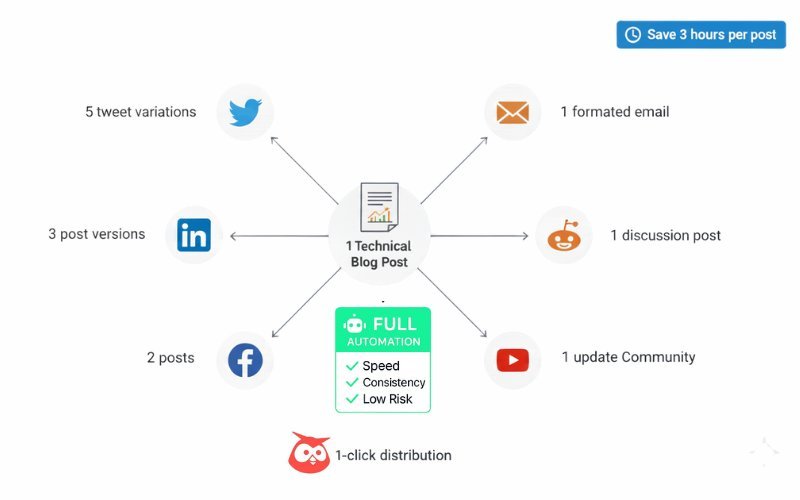
- I turn each blog post into tailored posts for X, LinkedIn, and Facebook with specific hooks.
- Bulk scheduling frees up time for deeper writing and technical testing.
- I use a campaign naming convention so UTM tracking stays clean across platforms.
Feature | Benefit | Notes / Pricing |
Bulk Scheduling | Queue large batches of posts in one upload | Professional plan from $99/month; good for solo users |
OwlyWriter AI | Generates varied captions and avoids duplicate phrasing | Helps repurpose content across platforms |
Posting Recommendations | Suggests optimal times per channel | Improves reach and saves time |
Advanced Analytics | Platform-level performance and engagement breakdown | Feeds insights back into editorial and marketing plans |
Quick workflow: export assets, run OwlyWriter for caption variants, bulk-schedule, monitor analytics, and reply personally to technical questions. That balance keeps automation efficient while preserving community trust.
👍Filestage: Review And Approval Automation To Keep Your Team Moving
Filestage speeds approvals so my drafts stop getting stuck in reviewer inboxes. It centralizes review tasks, due date reminders, and statuses so the review process stays visible and fast.
Version control shows side-by-side diffs with AI highlighting changes. That clarity prevents missed edits and reintroduced errors. My personal tip: using side-by-side diffs cut my review time by about a third on multi-author posts.
- Automated workflows route drafts to reviewer groups (legal, SME, editorial) with parallel reviews and due date nudges.
- Verified approvals and e-signatures support FDA 21 CFR Part 11 and EU Annex 11 for compliance-sensitive projects.
- Tag comments by accuracy, style, or compliance to speed triage and capture decision logs for audits and training.
- Review media—images, diagrams, and video captions—in the same hub to avoid scattered feedback across email.
Plan | Files / Projects | Notes |
Free | Unlimited files, 2 active projects | Good for trial and small teams |
Basic | Unlimited users, 10 active projects | From $109/month — scalable for teams |
Enterprise | Custom limits | Advanced compliance and integrations |
Integrate the platform with Slack or email for gentle notifications, and connect approvals to downstream tasks such as CMS staging or social queues. That keeps the publishing pipeline moving without manual chasing.
Subscribe to our news letters

- Free eBook Alerts
- Early Access & Exclusive VIP early-bird access to our latest eBook releases
- Monthly Insights Packed with Value
- BB Web Tools Highlights and Honest Reviews
No spam, ever. Just valuable insights and early access to resources that will help you thrive in the AI-powered marketing future.
⚙️Automate Content Creation
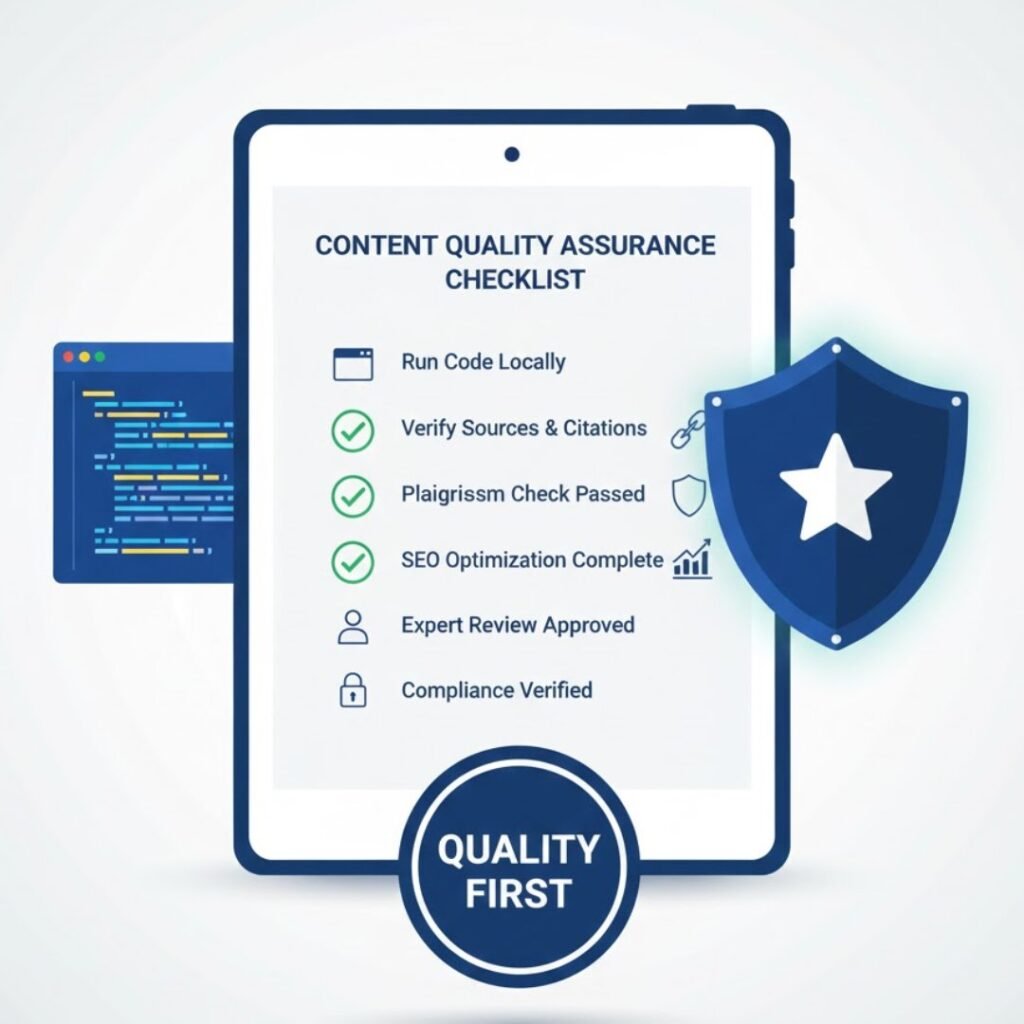
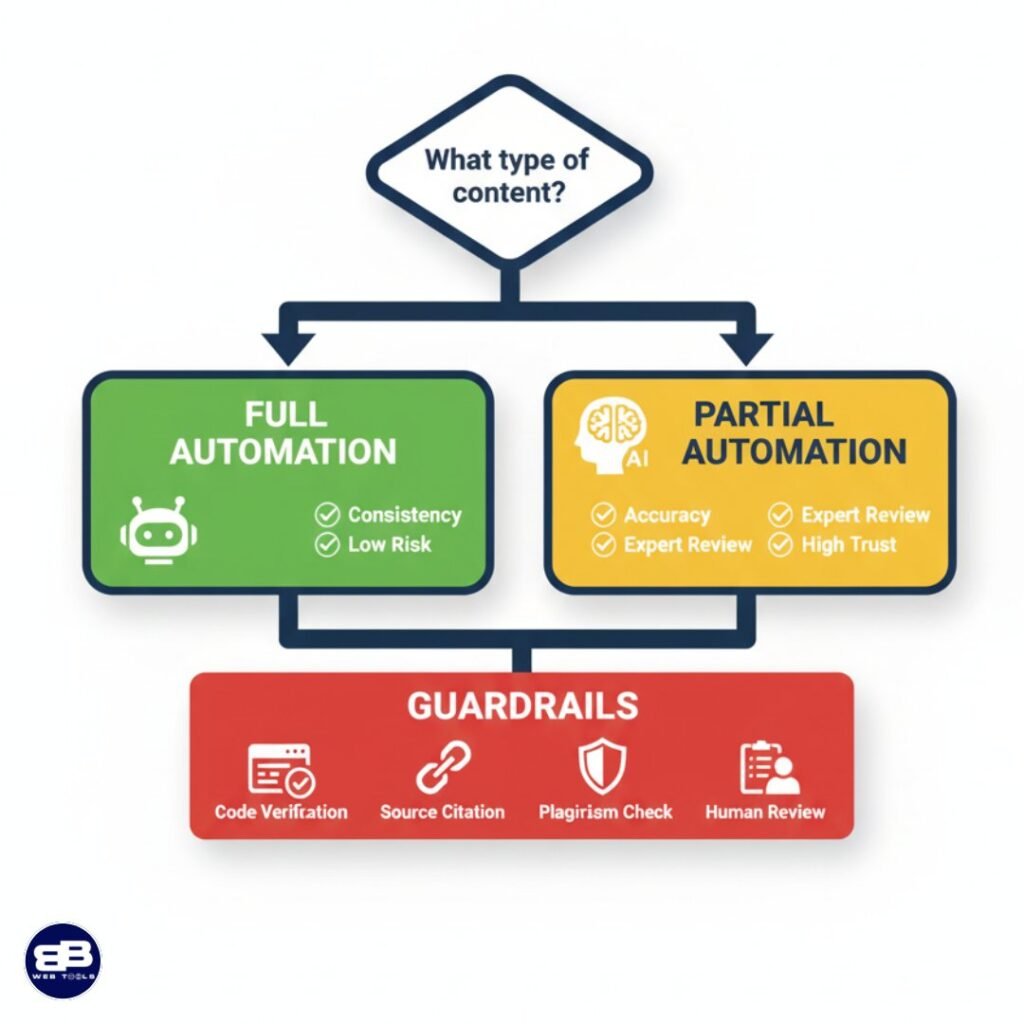
The right level of automation is a decision, not a default. I weigh topic risk, novelty, and the need for runnable code before choosing a path. For low-risk how-tos and routine updates, full automation can draft a solid page fast. For new frameworks, security-sensitive guides, or legal claims, I pick partial automation and keep humans in the loop.
Quick decision guide
- Full automation: formulaic how-tos, simple updates, repeatable tasks where code is minimal.
- Partial automation: complex topics, new research, high-impact recommendations, or sample code.
Guardrails checklist
- Verify code: run snippets, include unit test outputs or logs linked in an appendix.
- Source claims: cite authoritative references and run a plagiarism check.
- Compliance: red-flag security, medical, legal, or PII topics for mandatory manual review.
- Rule-of-two: at least two human reviewers on safety, finance, or privacy posts.
Decision Point | When to Use | Benefit |
Full automation | Routine updates, boilerplate how-tos | Speed and fewer revision cycles |
Partial automation | New frameworks, research, high-risk guidance | Preserves accuracy and compliance |
Guardrails | All published posts | EEAT, traceability, and lower error risk |
⚙️Technical Blogger’s Mini-Stack: How I Combine Tools Without Chaos
My mini-stack keeps tool overlap low while covering research, drafting, review, and distribution.
My lean stack for solo creators
I use a small set of platforms, so I move quickly and keep the monthly cost predictable.
- Surfer — outlines and on-page optimization (start here to shape the post). Pricing: Essential plan USD 79/month billed annually. See all plans
- Grammarly Pro — polish and plagiarism checks. ~ $12/month.
- Hootsuite — schedule social posts. ~ $99/month.
- Google Search Console & Google Analytics — measure rankings and traffic (free).
- Optional: Semrush Pro for deeper research — $117/month.
My Team Stack For Multi-Author Engineering Blogs
For teams, I add review, email, and discovery tools to maintain high quality.
- Filestage — approvals and versioned review. ~ $109/month; Free limied plan available
- ActiveCampaign — email automation. Starter plan at $15/month.
- BuzzSumo — trend discovery. Content Creation plan at $159/month.
- Phrase — localization when we scale. Professional plan $525/month; Freelancer $27/month.
- SocialBee and SEO Content Machine are available as lighter social and multilingual drafting options (~ $24 and $27/month).
Integrations & workflow: connect editor → CMS → analytics with Zapier. RACI: I draft, an engineer reviews code, an editor approves, and a publisher publishes. Weekly cadence: research Mon, draft Tue–Wed, review Thu, publish Fri. Start lean and add tools only when a bottleneck appears.
🧠Tactical Playbook: Tips And Tricks To Keep Quality High While Automating Content

I’m sharing a compact playbook with practical prompts and checklists that keep quality high when you scale writing workflows.
Prompt frameworks: use three short templates—outline, code explanation, and troubleshooting. For outlines: “Give me a 6-step outline for a beginner-friendly blog post on [topic] with examples.” For code: “Explain this snippet line-by-line and add a quick sanity test.” For troubleshooting: “List top 5 errors, causes, and fixes for [tool/version].”
On-page SEO checklist
- Title & meta: include main keyword and intent.
- Headers: H1–H3 coverage and semantic keywords.
- Internal links: 2–4 relevant anchor links.
- Facts & sources: cite authoritative docs and tests.
- Images: alt text and captions for accessibility.
- CTA: one clear action at the end.
Repurposing in under 30 minutes
Turn each blog post into 5–7 social variations and a short newsletter. Use Surfer or your editor to pull headings, then Hootsuite or SocialBee to spin media posts and schedule. Tag snippets by persona to keep tone relevant.
🧠Personal Experience: Two Lessons I Learned Automating My Creation Process
Scaling my blog taught me what to lock down: voice and internal linking. Those two areas had the biggest impact on reader trust and search performance.
How I prevented tone drift while scaling posts
I built a small tone library with real examples from my best-performing posts. The library included sample intros, technical summaries, and a short “key facts” box template I added to each article.
- Prompt patterns: I used clear positive and negative prompts to keep the voice steady across authors.
- Side-by-side diffs: They helped me keep edits aligned with the tone guide and protected disclaimers.
Tip: keep two short examples per tone entry—one technical, one conversational—so writers match voice fast.
What finally fixed my internal linking and content gaps
Surfer’s topical mapping and internal linking suggestions closed gaps that had been hurting navigation and rankings.
I adopted a weekly ritual: audit the top pages, add 2 internal links, and propose 1 new supporting article. That small cadence helped prevent link rot and boost discoverability.
- Run quick code and verify examples.
- Verify sources and add citations.
- Add at least two internal links before publishing.
- Publish, then monitor metrics for one week.
Metric | Before | After (3 months) |
Avg. time on page | 1m 45s | 2m 30s |
Editorial review cycles | 3.4 per post | 2.1 per post |
Internal links per page | 1.3 | 3.8 |
Two quick personal tips: keep a tiny “key facts” box to reduce reader confusion, and treat linking as a measurable task, not an afterthought. After three months, I saw steadier engagement and smoother reviews.
Other Notable Automation Tools Worth Testing
I tested several niche platforms that help at different stages: ideation, grading, distribution, localization, and scale drafting. Below, I summarize what each does, why it matters, and the starting price so you can pick a short pilot quickly.
BuzzSumo — trend discovery and monitoring
- What it does: surfaces trending topics, top headlines, and media mentions.
- Why it matters: a quick source of content ideas and competitor signals.
- Price: Content Creation plan $199/month.
Clearscope — content grade and readability
- What it does: grades pages against top-ranking results and suggests keywords and readability fixes.
- Why it matters: aligns your page to searcher intent and editorial quality.
- Price: Essentials $129/month.
ActiveCampaign: sequences and segmentation to nurture readers after publication.
SocialBee: AI captions, DALL‑E 3 image generation, and RSS-to-post for rapid social distribution.
Phrase: translation management and QA to scale localization.
SEO Content Machine: fast multilingual drafting with scraping support; verify output before publishing — from $24/month or $120/year.
Copysmith vs Jasper: scalable marketing workflows.
📝Measurement And Iteration: Dashboards And Reports That Matter
Good measurement turns guessing into decisions — I watch a handful of signals every week.
I combine Google Search Console and Google Analytics into a simple dashboard so I see discovery and engagement at a glance.
GSC gives clicks, impressions, CTR, and average position. GA shows session duration, bounce rate, and pages per session. Together they tell me if search brings users and if they stay.
How I prioritize updates with Surfer and rank data
I run Surfer Content Audit connected to GSC. It surfaces pages with rising impressions but low CTR, or pages that slid in average position.
Rank Tracker trends show which keywords need more coverage or internal links. I tag posts by cluster so I can see theme-level wins over time.
- Thresholds for action: CTR drop >20%, position drop of 5+ places, or time-on-page falling two standard deviations.
- Cadence: weekly anomaly checks, monthly audits, quarterly deep refreshes.
Quick update brief template
Item | Action | Goal |
Add facts | Insert latest references & citations | Improve authority and rank |
Re-run code | Validate snippets and example outputs | Reduce errors and support EEAT |
Expand FAQs | Answer top search queries and questions | Increase featured-snippet potential |
Improve visuals | Update diagrams, alt text, and screenshots | Boost engagement time |
After an update I compare pre- and post-optimization metrics (clicks, avg. position, time on page) to validate what worked. I also check cross-channel attribution to see how social and email amplified organic gains.
Iteration is the flywheel: measurement tells me where to spend time, and each refresh feeds better insights for the next round.
🎯Conclusion: Supercharge Your SEO with AI Backlinks
Here’s a short roadmap that turns tool choice into repeatable, measurable publishing wins.
I recap the path to scale: research, draft, review, publish, and learn. Follow that plan and you keep runnable examples accurate while saving time.
The best content wins when it is accurate, useful, and complete — not just fast. My lean stack fits solo writers; the team stack adds review, approvals, and compliance checks when risk rises.
Use a dashboard and regular audits to measure lift, fix gaps, and iterate weekly. Treat automation as support, not a replacement for accountability and trust.
One last nudge: test two tools this week, track time saved per post, and share what worked. Thanks for reading — I’d love to hear your wins and questions.
❓FAQ: Automate Content Creation for Technical Blogs
What does automating content creation mean for technical blogs?
Using AI tools and workflows to speed up keyword research, drafting, editing, and publishing while maintaining code accuracy and quality. Automation handles repetitive tasks so writers focus on technical validation and expertise.
Which AI tools are best for automating technical blog content?
The top 5 tools are Surfer (SEO optimization), Semrush (keyword research), Grammarly (editing & plagiarism), Hootsuite (social scheduling), and Filestage (review workflows). Each handles specific stages of the content pipeline.
How much does content automation increase productivity?
First-time users typically see 20% productivity gains. The average ROI is $6.66 for every dollar invested, with reduced revision cycles and faster time-to-publish across technical content teams.
Can AI write accurate code examples for technical posts?
AI can draft code snippets, but human verification is mandatory. Always run code locally, test outputs, and have an engineer review before publishing to maintain accuracy and reader trust.
When should I use full automation vs. partial automation?
Use full automation for routine how-tos and updates with minimal code. Choose partial automation for complex frameworks, security topics, or new research that requires expert validation and fact-checking.
How do I prevent AI from creating plagiarized content?
Run plagiarism checkers like Grammarly before publishing, cite all sources properly, and verify that AI-generated content is paraphrased rather than copied. Always review and rewrite AI drafts in your own voice.
What’s the minimum budget for content automation tools?
Solo creators can start with $120-230/month (Surfer, Grammarly, Hootsuite, plus free GSC/GA). Technical teams need $500-700/month when adding review tools, email automation, and collaboration platforms.
How do automation tools improve SEO for technical content?
Tools like Surfer analyze top-ranking pages and suggest optimal keyword placement, heading structure, content length, and internal linking. This data-driven approach helps technical posts rank faster and higher.
What quality checks prevent automation errors in technical posts?
Implement mandatory guardrails: verify all code snippets, cite authoritative sources, run plagiarism checks, enforce human review for high-risk topics, and maintain version control with documented approvals.
How long before I see ROI from content automation tools?
Most users see measurable improvements within 30 days and a positive ROI of around 4-8 posts per month. Track metrics like time-to-publish, organic traffic growth, and reduced revision cycles to quantify value.
📚 Articles You May Like

How to Use Keyword Clusters to Double Your Blog Traffic in 90 Days
Learn how to use keyword clusters to boost your blog...
Read More
7 Types of AI and Why We Mostly Talk About 3 Only
I explore 7 types of AI technology, from narrow to...
Read More
Claude vs Gemini 2026: Which AI Tool Wins for Coding, SEO & Content?
🚀 Quick Read: Which AI Tools is Better - in...
Read More


[…] For other productivity tips and tools, read 👉Automate Content Creation: Top 5 AI Tools for Technical Bloggers […]
This recommendation of 5 AI tools for blog content automation is so useful! They all generate content automatically, saving tons of writing time. Super friendly for bloggers and content creators—save it and try if you want to boost efficiency!