
Discover the top mobile marketing trends reshaping 2026. With 72% of internet traffic from mobile devices and $228 billion in...
Lindy AI Review 2026: Is This AI Agent Platform Worth It for Small Business?

Quick Read: Lindy AI Review 2026 at a Glance
Rating: 4.3
Factor | Details |
Product | Lindy — AI-Native Automation Agent Platform |
Best For | Solopreneurs, AI-first teams, inbox management, lead qualification |
Free Plan | ✅ 7-Days trial |
Entry Paid Plan | $49.99/month (Starter) |
App Integrations | Growing ecosystem — Gmail, Outlook, HubSpot, Salesforce, Slack, Notion + more |
AI Features | ✅ AI-native by design — every workflow is agent-driven |
Learning Curve | Low-to-Moderate — natural language setup, new mental model required |
Advanced Logic | ✅ AI reasoning handles branching — no manual rule configuration |
Multi-Step Workflows | ✅ Available on all plans |
Overall Rating | ⭐⭐⭐⭐ 4.3 / 5 |
Verdict | 🥇 Best AI-Native Automation Platform for Solopreneurs and AI-First Teams |
Lindy is not a traditional automation tool. It does not connect apps by moving data between them according to rules you define. It deploys AI agents — called Lindies — that read context, make decisions, draft communications, and complete tasks the way a trained assistant would, using natural language as both the setup interface and the operational engine. That distinction sounds subtle on paper, but it is enormous in practice.
After years evaluating software tools across 4 businesses, Lindy is the first automation platform I have tested that genuinely changes the question being asked — from “how do I wire these apps together?” to “what do I want my assistant to handle?”
For the right audience, that shift in question is transformative. Solopreneurs and small teams who spend significant time each week triaging inboxes, qualifying inbound leads, scheduling meetings, and following up with prospects — the exact tasks that rule-based automation tools like Zapier and Make cannot handle because they require judgment, not just data routing — will find Lindy’s capabilities genuinely compelling. For businesses whose primary automation bottleneck is connecting apps and moving data at scale, Lindy complements traditional automation tools rather than replacing them.
This review covers everything you need to make that determination: what Lindy actually does, how it works in practice, where it delivers real business value, where it falls short, and how it compares to Zapier and Make in the full context of our automation platform content series. If you have not yet read our three-way comparison, start there first.
Reading this as part of our automation series? For the full side-by-side context across all three platforms, see our Zapier vs. Make vs. Lindy: The Best Automation Tools for Small Businesses in 2026 comparison. For the Zapier deep dive, visit our Zapier Review 2026. For the Make deep dive, visit our Make Review 2026.
⚠️ Pricing Disclaimer
Pricing, plan features, and product details referenced in this article were accurate at the time of publication. Software pricing and features can change frequently and without notice.
bbwebtools.com makes every effort to keep reviews current, but cannot guarantee real-time accuracy of third-party pricing data.
Always verify current pricing directly on the official product website before making any purchasing decision.
Last reviewed: May 2026
Disclosure: BBWebTools.com is a free online platform that provides valuable content and comparison services. To keep this resource free, we may earn advertising compensation or affiliate marketing commissions from the partners featured in this blog.
🎯 Introduction: When Automation Stops Being About Rules and Starts Being About Reasoning
I want to open this review with an honest confession: Lindy required me to rethink a framework I had used to evaluate automation tools for years. When you have spent three decades in digital marketing and analytics, you develop mental models that are genuinely useful — until a product comes along that does not fit them. Lindy is that product for me, and I suspect it will be for many readers of this blog as well.
Every automation tool I had evaluated before Lindy, including Zapier, Make covered on bbwebtools.com, operated on the same fundamental logic: you define a trigger, you define one or more actions, you configure the conditions and data mappings that connect them, and the automation runs according to those rules reliably and predictably. The sophistication varied enormously, from Zapier’s beginner-friendly linear editor to Make’s powerful visual canvas, but the underlying model was always the same, automation as rule execution.
Lindy’s model is categorically different. You describe what you want an AI agent to do in plain English, “manage my inbox, classify incoming emails by type, draft replies for sales inquiries, flag anything from existing clients as urgent, and add new contacts to HubSpot”, and the platform deploys an agent that uses AI reasoning to interpret each incoming email, make appropriate decisions, and take actions without you having defined every possible condition in advance. The agent does not execute rules. It exercises judgment. That difference, between rule execution and judgment, is the lens through which everything about Lindy should be understood.
I tested Lindy extensively across real business scenarios during this evaluation: inbox triage for a content-heavy email operation, lead qualification and CRM updating from inbound contact form submissions, meeting scheduling coordination, and follow-up sequence management for affiliate partnership inquiries. What I found was a platform that delivers on its core promise more consistently than I expected, and that surfaces a genuinely new set of questions about where AI-driven automation belongs in a small business technology stack.
💡 What Is Lindy AI? The AI Agent Platform Explained
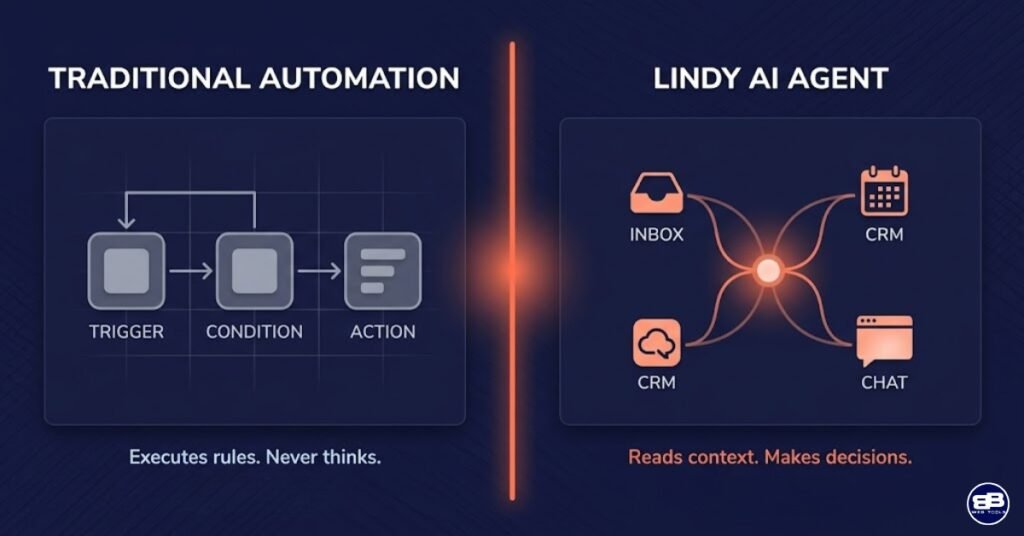
Lindy was founded in 2023 by Flo Crivello, a former Uber product leader, with a vision that is worth stating clearly because it differs fundamentally from that of traditional automation platforms: Lindy is not trying to help you connect apps. It aims to give every business owner an AI chief of staff—a capable, always-on assistant that handles the repetitive, judgment-intensive work that consumes time without creating strategic value.
The core unit of the Lindy platform is the Lindy agent, an individual AI assistant you create, name, give a role description and instructions to, connect to your apps, and deploy to handle a specific category of work. You might create one Lindy to manage your inbox and draft replies, another to qualify inbound leads and update your CRM, a third to handle meeting scheduling and calendar coordination, and a fourth to research and summarize topics for your content operation. Each Lindy operates independently, but they can also communicate with each other — delegating subtasks through what the platform calls Lindy-to-Lindy communication — enabling more complex workflows where multiple specialized agents collaborate toward a shared outcome.
Setting up a Lindy draws on a genuinely different cognitive process than building a Zap or a Make scenario. Rather than configuring triggers, actions, conditions, and data mappings, you write instructions to your Lindy the way you would write an onboarding document for a new team member. You explain the role, describe the kinds of inputs it will encounter, specify the outcomes you want, define any constraints or escalation paths, and connect the apps it needs access to. The Lindy then uses its AI reasoning to interpret real incoming information and decide what to do — drafting contextually appropriate responses, updating records with relevant data, and routing decisions based on content rather than predefined conditions.
This approach has profound implications for both the ceiling and the floor of what automation can accomplish. The ceiling rises dramatically: tasks that were impossible to automate with rule-based tools because they required reading, interpreting, and responding to unstructured content become automatable with Lindy agents. The floor also changes: the predictability and auditability that make rule-based automation trustworthy for data-critical workflows are less guaranteed when AI reasoning is making the decisions. Understanding both sides of that trade-off is essential for evaluating whether Lindy belongs in your specific business stack.
⚡ Lindy AI in Practice: Setting Up Your First Agent
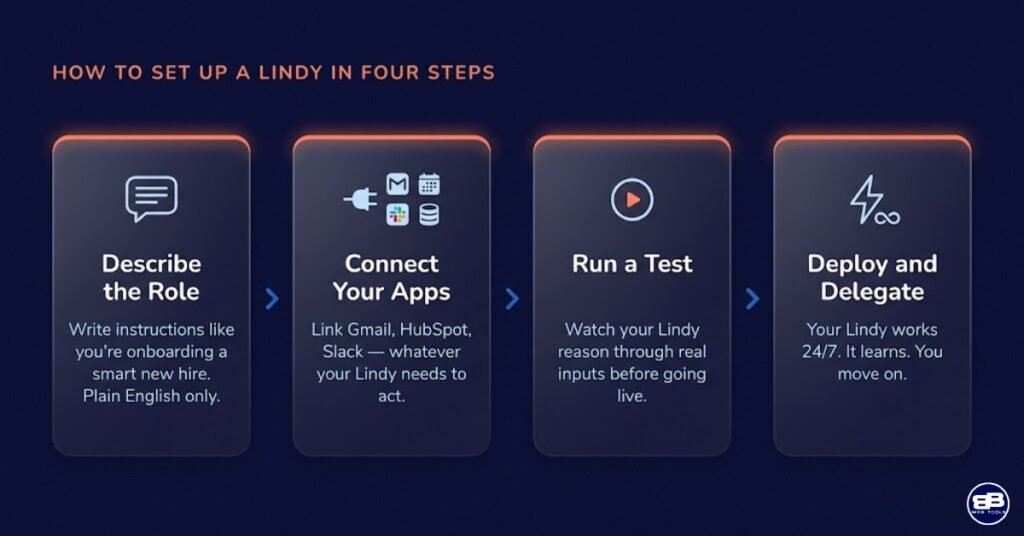
The Lindy onboarding experience is one of the most thoughtfully designed first-session flows I have encountered in the automation market. Rather than confronting you with a blank canvas or a generic trigger selector, Lindy immediately presents you with a curated set of agent templates — pre-configured Lindies for the most common use cases: Email Manager, Lead Qualifier, Meeting Scheduler, Follow-Up Agent, Research Assistant, and more. Each template comes with a pre-written role description and instruction set that you can activate immediately or customize to your specific needs.
I activated the Email Manager template during my testing and was genuinely impressed by how quickly it moved from setup to live operation. The process involved connecting my Gmail account (a standard OAuth flow that takes under two minutes), reviewing and customizing the pre-written instructions (specifying my business context, the types of emails I receive, and how I want different categories handled), doing a brief test run on a sample of existing emails to verify the agent’s behavior, and turning it on. From account creation to a live agent processing real incoming email took approximately twenty-five minutes — notably longer than Zapier’s fastest setup times for simple automations, but remarkably fast for a platform deploying genuine AI reasoning across an unstructured communication channel.
The instruction-writing step is where new users most often need to invest thought, and it is worth addressing directly. Lindy’s agents are only as good as the instructions you give them — and writing good Lindy instructions is a skill that improves with experience. Vague instructions produce inconsistent behavior. Specific, contextually rich instructions produce agents that operate more reliably and more usefully. During my testing, I found that the most effective approach was to treat the instruction-writing process like writing an onboarding guide for a smart new hire: explain the context, give examples of the decisions you want made in common scenarios, specify the escalation path for unusual situations, and be explicit about the outcomes that matter. The platform’s template instructions provided a useful starting scaffold, and Lindy’s in-product AI assistant helped refine instructions when initial behavior was inconsistent.
One feature that distinguishes Lindy from every rule-based automation tool is its memory capability — the ability of individual Lindy agents to retain context from previous interactions and use it to improve future responses. A lead qualification, Lindy, that has seen a hundred inbound inquiries from your specific industry, develops a progressively more accurate picture of what a qualified lead looks like for your business. An email management system, like Lindy, that has processed weeks of your inbox learns your communication patterns and prioritization preferences over time. This is not a dramatic AI fiction — the improvement is incremental and bounded — but it represents a genuine qualitative difference between AI-driven agents and static rule-based automations that never learn.
🏆 Lindy AI Review 2026: A Complete Features Breakdown
Lindy Agents: The Core Capability
Each Lindy agent is essentially a specialized AI assistant with a defined role, a set of natural language instructions, access to specific connected apps, and the ability to take autonomous actions within the boundaries you set. The agent architecture supports a wide range of operating modes: reactive agents that activate in response to specific triggers (a new email arrives, a form is submitted, a calendar event is created), proactive agents that run on a schedule to perform regular tasks (send daily briefings, follow up with contacts who have not responded within a defined period, generate weekly summaries), and conversational agents that interact directly with users through a chat interface.
The quality of Lindy’s AI reasoning — the underlying capability that determines how well agents interpret unstructured input and make appropriate decisions — is built on large language models that give agents a genuine capacity for contextual understanding that no rule-based system can replicate. An agent reading an email from a potential affiliate partner recognizes the intent, the sender’s context, and the appropriate response category without you having defined “affiliate partner email” as a filter condition. That implicit recognition of intent from unstructured text is Lindy’s most fundamental capability and its clearest differentiation from Zapier and Make.
Email Management: Lindy’s Flagship Use Case
Email management is the use case that most consistently demonstrates Lindy’s value proposition for small business owners and solopreneurs. The volume and variety of email that a typical multi-business operator receives daily — partnership inquiries, reader questions, affiliate communications, vendor proposals, customer service requests, PR pitches — represents exactly the kind of unstructured, judgment-requiring workload that rule-based automation handles poorly and AI agents handle well.
A Lindy email management agent can classify incoming messages by type and priority, draft contextually appropriate reply templates for review, or send low-stakes responses autonomously, extract and log contact information from new senders, flag time-sensitive messages with calendar deadlines, forward specific categories to team members, and maintain a running summary of inbox activity for your review. During my testing across a content-heavy email operation, the email management Lindy correctly classified incoming messages with high accuracy after an initial calibration period of approximately three to four days, and the reply drafts it produced for routine inquiries required minimal editing before sending.
The honest limitation here is that fully autonomous email sending — without human review — requires a high level of confidence in your Lindy’s calibration before it is appropriate for most business contexts. The safer initial deployment is to have your Lindy draft replies that you review and send, which still saves significant time while maintaining human oversight of outbound communications. As your confidence in the agent’s behavior builds, the degree of autonomy can be increased incrementally.
Lead Qualification and CRM Integration
Lead qualification is the second flagship use case where Lindy’s AI reasoning capabilities deliver clear, quantifiable business value. The speed-to-lead problem is well documented in sales research — the faster a business responds to an inbound inquiry, the higher the conversion rate. For solopreneurs and small teams who cannot have a human available to respond to every inbound lead within minutes, a Lindy lead qualification agent provides a practical solution that rule-based automation cannot match.
When a new inbound inquiry arrives — through a contact form, an email, a LinkedIn message, or a webhook from a landing page — a lead qualification Lindy can research the sender’s company using available public information, score the lead based on criteria you define in its instructions, draft a personalized initial response that acknowledges their specific inquiry, update your CRM with the enriched lead record, assign a follow-up task to the appropriate team member, and send an internal notification — all within seconds of the inquiry arriving, without human intervention. The personalization quality of the initial response, which references the sender’s specific situation rather than sending a generic acknowledgment, is a differentiator that rule-based automation cannot replicate.
During my testing, I configured a lead qualification, Lindy, for an inbound affiliate partnership inquiry workflow. The agent correctly identified and categorized 14 of 15 test inquiries, drafted personalized responses that I would have been comfortable sending with minimal editing, and updated the CRM records with accurate data extracted from each inquiry. The one misclassification involved an unusually ambiguous message that I would have also found difficult to categorize without more context — a reasonable failure mode for an AI agent.
Meeting Scheduling and Calendar Coordination
Lindy’s meeting scheduling capability is one of its most practically useful features for business owners who manage a high volume of external meetings. Rather than requiring the back-and-forth email exchange of manual scheduling — “Are you available Tuesday?” “No, how about Thursday?” “Thursday works, what time?” — a Lindy scheduling agent can receive a meeting request, check calendar availability, propose times that work, confirm the appointment, send calendar invites to all parties, and add preparation notes to your calendar entry.
The scheduling agent integrates with Google Calendar and Outlook, reads your availability in real time, and handles rescheduling requests with the same contextual awareness as the initial scheduling flow. For business owners who use scheduling tools like Calendly, Lindy’s scheduling agent provides a complementary AI layer that handles conversational coordination around scheduling rather than just providing a booking link — useful when a human-feeling coordination process matters more than a self-serve booking page.
Research and Summarization Agents
Lindy’s research and summarization capability allows agents to gather, synthesize, and summarize information from multiple sources in response to a defined trigger or on a regular schedule. A research Lindy configured for a content operation might monitor specified topics daily, pull relevant articles and announcements, synthesize the key developments into a structured briefing, and deliver it to your inbox each morning. A competitor monitoring Lindy might track specific company websites, social profiles, and press release feeds, summarizing significant changes or announcements every week.
During my testing, the research and summarization capabilities were impressive in their output quality for clearly scoped tasks — daily briefings on a defined topic set — but less reliable for broader, more open-ended research tasks, where the agent’s source selection and synthesis decisions were less predictable. The lesson here mirrors the instruction-writing principle: the more specifically you define the scope and format of the research task, the more consistently useful the output will be.
Multi-Agent Workflows: Lindy-to-Lindy Communication
One of Lindy’s most architecturally distinctive features is the ability for agents to delegate subtasks to other specialized Lindies — what the platform calls Lindy-to-Lindy communication. A lead management workflow might involve an intake Lindy that receives and classifies new inquiries, a research Lindy that enriches each lead with company information, a CRM Lindy that creates and updates records, and a communication Lindy that handles the outbound response. Each agent specializes in its domain, and the workflow coordinator delegates tasks between them based on the current state of the process.
This multi-agent architecture is genuinely powerful for complex workflows that benefit from specialized agents rather than a single generalist. It is also the feature that most directly positions Lindy as a platform for building AI-powered business processes rather than simply deploying individual automations. For early-adopter business owners considering how to structure AI-driven operations at the team level, Lindy’s multi-agent framework is a valuable design capability.
Lindy Features Summary
- Lindy Agents — Deploy individual AI agents for specific task categories: inbox, leads, scheduling, research, follow-up
- Natural Language Setup — Describe what you want your Lindy to do in plain English — no visual wiring required
- Email Management — Read, classify, draft, and optionally send emails based on context and instructions
- Lead Qualification and CRM Update — Score, enrich, and route inbound leads with personalized initial responses
- Meeting Scheduling — Coordinate calendar availability, send invites, and handle rescheduling conversations
- AI-Powered Follow-Up — Send personalized follow-up messages at defined intervals based on contact status
- Research and Summarization — Gather, synthesize, and deliver structured briefings from monitored sources
- Multi-Step AI Reasoning — Agents reason through multi-step problems before acting, not just pattern-matching
- Memory — Lindies retain context from previous interactions to improve future responses over time
- Lindy-to-Lindy Communication — Agents delegate subtasks to other specialized Lindies for complex workflows
- Templates — Pre-built Lindy templates for the most common agent use cases
- Webhook and API Triggers — Connect Lindy to external systems for event-based agent activation
- Team Lindies — Share agents across a team with shared context, instructions, and permissions
💰 Lindy AI Pricing: Understanding the Investment
Plus
$49.99/Month
- Standard Usage
- Up to 2 inboxes
- Chat via iMessage / SMS
- Email drafting
- Meeting scheduling
- Meeting note taking
- Meeting prep & follow-up
- 100+ integrations
- AI assistant, 24/7.
Pro
$99.99/Month
- Everything in Plus, and:
- 3x more usage than Plus
- Up to 3 inboxes
- Computer use
- Live onboarding session
Lindy’s pricing model is based on Lindy credits — a unit of consumption that reflects the AI inference cost of each agent action. More complex actions that require more AI reasoning consume more credits than simpler ones. This is a fundamentally different pricing model from Zapier’s task counting or Make’s operation counting — and it is the most important thing to understand before committing to a plan tier.
The honest pricing reality of Lindy is that it sits at a higher entry point than both Zapier and Make. This is not arbitrary — it reflects the genuine computational cost of running AI reasoning at scale, which is significantly more resource-intensive than routing data between apps according to predefined rules. The value proposition Lindy makes is that one AI agent handling tasks that would otherwise consume several hours of manual work per week delivers a strong ROI at $49.99 per month — and, for the right use case, that calculation holds.
The Honest Pricing Conversation
Lindy’s pricing deserves transparent treatment because it is the most common objection I encounter when discussing the platform with other business owners. At $49.99 per month for the Starter plan, Lindy costs more than five times Make’s Core plan ($9/month) and two and a half times Zapier’s Professional plan ($19.99/month). That is a real difference that requires a real justification.
Pricing Factor | Lindy Starter | Zapier Professional | Make Core |
Monthly cost | $49.99 | $19.99 (Annual Plan) | $12.00 (Annual Plan) |
Annual cost | ~$600 | ~$240 | ~$144 |
3-year cost | ~$1,800 | ~$720 | ~$432 |
Primary value | AI reasoning and judgment | App connectivity, ease of use | Logic depth, value per dollar |
Free plan utility | 7-Days Trial | Very limited | Genuinely useful |
Best ROI scenario | Replaces manual judgment tasks | Automates linear data workflows | Automates complex rule-based workflows |
The justification for Lindy’s premium rests entirely on whether the specific tasks you are automating require judgment rather than just data routing. If your primary automation need is connecting apps, moving data, and executing rules — Lindy is not the right tool and its pricing is not justified. If your primary automation bottleneck is the human judgment required in your inbox, your lead qualification process, your scheduling workflow, or your follow-up cadence — and if that bottleneck is costing you more than $49.99 per month in time and opportunity cost, which for most active business owners it clearly is — Lindy’s pricing is not just justified, it is potentially one of the highest-ROI software investments available.
🔍 Lindy Integrations: A Growing Ecosystem
Lindy’s integration library is the platform’s most significant current limitation relative to Zapier and Make, and it should be assessed with clear eyes. The ecosystem covers the core business communication and productivity tools — Gmail, Outlook, Google Calendar, Microsoft Calendar, Slack, HubSpot, Salesforce, Notion, LinkedIn, and a growing list of additional platforms — and it is expanding rapidly with each product update. For the use cases Lindy is designed to handle — inbox management, lead qualification, meeting scheduling, follow-up, and research — the current integration depth is more than adequate for most small businesses.
The integration gap becomes relevant when your Lindy needs to interact with specialized or industry-specific tools that are not yet in the library. A lead qualification workflow that needs to update a niche CRM not supported by Lindy, or an email management workflow that needs to interact with an industry-specific ticketing system, may require workarounds or may not be practical to implement with Lindy’s current integration set. Webhooks and API triggers provide a partial solution for technically confident users, but the native integration experience is meaningfully better than custom API configuration for most business owners.
Category | Notable Integrations | Coverage Depth |
Gmail, Outlook, generic IMAP | ⭐⭐⭐⭐⭐ | |
Calendar | Google Calendar, Microsoft Calendar | ⭐⭐⭐⭐⭐ |
CRM | HubSpot, Salesforce, Pipedrive | ⭐⭐⭐⭐ |
Communication | Slack, Microsoft Teams | ⭐⭐⭐⭐ |
Productivity | Notion, Google Docs, Google Sheets | ⭐⭐⭐ |
Social | ⭐⭐⭐ | |
Custom | Webhooks, API triggers | ⭐⭐⭐⭐ |
E-commerce | Limited — growing | ⭐⭐ |
Marketing Tools | Limited — growing | ⭐⭐ |
The integration roadmap trajectory is worth noting. Lindy’s team has consistently prioritized integration expansion with each product update, and the platform’s connectivity in 2026 is meaningfully broader than it was at launch. For business owners whose automation needs are concentrated in the email-CRM-calendar-communication space — which describes the highest-value automation territory for the majority of small businesses — Lindy’s current integration depth is sufficient. For businesses with broader, more diverse automation needs spanning e-commerce, marketing tools, and industry-specific platforms, a hybrid stack combining Lindy with Make or Zapier is the more practical approach.
⚡ Real-World Use Cases: Where Lindy Genuinely Shines
Scenario 1 — Solopreneur Content Creator: Inbox Triage and Partner Management
A content creator publishing regularly across multiple sites and managing an affiliate partnership program receives dozens of inbound emails daily — partnership inquiries, reader questions, PR pitches, sponsorship proposals, advertiser outreach. Manually triaging this volume, drafting contextually appropriate responses, and maintaining follow-up cadences across active conversations is genuinely time-consuming — and it is exactly the kind of unstructured, judgment-requiring communication work that Lindy handles better than any rule-based tool.
A Lindy email management agent configured for this scenario can classify each incoming email by category (partnership inquiry, reader question, PR pitch, spam, existing client), draft a contextually appropriate response for each category based on your instruction set, flag high-priority messages for immediate personal attention, add new contacts to the appropriate CRM or tracking sheet, and maintain a follow-up queue for conversations that require a response within a defined period. During my testing of this scenario, the time savings relative to manual inbox management were measurable and meaningful — particularly for the drafting step, where even a first-draft reply that requires editing is significantly faster to process than composing from scratch.
Scenario 2 — B2B Service Business: Speed-to-Lead and Qualification
For B2B service businesses where inbound leads are the primary revenue driver, the speed-to-lead problem is one of the highest-value operational challenges to solve. Research consistently demonstrates that responding to an inbound inquiry within five minutes increases the probability of conversion dramatically compared to responding within an hour or more. For a business where the owner or sales team cannot monitor inbound channels continuously, a Lindy lead qualification agent that responds within seconds of a lead arriving — with a personalized, contextually appropriate message rather than a generic auto-reply — can be a genuine competitive differentiator.
I tested this scenario by configuring a Lindy lead qualification agent to handle inbound inquiries to a contact form, with instructions to research each sender’s company, assess qualification signals against defined criteria, draft a personalized initial response referencing their specific situation, and update a HubSpot contact record. The output quality across fifteen test inquiries was strong: twelve of fifteen drafts required minimal editing before sending, two required moderate revision for tone calibration, and one required significant rewriting due to an unusual inquiry type that the instructions did not anticipate. The CRM update accuracy was consistently high across all fifteen.
Scenario 3 — Digital Marketer Running Multiple Sites: Research and Content Briefing
For a digital marketer managing multiple content properties across different verticals, staying current on industry developments, competitor activity, and trending topics across multiple domains simultaneously is a genuine research challenge. A Lindy research agent configured to monitor defined topic sets, aggregate relevant content from specified sources, and deliver a structured weekly briefing can meaningfully reduce the time spent on manual research aggregation without eliminating the editorial judgment that determines what actually gets used.
In practice, I found this use case to be one of the most immediately useful for a multi-site content operation. The briefings required calibration over the first few weeks — adjusting topic definitions, source priorities, and output formats based on what was and was not useful — but once calibrated, they provided a reliable weekly content intelligence summary that would have taken several hours to compile manually.
Scenario 4 — E-commerce Business Owner: Post-Purchase Follow-Up
For e-commerce businesses post-purchase communication is a high-impact, high-volume task that traditional automation handles well for simple linear sequences but poorly for the contextual, responsive follow-up that drives repeat purchase rates. A Lindy follow-up agent can manage the post-purchase conversation with nuance — adjusting follow-up timing and tone based on whether a customer has responded to previous messages, escalating to human attention when a customer expresses dissatisfaction, and generating personalized product recommendations based on purchase history context provided in its instructions.
This use case highlighted one of Lindy’s current limitations: its integration with e-commerce platforms like Shopify is less developed than its email and CRM integrations, meaning the workflow requires webhook-based connectivity rather than a native integration. The setup is achievable for technically comfortable business owners, but it is not the plug-and-play experience that Lindy’s more developed integrations provide. As Lindy’s e-commerce integration roadmap matures, this will likely become one of its strongest use cases.
✅ Lindy Pros and Cons: The Honest Assessment
✅ Pros | ❌ Cons |
AI-native by design — handles judgment, not just data routing | Highest entry price of the three platforms ($49.99/month Starter) |
Natural language setup — no visual wiring or rule configuration required | Smaller integration library than Zapier (7,000+) and Make (1,500+) |
Best-in-class for email management and inbox triage | AI reasoning less predictable than rule-based logic for data-critical workflows |
Genuinely replaces manual, judgment-requiring communication tasks | Credit consumption model can be difficult to forecast |
Lead qualification with personalized responses beats any rule-based alternative | Free plan too limited for meaningful evaluation before purchase |
Memory improves agent performance over time | Not a substitute for Zapier or Make for app-to-app data routing |
Multi-agent delegation enables sophisticated AI workflow architectures | E-commerce and marketing tool integrations still maturing |
Speed-to-lead capability measurably faster than manual response processes | Newer platform — less community support and fewer freelance builders available |
Rapidly expanding integration library and regular product updates | Requires careful instruction writing for consistent agent behavior |
Templates provide strong starting points for common agent configurations | Higher cognitive investment for understanding AI agent paradigm vs. traditional automation |
Lindy-to-Lindy communication enables specialized multi-agent collaboration | AI autonomy requires trust calibration period before full deployment |
🔬 How Does Lindy Compare to Zapier and Make?
This review focuses on Lindy, but competitive context is essential. Here is the condensed comparison — and I recommend the full three-way article for the complete picture across every relevant category.
The bottom line on competitive positioning: Lindy, Zapier, and Make are not competing products in the traditional sense — they are three different answers to three different automation questions. Lindy answers “how do I delegate judgment-requiring tasks to AI?” Zapier answers “how do I quickly connect my apps without technical knowledge?” Make answers “how do I build sophisticated, data-heavy automation workflows at the lowest possible cost?” The most practical recommendation for most growing small businesses is a deliberate combination of all three, with each tool deployed where its specific strengths are decisive. For the full breakdown, see our Zapier vs. Make vs. Lindy comparison.
Factor | Lindy | Zapier | Make |
App Integrations | ⭐⭐⭐ Growing | ⭐⭐⭐⭐⭐ 7,000+ | ⭐⭐⭐⭐ 1,500+ |
Free Plan Value | ⭐⭐ Limited | ⭐⭐ Limited | ⭐⭐⭐⭐⭐ Best in class |
AI-Native Capabilities | ⭐⭐⭐⭐⭐ | ⭐⭐⭐ Add-on | ⭐⭐⭐ Add-on |
Email and Inbox Automation | ⭐⭐⭐⭐⭐ | ⭐⭐⭐ | ⭐⭐⭐ |
Lead Qualification | ⭐⭐⭐⭐⭐ | ⭐⭐⭐ | ⭐⭐⭐ |
Beginner Ease of Use | ⭐⭐⭐⭐ | ⭐⭐⭐⭐⭐ | ⭐⭐⭐ |
Long-Term Pricing Value | ⭐⭐ | ⭐⭐⭐ | ⭐⭐⭐⭐⭐ |
Rule-Based Logic Depth | ❌ Not applicable | ⭐⭐⭐ | ⭐⭐⭐⭐⭐ |
Data Routing and Transformation | ⭐⭐ | ⭐⭐⭐⭐ | ⭐⭐⭐⭐⭐ |
Best Use Case | AI judgment tasks, inbox, leads | Beginners, broad integrations | Power users, complex logic |
🎯 Who Should Use Lindy in 2026?
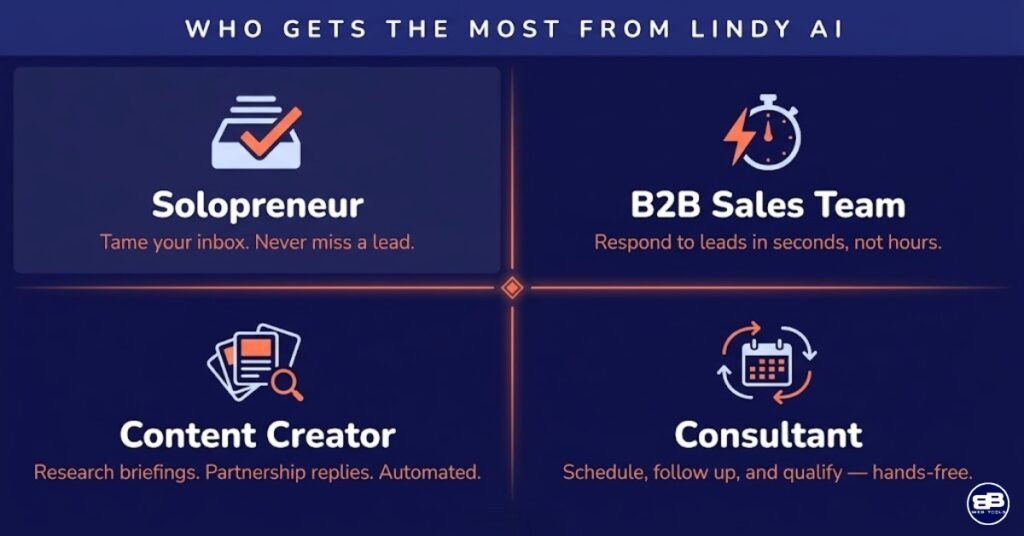
Lindy is the strongest choice if you:
- Spend significant time weekly on inbox triage, email drafting, and communication management that requires reading context and crafting appropriate responses
- Run a business where speed-to-lead is a competitive differentiator and inbound inquiry volume makes manual rapid response impractical
- Are a solopreneur or very small team who wants AI-driven assistance for delegation-oriented tasks rather than traditional rule-based automation
- Think naturally in terms of “what do I want my assistant to handle?” rather than “what trigger fires which action?”
- Have tried Zapier or Make for communication and lead qualification workflows and found that rule-based logic cannot handle the contextual variation in your real-world inputs
- Are building an AI-first business stack and want automation tools designed for the AI paradigm from the ground up
- Manage a high volume of external meetings and want intelligent calendar coordination that goes beyond a static booking link
Lindy may not be the right choice if you:
- Need to connect a large number of diverse apps and move data between them reliably at scale — Zapier’s 7,000+ integration library is the right tool for this
- Require the absolute predictability of rule-based logic for data-critical workflows where AI reasoning variance is unacceptable
- Are cost-sensitive and need the maximum automation capability per dollar — Make’s pricing model is dramatically more favorable for data routing and logic-based workflows
- Are new to both automation and AI tools and want the simplest possible onboarding experience — Zapier’s guided editor is the lowest-friction entry point
- Depend on e-commerce or specialized marketing tool integrations that Lindy does not yet natively support
Subscribe to our news letters

- Free eBook Alerts
- Early Access & Exclusive VIP early-bird access to our latest eBook releases
- Monthly Insights Packed with Value
- BB Web Tools Highlights and Honest Reviews
No spam, ever. Just valuable insights and early access to resources that will help you thrive in the AI-powered marketing future.
🏆 Final Verdict: Lindy AI Review 2026
After extensive testing across real business automation scenarios and honest comparison against Zapier and Make, my verdict on Lindy is this: it is one of the most genuinely innovative software tools I have evaluated in years — and it is best understood not as a competitor to Zapier or Make, but as a new category of business tool that those platforms cannot replicate.
The fundamental insight Lindy is built on — that a meaningful category of business work requires judgment rather than rule execution, and that AI reasoning can now perform that judgment at a quality level sufficient for business deployment — is correct, and the platform’s implementation of that insight is more mature than I expected from a company founded in 2023. The email management, lead qualification, and scheduling capabilities I tested delivered real, measurable value across the scenarios I ran. The multi-agent architecture suggests a platform that is building toward something significantly more ambitious than its current feature set, which is a compelling indicator for early adopters willing to grow with the product.
The honest caveats are equally real. The pricing is the highest of the three platforms reviewed and requires a clear ROI justification that does not apply universally. The integration library is the smallest of the three and remains a practical constraint for businesses with diverse app ecosystems. The AI reasoning model, while impressive, is less predictable and auditable than rule-based logic — a trade-off that is acceptable for communication and coordination tasks but not for data-critical pipeline workflows. And the free plan is too limited to provide a meaningful evaluation before committing to a paid tier.
My recommendation: start with Lindy’s free plan to explore the agent setup process and run the Email Manager template against your actual inbox. That experience alone will tell you more about whether Lindy’s AI reasoning quality is right for your specific communication patterns than any review can. If the email management output is strong after a few days of calibration, the Starter plan at $49.99 per month is almost certainly justified. If the output requires too much correction to save meaningful time, it is a signal that your inbox patterns may need more specific instruction work — or that Lindy is not the right fit for your particular communication context.
For multi-business operators, my most practical recommendation remains consistent with what I stated in our three-way comparison: run Make as your primary automation backbone for data workflows, Zapier for the integrations Make does not cover natively, and Lindy for your highest-value AI agent use cases. The combined free plans cost nothing, and that zero-cost evaluation period is the most honest starting point any review can recommend.
Overall Rating: ⭐⭐⭐⭐ 4.3 / 5
❓ FAQ Lindy AI Review 2026: Top 10 Questions
What is Lindy AI and how does it work?
Lindy is an AI agent platform that lets you deploy individual AI assistants — called Lindies — to handle specific categories of business work. Unlike traditional automation tools that connect apps by moving data according to rules you define, Lindy agents use AI reasoning to read context, make decisions, and take actions. You set up a Lindy by describing its role and instructions in plain English, connecting the apps it needs, and turning it on. The agent then handles incoming tasks — emails, leads, meeting requests, research — by reasoning through each situation rather than executing predefined conditions.
Is Lindy better than Zapier for automation?
Lindy and Zapier are better suited to different types of automation tasks. Lindy is superior for communication-heavy, judgment-requiring tasks like inbox management, lead qualification, and meeting scheduling — work that requires reading context and making decisions rather than just routing data. Zapier is superior for connecting apps, moving data reliably between systems, and running linear workflows at high volume. For most small businesses, the two tools are complementary rather than competing. See our full Zapier vs. Make vs. Lindy comparison for the complete breakdown.
How much does Lindy cost per month?
Lindy’s Starter plan costs $49.99 per month (billed monthly) and includes 3,000 Lindy credits, unlimited agents, all standard integrations, and email and chat support. The Business plan costs $99.99 per month and includes 10,000 credits, team Lindy functionality, CRM integrations including Salesforce and HubSpot, and Lindy-to-Lindy multi-agent workflows. A free plan is available with limited functionality. Enterprise pricing is available on request for custom credit volumes and compliance requirements.
Can Lindy replace a virtual assistant?
For specific, well-defined tasks — email triage, lead qualification, meeting scheduling, follow-up sequences — Lindy can meaningfully reduce the workload that would otherwise fall to a human virtual assistant. However, Lindy is not a general-purpose assistant capable of handling the full breadth of tasks a human VA manages, particularly those requiring complex judgment, creative thinking, or real-time communication with external parties requiring a human touch. The most accurate framing is that Lindy extends your capacity for repetitive, communication-oriented tasks — it augments rather than replaces human assistance for most small businesses in 2026.
What apps does Lindy integrate with?
Lindy’s current integration library covers core business communication and productivity tools: Gmail, Outlook, Google Calendar, Microsoft Calendar, Slack, Microsoft Teams, HubSpot, Salesforce, Pipedrive, Notion, Google Docs, Google Sheets, LinkedIn, and a growing list of additional platforms. Webhooks and API triggers extend connectivity to additional apps for technical users. The integration library is expanding with each product update, but it remains smaller than Zapier (7,000+) and Make (1,500+). For businesses with niche or specialized app requirements, a hybrid stack combining Lindy with Zapier or Make is often the most practical approach.
Is Lindy safe to use for business email management?
Lindy uses enterprise-grade security practices including OAuth-based app authorization (your email credentials are never stored directly by Lindy), encrypted data transmission, and granular permission controls that limit each agent’s access to only the apps and actions you explicitly authorize. For businesses with specific compliance requirements (HIPAA, SOC 2, GDPR), it is worth reviewing Lindy’s current compliance documentation and contacting the team to understand the exact scope of their certifications before deploying agents that handle sensitive data.
How does Lindy’s memory feature work?
Lindy’s memory capability allows individual agents to retain context from previous interactions and use that context to inform future responses. A lead qualification agent develops a progressively more accurate picture of your qualification criteria as it processes more inbound inquiries. An email management agent learns your communication patterns and prioritization preferences over time. Memory is enabled on paid plans and functions as a persistent context layer that supplements your written instructions with learned behavioral patterns. The improvement is incremental rather than dramatic — it is most noticeable after several weeks of consistent agent use.
Can I use Lindy and Zapier together?
Yes — and for most small businesses with diverse automation needs, using Lindy alongside Zapier (or Make) is the most practical approach. Lindy handles the AI-driven, judgment-requiring communication tasks — inbox management, lead qualification, scheduling — while Zapier or Make handles the data routing, app connectivity, and rule-based workflow execution. The tools are designed to complement each other through webhook and API integration, allowing data and events to flow between the Lindy ecosystem and your broader automation stack. This is the hybrid strategy I recommend for multi-business operators.
What is the difference between Lindy and Zapier Central?
Both Lindy and Zapier Central are AI agent platforms — but they represent different approaches to the same concept. Lindy is purpose-built for AI agents from the ground up, with its entire architecture designed around the agent paradigm. Zapier Central is an AI agent workspace layered on top of Zapier’s existing automation infrastructure. In practical terms, Lindy’s agent reasoning is more contextually aware and its agent management interface is more mature as of 2026 — it has been building toward AI agents as its primary product since founding, while Zapier Central is a relatively recent addition to an existing platform. For businesses whose primary need is AI agent functionality, Lindy is the more purpose-built solution.
Is Lindy worth the price for a small business?
The answer depends entirely on what tasks you are trying to automate. If your primary automation bottleneck is inbox management, lead qualification, meeting scheduling, or follow-up cadence management — tasks that require reading context and making decisions — and if those tasks are currently consuming several hours per week of your or your team’s time, Lindy’s Starter plan at $49.99 per month almost certainly delivers positive ROI. If your primary automation needs are data routing, app connectivity, and rule-based workflow execution, Lindy is not the right tool at any price point — Make or Zapier will serve you better for significantly less money.
📚 Sources
- Lindy Official Features and Pricing 2026 — Lindy.ai
- Generative AI and Autonomous Agents: Business Applications 2026 — McKinsey and Company
📚 Articles You May Like
✍️About the Author
With over 30 years of hands-on experience in analytics and digital marketing, I currently operate four online businesses spanning digital marketing, e-commerce, and health and wellness content publishing. I tested Lindy extensively across real business scenarios during this evaluation — inbox triage across a content-heavy email operation, lead qualification workflows, meeting scheduling coordination, and research briefing agents — because the only way to evaluate an AI agent platform honestly is to run it against the kinds of unstructured, real-world inputs that actually define its use case. This review reflects that direct testing experience, not a demo walkthrough.
My team and I evaluate every platform through four consistent lenses: real-world output quality, transparent total cost of ownership, genuine ease of use across different user types, and measurable business value over time. We always disclose affiliate relationships, acknowledge both strengths and weaknesses, and write for the reader’s benefit — not the vendor’s.
Have a question about Lindy or AI automation for your business? Drop it in the comments below — I read and respond to every one.
Related Blogs
Automate Content Creation: Top 5 AI Tools for Technical Bloggers
on
Automate content creation for technical blogs using 5 proven AI tools that streamline your entire workflow from keyword research to...
How to Recover a Hacked Facebook Account: Step-by-Step Guide (2025)
on
Complete guide to recovering your hacked Facebook account in 2025. Five proven methods, real timelines, and security tips included....
Download Your Free eBook
Subscribe to Latest News & Alerts
Valuable insights, free eBooks, and early access to resources that will help you thrive in the AI-powered marketing future

Vibe Coding for Marketers: Build Landing Pages and Tools Without a Developer
I tried vibe coding for marketers to build landing pages and tools without a developer—here's what worked, what flopped, and...
Read More
n8n vs Make vs Zapier 2026: Best AI Automation Platform for Marketers
I tested n8n vs make vs zapier myself to find the best AI automation platform for marketers in 2026 and...
Read More
YouTube Algorithm 2026: How Satisfaction Signals Are Changing Rankings
I cracked the YouTube Algorithm 2026 code by tracking satisfaction signals that boost rankings. Here's my step-by-step guide to grow...
Read More