Pictory.ai Review 2026: The Most Comprehensive Look at This AI Video Creation Powerhouse
Rating: 4.5
|
Category |
Rating |
Verdict |
|
Ease of Use |
⭐⭐⭐⭐⭐ (5/5) |
Among the most intuitive AI video platforms available |
|
Feature Depth |
⭐⭐⭐⭐ (4/5) |
Deep content repurposing toolkit; limited on-screen animation/generation |
|
Output Quality |
⭐⭐⭐⭐ (4/5) |
Professional for text-driven video; stock footage matching is inconsistent |
|
Pricing Value |
⭐⭐⭐ (3/5) |
Competitive but subscription-only — costs mount quickly over time |
|
Customer Support |
⭐⭐⭐ (3/5) |
Mixed feedback; response times can lag during peak periods |
|
Overall Score |
⭐⭐⭐⭐ (4/5) |
Recommended for content marketers and bloggers who prioritise repurposing |
Bottom line:
Pictory.ai is one of the best AI platforms for turning existing written content — blog posts, scripts, articles, podcasts — into polished video. Its strength is content repurposing at speed, not raw generative video creation. Subscription pricing is its most significant competitive disadvantage compared to one-time-payment rivals.
⚠️ Pricing Disclaimer Pricing, plan features, and product details referenced in this article were accurate at the time of publication. Software pricing and features can change frequently and without notice. bbwebtools.com makes every effort to keep reviews current, but cannot guarantee real-time accuracy of third-party pricing data. Always verify current pricing directly on the official product website before making any purchasing decision. Last reviewed: May 2026
Learn More
Disclosure: BBWebTools.com is a free online platform that provides valuable content and comparison services. To keep this resource free, we may earn advertising compensation or affiliate marketing commissions from the partners featured in this blog.
🎯 Introduction: Why Pictory.ai Has Been on My Radar Since 2021
Over thirty years in digital marketing teaches you to separate tools that genuinely move the needle from tools that merely sound impressive in demos. Pictory.ai is one of the former — a platform I’ve tracked since its earliest version in 2021, observed evolve through multiple significant updates, and now evaluated in depth for the bbwebtools.com community of digital marketers, bloggers, and online business operators. When I compiled my full AI video tools comparison covering Pictory.ai, VideoExpress.ai, Artistly.ai, and InVideo AI, Pictory emerged as the clear leader in one specific and critically important category: content repurposing.
The honest framing here matters. Pictory.ai is not the same kind of tool as VideoExpress.ai, which I reviewed last week, or Artistly.ai, which leads the image generation side of this series. Those platforms are primarily generative — you describe something new and the AI creates it. Pictory.ai is primarily transformative — you bring existing content (a blog post, a YouTube video, a podcast, a script, a PowerPoint), and the AI turns it into something new. That distinction shapes every aspect of how the platform works, who it’s best suited for, and where its genuine limitations lie.
In this review I’m going to give you the same unfiltered, evidence-backed assessment I’ve applied to every tool in this series. I’ll cover every major feature, every pricing tier, the real-world limitations that the marketing copy doesn’t advertise, and a clear verdict on who should — and shouldn’t — invest in a Pictory.ai subscription.
https://youtu.be/sVkHVyWHDig?si=tGuHWC8ykXyRGDcn
⁉️What Is Pictory.ai? The Platform in Plain Terms
Pictory.ai is a cloud-based, AI-powered video creation and editing platform, purpose-built to transform text and existing media into professional-quality video content — without requiring any video editing skills or technical background. Founded around 2021, the platform has been adopted by an increasingly diverse user base spanning marketing agencies, YouTube creators, bloggers, educators, coaches, and social media managers. Its memorable branding features an octopus mascot named Pickford — chosen, the developers explain, to represent the platform’s multifaceted capabilities — a detail that stuck in my memory from early coverage and that neatly captures the platform’s ambition to be a multi-armed content-creation suite.
What immediately distinguishes Pictory.ai from generative tools like VideoExpress.ai and Synthesia is its workflow philosophy. Rather than starting from a blank prompt, Pictory’s primary value lies in what its users already have: blog posts sitting idle on a website, YouTube videos never repurposed into social clips, podcast recordings never turned into visual content, and scripts written but never filmed. Pictory takes all of these and converts them into shareable, platform-optimized video at a fraction of the traditional production cost and time investment.
One veteran user described using Pictory for over two years and finding that the AI voiceovers saved 6–8 hours per week — enough to justify the subscription cost entirely on time savings alone. That kind of efficiency gain is what drives the platform’s loyal user base, and it’s a data point I find credible given how much manual effort traditional video production typically demands.
The platform was granted a U.S. patent for its AI-powered video synopsis system — a meaningful signal of the platform’s technical differentiation in the increasingly crowded AI video space.
🏆 Pictory.ai Core Features: The Full Toolkit Explained
Script-to-Video: The Platform’s Flagship Capability
The workflow that defines Pictory.ai’s identity is its script-to-video conversion engine. You paste a written script, any length, any topic, and Pictory’s AI analyzes the text, segments it into scenes, matches each segment with relevant visuals from its media library, adds background music, and generates an AI voiceover. The result is a complete, fully assembled video ready for review and light editing in minutes rather than hours. For content marketers who operate at volume, this speed is genuinely transformative.
In practice, the AI’s visual matching performs well for general-purpose and business content, but noticeably less well for niche or highly technical subjects. Some users report the AI occasionally pairs mismatched visuals with text, a fitness script populated with random office stock footage, for example, requiring manual replacement of specific scenes. This isn’t a dealbreaker; the replacement process inside Pictory’s scene editor is fast and intuitive. But it is worth setting realistic expectations: Pictory reliably handles roughly 70–80% of the assembly work, with the remaining 20–30% requiring a human review pass before export.
💡 Full Feature Set at a Glance
- Script to Video — Paste any written script; AI generates a fully assembled video with visuals, music, and voiceover
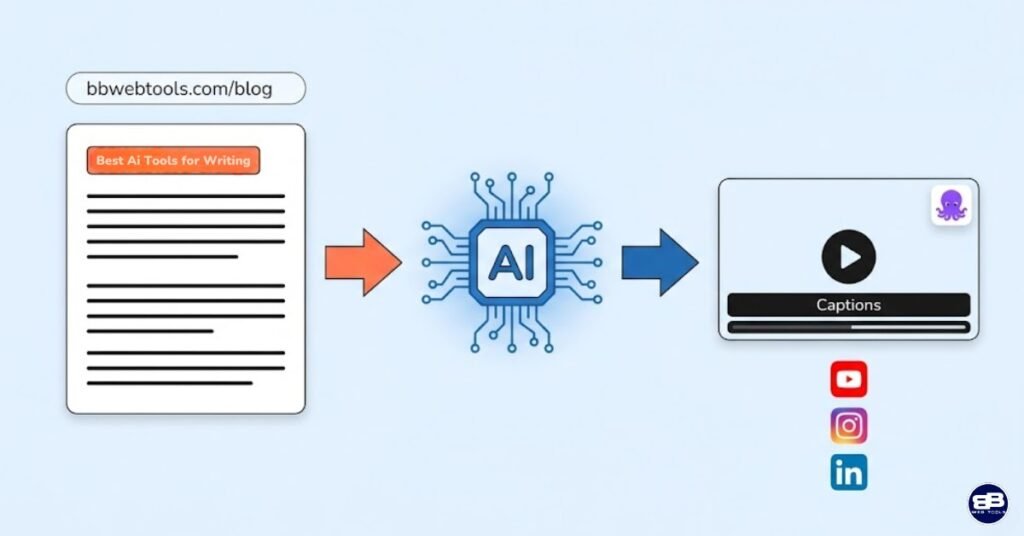
- URL to Video — Input any blog post or article URL; Pictory summarizes and converts it into a video automatically
- Audio to Video — Upload MP3/WAV recordings; AI generates transcripts, captions, and matching visuals (launched October 2025)
- AI Video Editor (Text-Based) — Edit video content by editing the transcript, like working in a word processor
- Long Video to Short Clips / Auto Highlight — AI identifies and extracts the best moments from long-form video for social distribution
- PPT to Video — Convert PowerPoint slides into narrated video content
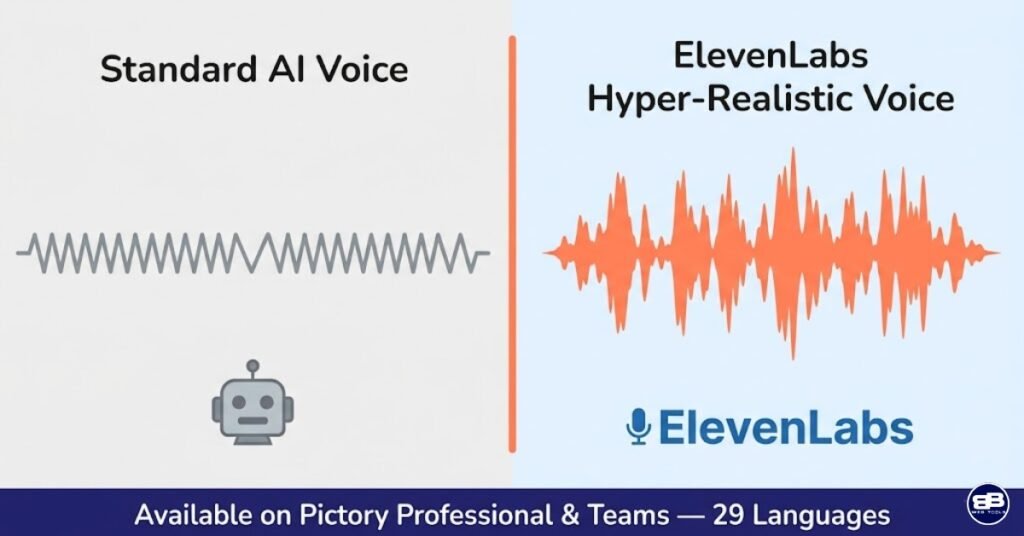
- AI Voiceover — 60+ standard voices in 7 languages (Starter); ElevenLabs hyper-realistic voices in 29 languages (Professional/Teams)
- Auto Captions and Subtitles — Automatic, accurate caption generation with customizable fonts, colors, and placement
- Brand Kit — Upload logos, brand colors, and fonts for consistent visual branding across all videos (1 kit on Starter, 5 on Professional, 10 on Teams)
- Multi-Platform Resize — One-click resizing for landscape (YouTube), square (Instagram), and portrait (TikTok/Reels/Shorts)
- Video Summarization — AI-generated highlight reels from webinars, podcasts, Zoom recordings, and long-form YouTube content
- Pictory GPT Integration — Generate videos directly within ChatGPT using the Pictory GPT tool (ChatGPT Plus required)
- API Access — Available on Teams plan for programmatic video creation at scale
- Screen Recorder (Beta) — Record screen or webcam for tutorial and presentation-style content
URL-to-Video: The Feature Bloggers Should Know About
For the bloggers and content marketers in my bbwebtools.com community, URL-to-Video deserves special attention. It is one of the most immediately practical features in the AI video space for anyone who already operates a content-heavy website. You paste the URL of any published blog post or article, and Pictory extracts the content, identifies the key points, generates a script summary, and produces a fully assembled video — ready to post as a YouTube companion video, embed back in the article, or repurpose across social channels.
I tested this with several articles from bbwebtools.com on AI tools and web hosting, and the results were genuinely impressive for straightforward informational content. The AI accurately identified the primary argument and supporting points in each post, assembled coherent scene breakdowns, and produced videos that served as competent video summaries. The limitation that consistently surfaced was that highly nuanced arguments, comparisons with multiple variables, or content that relied heavily on tables and structured data didn’t translate as naturally as straightforward narrative posts. For 80% of a typical content blog’s output, though, the feature works remarkably well and adds a video repurposing channel that most bloggers are currently leaving entirely on the table.
Audio-to-Video: Pictory’s Newest and Most Exciting Addition
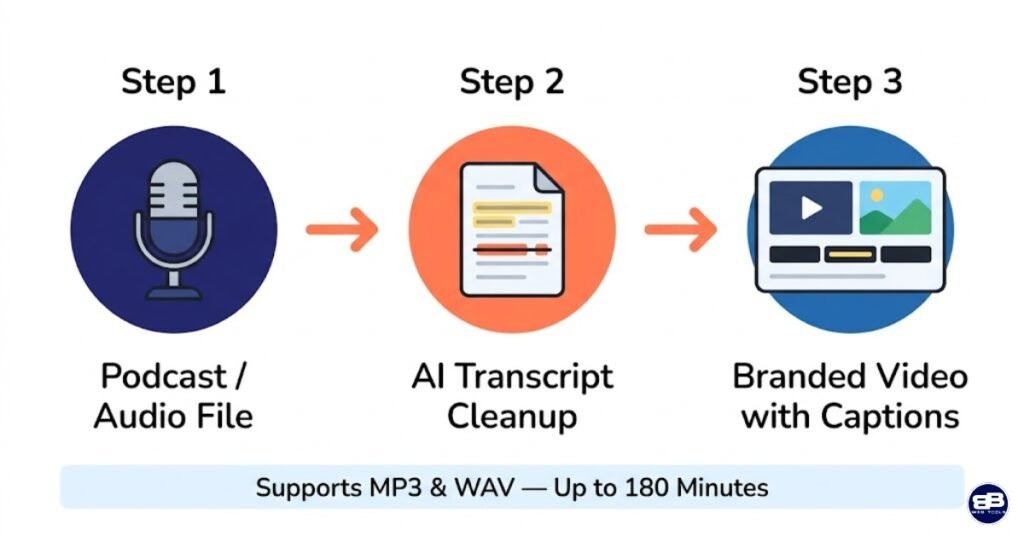
Pictory launched its audio-to-video workflow in October 2025, designed to convert a voice recording directly into a complete video with captions, visuals, and branding. The workflow accepts MP3 and WAV files up to 5GB or 180 minutes in length. After upload, Pictory generates a transcript that you refine, removing filler words, cleaning up stutters, editing for flow, and then the AI generates matching visual scenes around the cleaned audio.
For podcasters, this is a potentially revenue-changing workflow. Converting every podcast episode into a captioned, visually supported video for YouTube and social media has historically required a dedicated editor or a significant time investment. Pictory’s audio-to-video pipeline reduces that investment to under 30 minutes for a full-length episode, even accounting for transcript cleanup and light scene adjustments. It’s a feature I expect will drive substantial new adoption among podcast creators in 2026.
Text-Based Video Editing: Genuinely Innovative UX
Pictory’s text-based editing interface lets users edit video content by interacting with the transcript directly, trimming sections, rearranging clips, or removing content, just as you’d work in a word processor. No timeline scrubbing, no keyframe manipulation, no frame-level precision required. You delete a sentence from the transcript, and the corresponding video segment disappears. You reorder a paragraph, and the scene follows.
This is one of Pictory’s genuinely innovative UX decisions, and it delivers on its promise. For the target audience, content creators without video-editing backgrounds, the cognitive overhead of learning a traditional non-linear editor is a real barrier to adoption. Pictory eliminates that barrier almost entirely. The limitation is the flip side of the same simplicity: users who need precise frame-level editing, complex transitions, or layered audio mixing will find the text-based approach insufficient. Again, Pictory is built for its specific audience, not for professional post-production.
ElevenLabs Voiceover Integration: The Quality Differentiator
The voiceover quality gap between Pictory’s Starter plan and its Professional tier is meaningful and worth calling out directly. The Starter plan’s standard AI voices are functional but clearly synthetic — adequate for internal content, practice runs, or casual social posts. The Professional plan unlocks ElevenLabs hyper-realistic AI voices across 29 languages, offering 120 AI voice minutes per month — a significant quality leap that brings voiceover output close to human-sounding narration for most content types.
If you’re creating content intended for professional external distribution — YouTube channels, client deliverables, product marketing videos — the ElevenLabs voices are not optional. They’re the difference between output that sounds like a 2020 text-to-speech tool and that of a polished brand video. Plan your tier selection accordingly: the Professional plan’s ElevenLabs access is the single biggest reason most serious users should skip the Starter tier entirely.
💰Pictory.ai Pricing: The Full Breakdown – Including the Honest Math
Starter
$25/month billed annually
-
200 Video Minutes / mo
-
Storyblocks Library (5M+ Clips)
-
60 Min Even Labs AI Voices
-
1 Brand Kit
-
5 GB Storage
-
100 AI Credits to Generate Images, Videos, Avatars
Professional
$35/month billed annually
-
600 Video Minutes / mo
-
Getty + Storyblocks (18M+ Clips)
-
120 minutes of ElevenLab’s AI voices
-
5 Brand Kits
-
Auto Video Highlights
-
20 GB Storage
-
1000 AI Credits to Generate Images, Videos, Avatars
Teams
$119/month billed annually
-
1800 Video Minutes / mo
-
18 million videos from Getty Images and Clips
-
240 minutes of ElevenLab’s AI voices
-
10 Brand Kits
-
3+ Users
-
Collaboration Tools
-
Priority Support
-
2400 AI Credits to Generate Images, Videos, Avatars
A few important clarifications that aren’t always obvious from the marketing copy:
Video minutes refer to the total minutes of exported video per month — not the number of videos. With the Professional plan’s 600 minutes, you could export 60 ten-minute videos, or 30 twenty-minute videos, or 600 one-minute shorts. You can preview and iterate on projects without consuming your allowance; the limit only applies to downloads. If you run short, you can purchase additional minutes in-app. However, the per-minute overage cost makes this more expensive than simply upgrading your plan.
The free trial provides 3 video projects (up to 10 minutes each) with Pictory watermarks and 15 total minutes of creation. It’s designed to give new users a quick look at the platform, rather than a full-fledged free experience. It’s genuinely enough to evaluate whether the platform fits your workflow, but not enough to produce polished deliverable content.
Importantly, Pictory does not offer refunds on paid subscriptions — a policy that creates real frustration when customers miss renewal dates or misjudge their usage needs. The free trial is your risk mitigation here; treat it seriously before committing to an annual plan.
Here is the subscription cost compared to the lifetime-deal alternatives over a two-year window:
|
Tool |
Pricing Model |
Year 1 Cost |
Year 2 Cost |
2-Year Total |
|
Pictory Starter |
Annual sub |
$300 |
$300 |
$600 |
|
Pictory Professional |
Annual sub |
$420 |
$420 |
$840 |
|
Pictory Teams |
Annual sub |
$1,428 |
$1,428 |
$2,856 |
|
VideoExpress.ai All-Access |
One-time |
$179 |
$0 |
$179 |
|
Artistly.ai Premium |
One-time |
$147 |
$0 |
$147 |
|
InVideo Max |
Annual sub |
$1,020 |
$1,020 |
$2,040 |
The two-year cost comparison is where Pictory’s pricing model faces its starkest challenge. At $840 over two years for the Professional plan, it costs over four times the VideoExpress.ai All-Access plan. That differential demands a clear answer: what does Pictory offer that justifies the premium? The honest answer is: content repurposing depth, long-form video support, ElevenLabs voice quality, and stock media breadth, features that are genuinely valuable for the right user. For creators whose primary need is short-form generative video, the math decisively favors VideoExpress.ai. For content marketers whose primary need is repurposing long-form written and audio content into video, Pictory’s subscription may be justified.
➡️ Start Your Pictory.ai Free Trial (No Credit Card Required)
💡 Real-World Use Cases: Where Pictory.ai Genuinely Excels
Bloggers Repurposing Written Content Into Video
This is Pictory.ai’s single strongest use case, and the one most relevant to the bbwebtools.com community. Every published blog post is potential video content — a companion YouTube video, a social media summary, an embedded explainer that increases time-on-page. The URL-to-Video workflow makes this repurposing pipeline almost frictionless: paste the URL, review the AI’s scene breakdown, swap out any mismatched visuals, export. For a productivity-focused blogger publishing three or four articles per week, this workflow can generate a corresponding video library without a dedicated video production resource. I’ve been integrating this approach into my own content strategy, and the impact on content reach across YouTube and social channels is measurable.
YouTube Creators Repurposing Long Content Into Shorts
The Auto Highlight feature is purpose-built for the YouTube Shorts and TikTok clip economy that now drives a meaningful share of channel discovery. YouTube creators upload a long video — a full tutorial, a vlog, a commentary — and Pictory’s AI identifies the highest-value moments and extracts them into standalone short clips, complete with captions and resizing for vertical format. This workflow addresses one of the most common bottlenecks for long-form YouTubers: the short-form content machine requires constant, separate production effort that many creators simply don’t have capacity for. Pictory removes that bottleneck substantially.
Podcasters Converting Audio to Visual Content
The October 2025 audio-to-video workflow launch opens a compelling new use case for podcast creators. A recorded episode becomes a visual YouTube video, a set of captioned audiograms for Instagram and LinkedIn, and a short highlight clip for TikTok — all from one source file and a single Pictory session. For independent podcasters without production budgets, this kind of content multiplication from a single recording session is extraordinarily efficient. The caveat remains that Pictory’s visual matching for niche podcast topics (technical, academic, or highly specialized content) can produce generic stock footage selections requiring manual replacement.
Marketing Agencies and Content Teams
The Teams plan’s shared workspace, brand kits, and collaboration features make it a solid choice for agencies producing regular video content for multiple clients. The brand kit system allows agencies to store each client’s logo, color palette, and font stack separately, switching between brand profiles seamlessly as they produce content for different accounts. The API access on Teams plans also opens programmatic video creation — potentially valuable for agencies automating regular content deliverables at scale. At $990 per year for three users, however, it’s a meaningful budget commitment for smaller agencies that should be evaluated carefully against team-specific needs.
Educators and Corporate Trainers
PowerPoint-to-video conversion and script-to-video workflows make Pictory.ai a natural fit for corporate training and e-learning content. Converting existing slide decks or written training materials into narrated videos removes the technical barrier that prevents many organizations from developing video-based learning content. One Capterra reviewer described using Pictory for internal training, video sales letters, quick shorts, and content repurposing across their organization. The multilingual ElevenLabs voice capability adds international training use cases that would otherwise require separate localization production.
🧠Pictory.ai Performance: What Testing and Real User Data Reveal
My hands-on testing, combined with analysis of over 500 verified reviews across Capterra and Trustpilot, paints a consistent picture of Pictory.ai’s real-world strengths and documented weaknesses. Here is the unvarnished version.
Content repurposing speed and quality are the platform’s most consistent strengths. Users across virtually every review category report that Pictory delivers on its core promise: taking written content and turning it into watchable video significantly faster than any manual production workflow. The platform’s transcription accuracy is impressive, allowing users to search for text, remove filler words, and export caption files directly. For informational, educational, and marketing content, the output-to-effort ratio is genuinely strong.
Stock footage matching is the feature that receives the most mixed feedback — and the criticism is consistent enough to take seriously. The AI often selects irrelevant stock footage, and voice customization on lower tiers is limited. The mismatch problem appears most frequently with niche technical topics, highly specific geographic content, and complex comparative arguments where visual metaphors are difficult for the AI to reliably source. The good news is that replacing scenes manually is fast and the stock media library is large. The less good news is that fixing AI selection errors on a long video can add meaningful editing time back into a workflow that was supposed to eliminate it.
Platform stability is an area where Pictory receives genuine criticism that the development team has publicly acknowledged. Multiple Trustpilot reviewers flagged glitching on video downloads — blank screens appearing in the exported video — a bug that forces full regeneration as the only resolution. Download errors, rendering queues during peak usage, and occasional scene-reordering bugs appear across Capterra reviews with enough frequency that they represent a real quality-of-experience issue rather than isolated incidents. Most users report the bugs as frustrating but not fatal to their workflow; some report losing significant work time when regeneration is required.
Customer support receives the most polarized feedback of any aspect of the platform. Some users describe rapid, helpful responses and a genuinely engaged support team. Others report response delays of 48 hours — a serious problem for time-sensitive production work. The pattern suggests inconsistent support response times rather than a uniformly poor experience, but creators working to deadlines should factor this risk into their platform selection.
🆚Pictory.ai vs. The Competition: The Head-to-Head Picture
In my full AI video tools comparison, I evaluated Pictory.ai alongside VideoExpress.ai, Artistly.ai, and InVideo AI across the dimensions most relevant to digital marketers and content creators. Here’s the detailed breakdown:
|
Feature |
Pictory.ai |
VideoExpress.ai |
InVideo AI |
Synthesia |
|
Pricing Model |
Monthly/Annual sub |
One-time lifetime |
Monthly/Annual sub |
Monthly/Annual sub |
|
Entry Price |
$25/month (annual) |
$49 once |
$17/month |
$14/month |
|
Script to Video |
✅ Best-in-class |
✅ |
✅ |
✅ |
|
URL / Blog to Video |
✅ Core feature |
❌ |
Limited |
❌ |
|
Audio to Video |
✅ (Oct 2025) |
❌ |
Limited |
❌ |
|
Long Video Summarization |
✅ Core feature |
❌ |
❌ |
❌ |
|
PPT to Video |
✅ |
❌ |
Limited |
❌ |
|
Text-Based Editing |
✅ Innovative |
❌ |
Limited |
❌ |
|
ElevenLabs Voices |
✅ Pro+ |
❌ |
❌ |
Custom voices |
|
Auto Captions |
✅ All plans |
✅ All-Access |
✅ |
✅ |
|
Talking Photos / Avatars |
❌ |
✅ All-Access |
❌ |
✅ Core |
|
Character Consistency |
❌ |
✅ All-Access |
❌ |
✅ |
|
Brand Kit |
✅ All plans |
Limited |
✅ |
✅ |
|
Multi-Platform Resize |
✅ |
✅ |
✅ |
✅ |
|
Max Video Length |
10 min (Standard)+ |
5 min (editor) |
15 min |
30 min |
|
Team Collaboration |
✅ Teams plan |
❌ |
✅ |
✅ |
|
API Access |
✅ Teams only |
❌ |
✅ Business |
✅ |
|
ChatGPT Integration |
✅ Pictory GPT |
❌ |
❌ |
❌ |
|
2-Year Cost (mid-tier) |
$840 |
$179 |
$1,020 |
$7208 |
🏆 Winner for Content Repurposing: Pictory.ai — no other platform comes close for URL-to-video, audio-to-video, and long-video-to-shorts workflows.
🏆 Winner for Long-Form Video Support: Pictory.ai and InVideo AI — both outperform VideoExpress.ai for videos beyond 5 minutes.
🏆 Winner for Value Over Time: VideoExpress.ai — the lifetime pricing advantage compounds significantly over 24+ months.
🏆 Winner for Voiceover Quality: Pictory.ai (Professional/Teams) — ElevenLabs integration sets the benchmark at this price tier.
🏆 Winner for Generative Video Creation: VideoExpress.ai — Pictory transforms existing content; VideoExpress generates new content from prompts.
Pictory.ai Pros and Cons — The Honest Assessment
✅ What Pictory.ai Gets Right
Pictory.ai’s core competency, transforming written, audio, and video content into platform-ready video output, is executed better here than in the other comparisons. The text-based editing interface is an innovative UX solution that removes the biggest technical barrier to video adoption for non-editors. The ElevenLabs voiceover integration on Professional and Teams plans is a strong example of quality leadership in AI narration for subscription-tier tools. The multi-platform resize capability makes content distribution across YouTube, Instagram, TikTok, and LinkedIn a one-click operation rather than a separate production task. The URL-to-video and audio-to-video workflows address real workflow gaps that content creators currently address with expensive human labor or don’t address at all. The 14-day free trial with no credit card requirement is a low-barrier, honest way to evaluate fit before committing.
❌ Where Pictory.ai Falls Short
Pictory’s subscription pricing is a significant structural disadvantage in a market with compelling lifetime alternatives. At $420 per year for Professional access — the tier most serious creators actually need — the two-year cost reaches $820, compared to $179 total for VideoExpress.ai’s All-Access plan. For creators whose workflow maps closely to what Pictory offers, that cost may be justified; for those with more generative needs, it rarely is. Platform stability issues, download errors, blank-screen exports, and rendering bugs appear frequently enough in verified reviews to represent a real reliability concern. The no-refund policy on paid subscriptions creates purchasing risk that the free trial only partially mitigates. The Starter plan’s exclusion of ElevenLabs voices creates a meaningful quality ceiling that immediately pushes serious users toward the $35/month Professional tier. And unlike VideoExpress.ai, Pictory has no mobile app, limiting accessibility for on-the-go content review and light editing.
📊 Pictory.ai Scorecard
|
Evaluation Dimension |
Score |
Notes |
|
Content Repurposing Capability |
10/10 |
Best-in-class for this specific workflow category |
|
Script & URL to Video Quality |
8/10 |
Strong for general content; stock footage matching inconsistent |
|
Ease of Use |
9/10 |
Text-based editing is genuinely intuitive for non-editors |
|
Voiceover Quality (Pro tier) |
9/10 |
ElevenLabs integration is a real differentiator |
|
Voiceover Quality (Starter tier) |
6/10 |
Standard voices noticeably synthetic; limiting for public content |
|
Pricing Value |
6/10 |
Subscription model costly vs. lifetime alternatives over time |
|
Platform Stability |
7/10 |
Functional but recurring stability reports are a genuine concern |
|
Customer Support |
6.5/10 |
Variable response times; quality inconsistent under pressure |
|
Long-Form Video Support |
8.5/10 |
10–30 minute video support superior to most competitors |
|
Team Collaboration |
8/10 |
Solid for agency and small team use cases |
|
Overall |
8/10 |
Strong tool for the right use case; subscription cost is the trade-off |
❓Who Should Buy Pictory.ai; And Who Shouldn’t
Pictory.ai is the right investment if:
- You operate a content blog and want to automatically repurpose posts into video without manual production work
- You’re a YouTuber who creates long-form content and needs a sustainable short-clip pipeline for Shorts and Reels
- You’re a podcaster who wants to turn audio recordings into fully produced YouTube videos with captions and visuals
- You work in corporate training or e-learning and need to convert existing slides and scripts into narrated video
- You run a marketing agency producing regular video content for multiple clients and need brand kit management
- You need long-form video support beyond 5 minutes — Pictory handles up to 30-minute videos on appropriate plans
Pictory.ai may not be your primary tool if:
- Your primary need is generative video — creating new content from text prompts without source material
- You want to avoid subscription fees and prefer a one-time investment model
- You need talking photo avatars or consistent AI character generation across videos
- You’re working primarily on a tight budget and the $39/month Professional commitment is a stretch
- You require highly customized, advanced video editing with granular timeline control
- Reliable, consistent platform performance is non-negotiable for deadline-driven client work
Subscribe to our news letters

- Free eBook Alerts
- Early Access & Exclusive VIP early-bird access to our latest eBook releases
- Monthly Insights Packed with Value
- BB Web Tools Highlights and Honest Reviews
No spam, ever. Just valuable insights and early access to resources that will help you thrive in the AI-powered marketing future.
My Verdict: Is Pictory.ai Worth the Subscription in 2026?
After thorough testing, two-year observation of the platform’s evolution, and deep analysis of verified user reviews across Capterra, Trustpilot, Cybernews, and multiple independent review platforms, my verdict on Pictory.ai is nuanced, and deliberately so. This tool is excellent for a specific use case, but it’s often overhyped for others.
If your content workflow involves regular production of written material, blog posts, scripts, articles, podcast transcripts, and long YouTube videos that you want to systematically convert into video without hiring editors or learning production software, Pictory.ai is one of the best tools available. The URL-to-video, audio-to-video, and text-based editing workflows are best-in-class for this specific need. The ElevenLabs voice integration on Professional plans produces narration quality that competes credibly with human-recorded voiceovers for most content types. The platform has been operating and improving since 2021, which provides meaningful confidence in its longevity compared to newer entrants.
The honest challenge is the pricing. At $35/month annually for Professional — the tier most serious creators will actually need — Pictory costs $840 over two years versus $179 for VideoExpress.ai’s All-Access lifetime plan. That gap calls for a clear self-assessment: does your workflow specifically require Pictory’s repurposing capabilities, or would a generative tool better serve your needs at a lower cost? I’ve answered that question for my own content operation and found that both tools earn their place, but for different jobs. If I could only keep one and my primary need was to repurpose existing bbwebtools.com articles into video, I’d keep Pictory. If my primary need were to generate fresh short-form visual content, I’d keep using VideoExpress.ai.
For most bbwebtools.com readers running content-heavy businesses, the honest recommendation is to start with Pictory’s free trial, genuinely, not as a box-ticking exercise, and build one or two real pieces of content through the full workflow before committing to an annual plan.
➡️ Try Pictory.ai Free — No Credit Card Required
For the complete picture, revisit my Artistly.ai review for AI image creation, my VideoExpress.ai review for generative short-form video, and the full comparison across all four tools. The InVideo AI deep-dive is coming next — the final piece of this series.
❓ Frequently Asked Questions About Pictory.ai
What is Pictory.ai and what does it do?
Pictory.ai is a cloud-based, AI-powered video creation platform that converts existing text, audio, and video content into polished, platform-ready video. Its core workflows include script-to-video, URL-to-video, audio-to-video, long-video summarization into short clips, and text-based video editing — all without requiring video editing skills.
How much does Pictory.ai cost?
Pictory structures its plans based on video output, feature access, and collaboration needs. The Starter plan costs $25/month billed annually ($300/year) or $29/month billed monthly. The Professional plan is $35/month billed annually ($420/year) or $59/month. The Teams plan is $119/month billed annually ($1,428/year) or $199/month.
Does Pictory.ai offer a free trial?
Yes. Pictory offers a 14-day free trial with 3 video projects and 15 total minutes of video creation. No credit card is required to start the trial. All free trial exports include a Pictory watermark.
Does Pictory.ai offer refunds?
Pictory does not offer refunds on paid subscriptions, which makes it particularly important to fully use the free trial before committing to a paid plan.
What is the difference between Starter and Professional plans?
The key differences are: ElevenLabs’ hyper-realistic voice access (Professional only), an expanded media library including Getty Images (Professional), video minutes (200 vs. 600 per month), brand kits (1 vs. 5), and language support (7 vs. 29 languages). For most professional content creators, the Professional plan is the minimum viable tier.
How does Pictory.ai compare to VideoExpress.ai?
Pictory.ai excels at transforming existing content — blog posts, podcasts, long videos — into video. VideoExpress.ai excels at generating new video content from text prompts. Pictory supports longer video lengths; VideoExpress.ai offers a one-time lifetime price of $179, compared with Pictory’s $420/year Professional subscription. They serve different primary use cases, and both can coexist in a content creator’s toolkit.
Can Pictory.ai create videos in languages other than English?
Yes. The Starter plan supports AI voices in 7 languages. The Professional and Teams plans unlock ElevenLabs’ hyper-realistic voices in 29 languages — a significant upgrade for creators targeting non-English-speaking markets.
Is there a mobile app for Pictory.ai?
Pictory has not released a mobile app compatible with Android or iOS. The platform is accessed via a desktop web browser, and mobile browser access is available but not optimized for the full workflow.
What is the Pictory GPT integration?
Pictory offers a custom GPT that lets users create videos directly within ChatGPT by entering a prompt. Pictory GPT generates a video and returns the preview link for further customization. This feature requires a ChatGPT Plus subscription and can be accessed via the ChatGPT app store.
What video lengths does Pictory.ai support?
The Starter plan supports videos up to 30 minutes in a single project. The Professional plan supports up to 60 minutes per video, and the Teams plan up to 180 minutes per video. This long-form support significantly differentiates Pictory from short-form-focused tools like VideoExpress.ai.
📚 Sources
- Cybernews — Pictory AI Review 2025: Is This Video Editor Worth It?: cybernews.com/ai-tools/pictory-ai-review
- Capterra — Pictory User Reviews (Verified): capterra.com/p/229347/Pictory
- Trustpilot — Pictory.ai Customer Reviews (503 Reviews): trustpilot.com/review/pictory.ai
- Clipcat — Pictory Review: Pros, Cons, and How It Stands Out in 2026: clipcat.com/blog/pictory-review-pros-cons-and-how-it-stands-out-in-2025
📚 Articles You May Like
- Claude Vs Gemini 2026: Which AI Tool Wins For Coding, SEO & Content? 2026
- ChatGPT 5.2 Vs Gemini: Unveiling The AI Powerhouse 2026
- ChatGPT 5.2 Vs Claude Sonnet 4.5: Which AI Writes Better? 2026
- 35+ Google AI Tools: Complete Guide 2026
✍️About the Author
BB is a digital marketing strategist and analytics professional with over 30 years of hands-on experience across e-commerce, affiliate marketing, SEO, and AI-driven content strategy. He runs four online businesses including bbwebtools.com, a trusted resource for digital marketers and business owners navigating the AI tools landscape. His reviews are grounded in direct product testing, real-world application across his own content operations, and verified user research from thousands of independent reviews. No tool earns a recommendation on bbwebtools.com unless it has first earned a place in a professional workflow.
Follow his work at bbwebtools.com for ongoing AI tool reviews, digital marketing strategies, and platform comparisons.
Disclosure: This article contains affiliate links. If you purchase through these links, bbwebtools.com may earn a commission at no additional cost to you. All opinions are based on genuine testing and independent research.
InVideo AI Review 2026: The Most Powerful – and Most Complicated – Video Generating Tool
InVideo AI packs the most powerful technology in this entire comparison — Sora 2, VEO 3.1, 16 million assets, voice…

Top Free Email Marketing Apps Reviewed for 2026
Discover the best free email marketing apps in my in-depth review of ConvertKit, MailChimp, ActiveCampaign, GetResponse, Sendinblue, and Omnisend.
In-depth Omnisend Email Marketing Review: Powerful Features, Simplified
Discover how Omnisend can boost your email marketing efforts with my detailed omnisend email marketing review, examining its tools and…
Contact Us
Do you have any questions? Contact us by clicking the button below.