InVideo AI Review 2026: The Most Powerful and Most Complicated Tool in This Comparison
Rating: 4.5
|
Category |
Rating |
Verdict |
|
Ease of Use |
⭐⭐⭐⭐ (4/5) |
Beginner-friendly on the surface; credit system adds friction |
|
Feature Depth |
⭐⭐⭐⭐⭐ (5/5) |
The most technically advanced platform in this entire comparison |
|
Output Quality |
⭐⭐⭐⭐½ (4.5/5) |
Sora 2 + VEO 3.1 integration produces genuinely stunning results |
|
Pricing Value |
⭐⭐⭐ (3/5) |
Strong feature set, but credit burn is a real ongoing frustration |
|
Customer Support |
⭐⭐⭐⭐ (4/5) |
24/7 live chat is a genuine differentiator; quality is variable |
|
Overall Score |
⭐⭐⭐⭐ (4/5) |
Recommended — with honest caveats about credit management |
Bottom line:
InVideo AI is the most technically capable platform in this four-tool comparison, and the only one currently integrating both OpenAI’s Sora 2 and Google’s VEO 3.1 into standard pricing plans. But the credit-based cost model requires careful management, and the gap between what the platform can do and what individual plans allow has frustrated a meaningful share of its user base. Go in with eyes open — the power is real, the ceiling is real, and both matter.
⚠️ Pricing Disclaimer Pricing, plan features, and product details referenced in this article were accurate at the time of publication. Software pricing and features can change frequently and without notice. bbwebtools.com makes every effort to keep reviews current, but cannot guarantee real-time accuracy of third-party pricing data. Always verify current pricing directly on the official product website before making any purchasing decision. Last reviewed: May 2026
Learn More
Disclosure: BBWebTools.com is a free online platform that provides valuable content and comparison services. To keep this resource free, we may earn advertising compensation or affiliate marketing commissions from the partners featured in this blog.
🎯 Introduction: Completing the Picture – Why InVideo AI Deserves the Final Slot
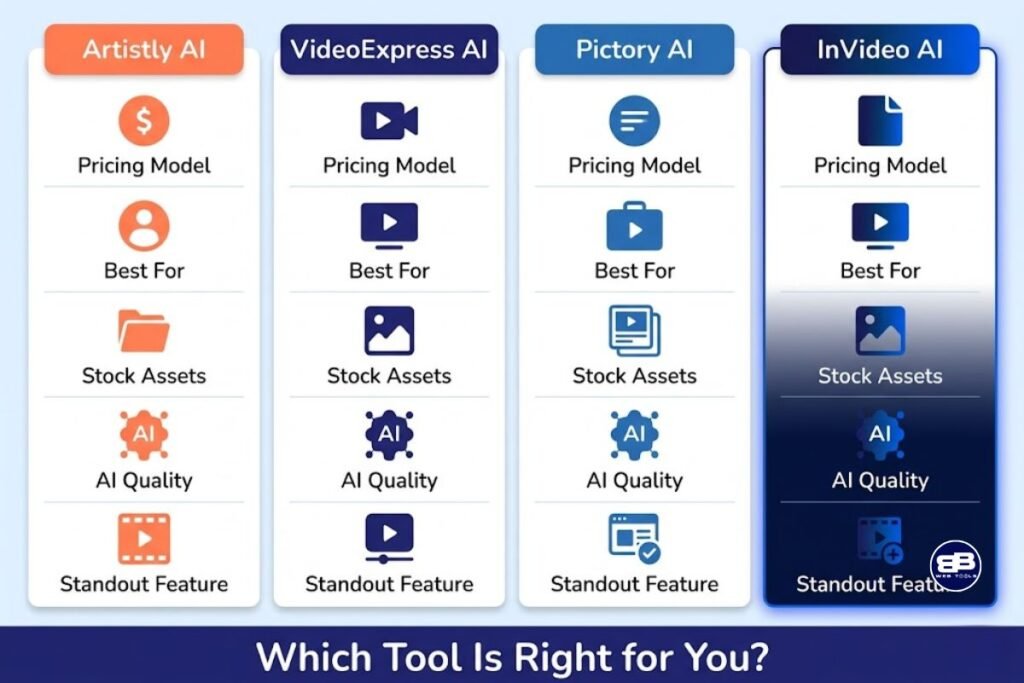
Over the past several weeks at bbwebtools.com, I’ve been building a comprehensive review series on the four AI video and creative tools I featured in my original comparison. I’ve covered Artistly.ai for AI image generation, VideoExpress.ai for accessible short-form video creation, and Pictory.ai for depth in content repurposing. InVideo AI is the final review in the series — and in many ways, the most complex one to write fairly.
I also took a unique approach and compared VideoExpress AI + Artistly vs. Leonardo AI.
InVideo AI is the most technically ambitious platform in this comparison. It’s also the one that generates the most polarized user feedback: passionate advocates who describe it as transformative, and equally vocal critics who feel burned by a credit system they didn’t fully understand before subscribing. Both groups are describing the same product. Understanding why requires a clear-eyed look at what the platform genuinely offers, what it costs in practice — not just in headline pricing — and who it’s actually designed to serve at each tier.
I want to be especially direct in this review because InVideo AI carries a reputation risk that the other tools in this series don’t share. With over thirty years in digital marketing, I’ve seen enough platforms use “unlimited” language to attract subscribers, only to have the fine print tell a different story. InVideo’s credit model is more nuanced than most, and that nuance deserves honest treatment. My goal, as it has been throughout this series, is to give the bbwebtools.com community the information they need to make a genuinely informed decision.
https://youtu.be/9rpOO0Bh7i0?si=SRuBt1S8Ebe-6R6s
⁉️What Is InVideo AI? Platform History and Core Identity
InVideo was founded in 2017 as InVideo Studio — a template-based video editing tool that gave non-technical users access to professional-looking video creation without video production skills. It operated in that mode successfully for several years, building a library of 6,000+ templates and a user base of millions across 190 countries. In 2024, the company made a decisive strategic pivot: launching InVideo AI as a separate, prompt-driven, fully generative video creation product that sits alongside — but does not replace — InVideo Studio.
This separation matters, and I’ll return to it repeatedly throughout this review because it has caused genuine confusion and frustration among users. InVideo AI and InVideo Studio are two completely different products with distinct subscription plans. Purchasing one does not include the other. Multiple verified Capterra and Trustpilot reviewers report signing up expecting the AI-powered features, only to discover they’d accidentally purchased the Studio plan — or vice versa. One Capterra reviewer described being promised AI access during the checkout for a lifetime Studio deal, then discovering after purchase that AI features weren’t included, followed by weeks of unanswered support tickets. That kind of experience is a serious trust problem, and it’s an important context for anyone evaluating the platform today.
InVideo AI — the product this review focuses on — is the generative platform. It uses advanced AI to automate the entire video creation process, from scriptwriting to scene selection, voiceover generation, and final editing. And as of October 2025, it became something considerably more powerful than it already was.
🏆 The October 2025 Transformation: Sora 2, VEO 3.1, and What They Mean
This is the section that separates a 2025 InVideo AI review from anything written before October of that year. The platform’s partnerships with OpenAI and Google DeepMind — integrating Sora 2 and VEO 3.1, respectively, into standard pricing plans — represent a genuine technological leap that changes the competitive picture entirely.
Sora 2 Integration: Cinematic Quality at the Prompt Level
InVideo AI integrates Sora 2 by OpenAI for cinematic, photorealistic video up to 60 seconds with synchronized audio. Sora 2, OpenAI’s second-generation text-to-video model, produces outputs that are in a different quality tier from anything a standard AI video tool could generate before late 2025. The photorealism, motion coherence, and lighting accuracy represent a step change — not an incremental improvement. Having access to Sora 2 inside InVideo’s workflow, rather than through OpenAI’s direct API at $19.99–$249.99/month separately, is a meaningful value argument for the platform.
VEO 3.1 Integration: Solving the Character Consistency Problem
VEO 3.1 by Google DeepMind maintains character consistency across multi-scene narratives with frame referencing. Character consistency — keeping the same face, physique, and style across multiple video scenes — has been one of the most technically difficult problems in AI video generation. VEO 3.1 directly addresses this by using reference images to lock character appearance across scenes, a capability that previously required expensive custom animation or Synthesia-level avatar systems.
While direct Google access costs $19.99–$249.99/month with credit limitations, InVideo provides comprehensive VEO 3.1 access as part of its standard plans at no additional cost. That bundling alone is an extraordinary value proposition on paper — the practical question, which I’ll address in the pricing section, is whether the platform’s credit structure allows you to actually use these capabilities at meaningful volume on any plan below the top tier.
The Full AI Engine Stack
InVideo AI uses multiple cutting-edge AI models. The platform integrates Sora 2 by OpenAI, VEO 3.1 by Google DeepMind, Nano Banana for storyboarding and character generation, and proprietary AI Twins v4.0 for avatar cloning. InVideo is, as of this writing, the only platform offering integrated access to both Sora 2 and VEO 3.1 in a single subscription. If raw generative video quality is your primary criterion, no other platform in this comparison — or, frankly, in the entire market — can match this combination.
💡InVideo AI Core Features: The Full Toolkit
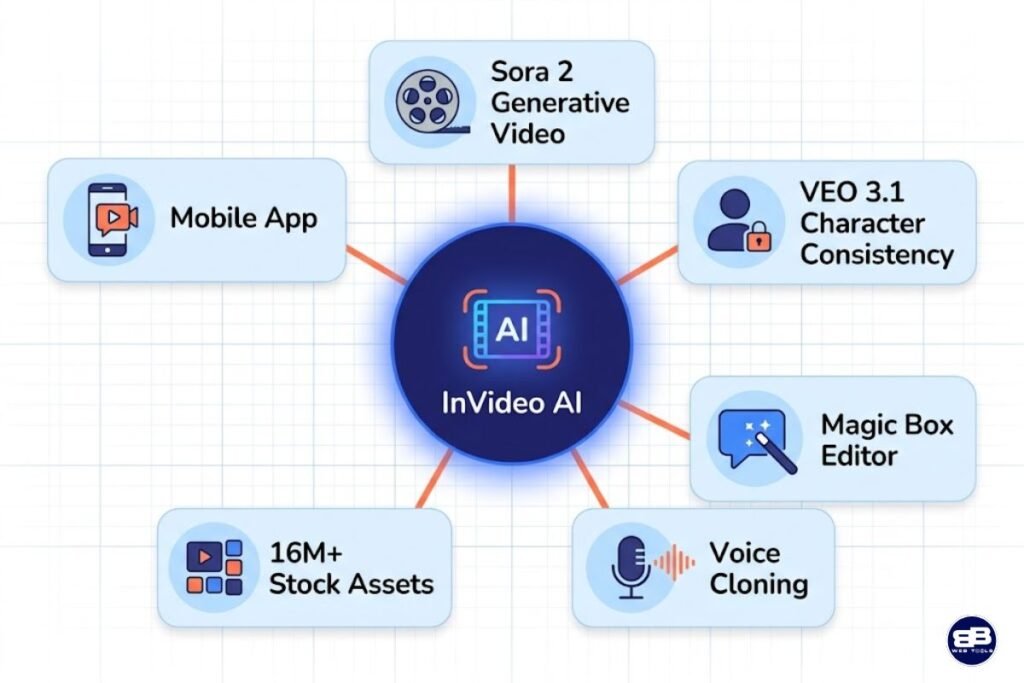
Text-to-Video: The Prompt-to-Production Pipeline
The platform automatically breaks your script into scenes, selects relevant stock footage, adds transitions, and syncs everything with voiceovers. Scene selection is context-aware and smart. The workflow begins with a simple text prompt — a topic, a script fragment, or even a full article URL — and the AI handles everything from scene breakdown to visual selection, voiceover generation, caption placement, and music matching. The result is a draft video ready for review and light editing in under five minutes for standard content.
The Magic Box conversational editing interface is one of InVideo AI’s most innovative UX features. Rather than navigating menus and clicking through options, you simply type what you want to change — “make the background darker,” “change the voiceover to a female voice,” “add a caption at 0:15 saying ‘subscribe now'” — and the AI executes the edit. It’s no longer just about templates or pre-made assets. Now, the entire video is generated by AI, including the script, visuals, and voiceover. This conversational editing layer dramatically reduces the technical overhead of video refinement and makes the platform genuinely accessible to users with no video production background.
💡 Full Feature Set at a Glance
AI Text-to-Video — Full prompt-to-video generation including script, scenes, voiceover, captions, and music
Magic Box Conversational Editor — Edit videos through natural language commands rather than menus and timelines
Sora 2 Generative Video — Cinematic, photorealistic AI-generated video clips up to 60 seconds (generative credits required)
VEO 3.1 Character Consistency — Maintain consistent characters across multi-scene videos using 3 reference images
AI Twins v4.0 Avatar Cloning — Clone your own voice and appearance for AI presenter videos
Frame & Object Referencing — Specify first and last frames, replace specific objects throughout videos
Scene Extension — Extend 8-second AI clips to 2+ minutes through AI-generated interpolation
16M+ Stock Asset Library — iStock, Storyblocks, and Shutterstock access across all paid plans
AI Script Generator — Full script creation from a simple topic prompt before video generation begins
Voice Cloning — 2 clones on Plus, 5 on Max; create AI versions of your own voice for all future content
Brand Kit — Logo, fonts, and colors saved for consistent branding across all video output
Multi-Platform Formatting — Templates and resize tools for YouTube, TikTok, Instagram, Facebook, and more
6,000+ Templates — Platform-specific templates professionally designed for every major content type
Real-Time Collaboration (Beta) — Multi-user workspace for team video production
API Access — Available on Max plan for programmatic, automated video creation
Mobile App — Full iOS and Android apps with 1080p export, real-time collaboration, and cloud sync
24/7 Live Chat Support — Available on all paid plans, a genuine differentiator from most competitors
The 16 Million Asset Library: Scale That Matters
The AI handles script generation, scene assembly from a library of over 16 million stock assets sourced from iStock, Storyblocks, and Shutterstock, and natural-sounding voiceovers. For context, Pictory.ai’s Professional plan provides access to Getty Images as a premium add-on. VideoExpress.ai and Artistly.ai rely on more limited media libraries. InVideo’s 16-million-asset library — spanning video clips, images, music tracks, and sound effects — is arguably the broadest stock media access available on any platform in this comparison, and it meaningfully reduces the likelihood of generic or mismatched visual selections that frustrate users on competing tools.
The iStock integration is particularly valuable for business and marketing content. iStock’s editorial and commercial-use library covers the professional scenarios — office environments, product categories, lifestyle demographics — that most marketing video content requires. Having iStock access natively within a video creation workflow, rather than as a separate subscription, eliminates a common and costly bottleneck for content teams.
Voice Cloning: A Feature Worth Understanding Carefully
InVideo AI’s voice cloning capability lets you upload a sample of your voice and create an AI model that can narrate future content in your voice. The practical application for content creators is significant: YouTubers, podcasters, and course creators can produce large volumes of AI-generated content that sounds like them, rather than a generic AI narrator. On the Plus plan, you get 2 voice clones. On the Max plan, 5 clones — sufficient for multilingual voice versions or separate brand personas.
One nuance worth noting: the avatar cloning feature — creating a visual AI representation of yourself, not just your voice — consumes credits at a rate that multiple Trustpilot reviewers describe as unexpectedly fast. One reviewer described using the platform for less than an hour, focusing on the avatar clone feature, and burning through credits so quickly that they immediately requested a refund. This is a specific use case with a higher credit cost, and it’s important to understand that not all InVideo AI features consume credits equally. High-generation features like avatar cloning and Sora 2 generative video are more expensive per use than standard text-to-video assembly.
💰InVideo AI Pricing: The Complete, Honest Breakdown
Plus
$17/month
-
75 credits/mo.
-
Access to all AI models including Veo 3.1, Sora 2 & Kling 3
-
Access to all AI workflows
-
Access to AI video trends
-
4 AI avatars & voice clones
-
20 GB storage & 100 iStock
-
75 credits is enough for: 300 Nano banana pro, 600 Nano banana 2 generations
Max
$85/month
-
390 credits/mo.
-
Access to all AI models including Veo 3.1, Sora 2 & Kling 3
-
Access to all AI workflows
-
Access to AI video trends
-
16 AI avatars & voice clones
-
100 GB storage & 200 iStock
- 390 credits is enough for: 1560 Nano banana pro, 3120 Nano banana 2 generations
Generative
$170/month
-
800 credits/mo.
-
Access to all AI models including Veo 3.1, Sora 2 & Kling 3
-
Access to all AI workflows
-
Access to AI video trends
-
40 AI avatars & voice clones
-
2 TB storage & 1000 iStock
- 800 credits is enough for: 3200 Nano banana pro, 6400 Nano banana 2 generations
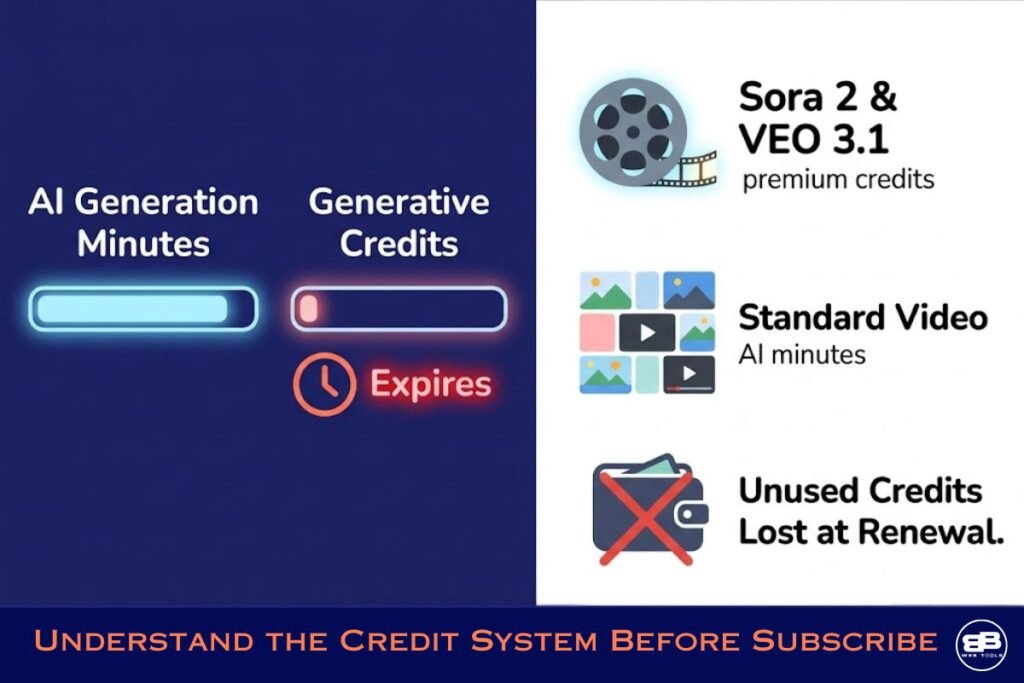
The credit system explained — clearly: InVideo AI operates on two parallel resource limits that function independently. The first is AI generation minutes — the total minutes of AI-assembled video you can create per month. The second is generative credits — a separate allowance specifically for using the high-powered Sora 2 and VEO 3.1 generative models. Standard text-to-video assembly using stock footage consumes AI minutes. Generating new visual content using Sora 2 or VEO 3.1 consumes generative credits. On the Plus and Max plans, generative credits are limited to a 60-second “1x Boost.” The Generative plan’s 15 generative minutes provide meaningful access, but even here, complex or long-scene generations can deplete that allowance faster than new users expect.
Read more about the credits system here.
💡 Real-World Use Cases: Where InVideo AI Performs Best
Faceless YouTube Channel Creators
For those just starting on YouTube, the AI script generator is extremely helpful for creating faceless videos, which can help users gain subscribers and views while drastically speeding up the content creation process. InVideo AI’s complete text-to-video pipeline, script generation, visual assembly, AI narration, and automatic captions, is purpose-designed for the faceless YouTube channel format. The 6,000+ platform-specific templates include formats optimized specifically for YouTube long-form, YouTube Shorts, and the hybrid content that performs across both. For operators running multiple faceless channels simultaneously, the API access on Max plans enables programmatic content generation at scale.
Social Media Managers and Marketing Teams
InVideo AI is fast for quick social drafts, best for quick TikTok/Reels drafts, promo clips, and simple explainers on tight deadlines. The multi-platform template library and one-click resize capability make InVideo AI a natural fit for social media managers producing content across multiple platforms simultaneously. The brand kit system ensures consistent visual identity across all output without manual formatting adjustments per platform. For marketing teams that measure success by content volume and turnaround speed, InVideo AI’s automation helps reduce per-video production time.
E-Commerce Businesses Needing Product Videos
The combination of iStock’s commercial-use product photography and video library with InVideo AI’s assembly engine creates a compelling workflow for online retailers. Product demonstration videos, promotional reels, seasonal campaign content, and platform-specific ad formats (Facebook video ads, Instagram shopping posts, TikTok product showcases) can all be produced in-house without external video production resources. For e-commerce operators in the bbwebtools.com community — and across my own online businesses — this workflow addresses one of the most persistent content-production bottlenecks.
Educators and Course Creators
InVideo makes producing YouTube content so easy — users drop in a pre-written script and storyboard, and it creates the perfect results. For educators producing course content, tutorial videos, and explainer animations, InVideo AI’s script-to-video pipeline removes the production barrier that prevents most solo educators from building video-heavy curricula. The voice cloning feature adds a particularly useful capability: record yourself explaining a topic once, clone your voice, and then produce hundreds of video lessons in your authentic voice without recording sessions for every module. The 24/7 live chat support is also genuinely valuable for educators who may be less technically experienced and need responsive help during production sessions.
High-Volume Content Agencies
API access on the Max plan enables InVideo AI to function as the engine behind automated content production pipelines — generating videos programmatically from data feeds, product catalogs, or content calendars without manual prompt entry for each piece. With real-time collaboration (beta) that lets multiple team members work in shared workspaces, the platform supports small- to midsize agency workflows. The caveat is clear: agency-level usage will exhaust AI generation minutes quickly, pushing teams toward the Max or Generative plans and significantly increasing the total monthly cost.
🧠InVideo AI Performance: What Testing and Real User Data Reveal
My hands-on testing, combined with analysis of verified reviews on Capterra (4.2/5 across hundreds of reviews), Trustpilot, and multiple independent sources, shows a mixed performance — strong in some areas and problematic in others.
Generative video quality with Sora 2 and VEO 3.1 is legitimately impressive. In testing, Sora 2-generated clips demonstrated photorealistic environments, convincing motion physics, and cinematic lighting that no other platform in this comparison can currently match. VEO 3.1’s character consistency performed reliably across simple multi-scene narratives — maintaining facial features and character style across scene changes in a way that previously required custom animation. For creators whose primary criterion is raw video quality ceiling, InVideo AI is the clear leader in this comparison.
Standard text-to-video quality — using stock footage assembly rather than generative content — is good but not exceptional. The AI gives you easy access to create animated videos, but it is super inconsistent; a character can look different from chapter to chapter. Stock footage selection follows the same pattern as Pictory.ai: contextually appropriate for general-purpose content, but less reliable for niche or highly specific topics. One Trustpilot reviewer described a visual glitch in which the AI generated a figure with three hands, an error that required additional credits to fix, rather than being corrected at no cost, a policy that generated genuine frustration. The worst part was that to “fix” an AI-caused error, more credits were required. This policy, which charges credits for correcting AI errors, is a user experience decision that the development team should reconsider.
Platform stability is an area where InVideo AI’s scale and ambition create genuine operational challenges. InVideo AI’s primary limitations include technical reliability issues with frequent export failures, videos stuck at loading percentages, slow rendering times, sometimes taking hours, and platform crashes during editing. These issues appear frequently enough in verified reviews to represent a real reliability concern rather than isolated incidents. Multiple Capterra reviewers describe the platform as occasionally slow, while others report more serious rendering failures requiring full video regeneration. The development team is actively addressing stability, and the platform has improved meaningfully since its 2024 launch — but reliability is not yet at the level of a mature, stable production tool.
Customer support is InVideo AI’s most consistently praised operational feature, and it’s a genuine differentiator from the rest of this comparison set. The 24/7 live chat is real — not a bot-forward experience with human escalation buried several layers deep. Multiple reviewers on Trustpilot and Capterra specifically name individual support agents for their patience and competence in resolving complex issues. The counterpoint is that support quality is variable; some reviewers describe fast, skilled resolution, while others report inconsistent responses or repeated contact for the same issue. Overall, it’s the best support experience in this four-tool comparison.
🆚 InVideo AI vs. The Competition: Where It Leads and Where It Doesn’t
In my full AI video tools comparison, I placed VideoExpress.ai alongside Pictory.ai and InVideo AI. Here’s how the tools compare across the dimensions that matter most to my bbwebtools.com audience:
|
Feature |
VideoExpress.ai |
Pictory.ai |
InVideo AI |
|
Pricing Model |
One-time |
Monthly sub |
Monthly sub |
|
Entry Price |
$49 lifetime |
~$25/month |
~$17/month |
|
Text to Video |
✅ |
✅ |
✅ |
|
Image to Video |
✅ |
Limited |
✅ |
|
Talking Photos |
✅ All-Access |
❌ |
❌ |
|
Consistent Characters |
✅ All-Access |
❌ |
❌ |
|
Voice-to-Prompt |
✅ |
❌ |
❌ |
|
AI SFX Generator |
✅ |
❌ |
Limited |
|
Multilingual Voices |
✅ 36 languages |
✅ |
✅ |
|
Subtitle Generator |
✅ All-Access |
✅ |
✅ |
|
Watermark-Free |
✅ Both plans |
Paid plans only |
Paid plans only |
|
Commercial Rights |
✅ Both plans |
✅ |
✅ |
|
Video Length (max) |
5 min (editor) |
10 min |
15 min |
| 2-Year Cost (mid-tier) | $179 | $840 | $2040 |
🏆 Winner for Raw Generative Quality: InVideo AI — Sora 2 + VEO 3.1 integration is in a class of its own.
🏆 Winner for Stock Media Depth: InVideo AI — 16M+ assets across iStock, Storyblocks, and Shutterstock.
🏆 Winner for Mobile Accessibility: InVideo AI — the only platform with a full-featured iOS and Android app.
🏆 Winner for Value Over Time: VideoExpress.ai and Artistly.ai — the lifetime pricing math is decisive.
🏆 Winner for Content Repurposing: Pictory.ai — URL-to-video and audio-to-video workflows remain unmatched.
🏆 Winner for Transparency of Cost: VideoExpress.ai and Artistly.ai — no credits, no expiry, no hidden ceilings.
InVideo AI Pros and Cons — The Unvarnished Assessment
✅ What InVideo AI Gets Right
InVideo AI’s technology stack is genuinely extraordinary for a platform at this price point. The integration of Sora 2 and VEO 3.1 into standard subscription plans gives users access to the world’s most advanced text-to-video models without paying OpenAI and Google separately — a bundled value that no competitor in this comparison currently replicates. The 16-million-asset stock library eliminates a sourcing problem that constrains every rival platform. Voice cloning adds a layer of personal authenticity to AI-generated content, meaningfully differentiating it from generic narration. The mobile app — full-featured on both iOS and Android — makes InVideo AI the only platform in this series that supports serious on-the-go content creation. The 24/7 live chat support is a genuine operational advantage for creators working across time zones or under deadline pressure. And the free plan, with 10 minutes of AI generation per week and no credit card required, is a legitimate no-risk entry point for evaluation.
❌ Where InVideo AI Falls Short
The credit system is InVideo AI’s most significant weakness, and we should state this clearly rather than bury it in caveats. The disconnect between what the platform promises and what individual plans deliver in practice has created a pattern of frustrated users that is too consistent across Capterra, Trustpilot, and G2 to be dismissed. One verified Capterra reviewer noted: “It used to be the best, most affordable AI product to use — that’s no longer the case,” a sentiment that reflects the platform’s price increases alongside capability additions that require higher-tier plans to access. Expiring purchased top-up credits at the start of each billing cycle has cost users money and damaged platform trust. The development team needs to address this. Platform stability — export failures, rendering hangs, occasional crashes — remains an area with documented, recurring issues. The confusion between InVideo AI and InVideo Studio is leading to mismatched purchases and frustrated new users. This reflects a gap in onboarding rather than malicious intent, but the cost is being borne by customers. For creators whose specific use case involves heavy generative credit usage — avatar cloning, Sora 2 content, VEO 3.1 character generation — the Generative plan at $2000/year may be the only tier where the platform’s headline capabilities are genuinely accessible at production volume.
📊 InVideo AI Review – Features Scorecard
|
Evaluation Dimension |
Score |
Notes |
|
Generative Video Quality |
10/10 |
Sora 2 + VEO 3.1 is the best available in this price class |
|
Standard Text-to-Video Quality |
7.5/10 |
Stock footage assembly is good; AI errors cost credits to fix |
|
Ease of Use |
8/10 |
Magic Box is innovative; credit system creates ongoing friction |
|
Feature Breadth |
10/10 |
The most comprehensive toolkit in this entire comparison |
|
Pricing Transparency |
5/10 |
Credit model and plan confusion are genuine trust problems |
|
Platform Stability |
6.5/10 |
Recurring export failures and rendering issues are documented |
|
Customer Support |
8/10 |
24/7 live chat is a real differentiator; quality is variable |
|
Mobile Accessibility |
9/10 |
Only platform in comparison with a full-featured mobile app |
|
Value Over Time |
6/10 |
Feature-rich but subscription costs compound significantly |
|
Stock Media Depth |
10/10 |
16M+ assets across premium providers is unmatched here |
|
Overall |
8/10 |
Powerful tool for the right use case — go in with full information |
❓Who Should Use InVideo AI — And Who Shouldn’t
InVideo AI is the right investment if:
- Raw generative video quality — using Sora 2 and VEO 3.1 — is your primary criterion
- You create faceless YouTube content at volume and need the full text-to-video pipeline
- You need a mobile app for content creation and review on the go
- You want voice cloning to build AI narration in your own voice at scale
- You manage content for multiple brands and need API access for automated production
- You value 24/7 live support and want responsive help when production issues arise
- You’re a social media manager producing daily multi-platform content with consistent branding
InVideo AI may not be your primary tool if:
- You want straightforward, predictable pricing without credit management complexity
- You primarily need to repurpose existing written or audio content into video (use Pictory.ai)
- You want a one-time payment and no ongoing subscription costs (use VideoExpress.ai or Artistly.ai)
- You need highly reliable, deadline-critical exports with minimal rendering failures
- You’re evaluating on a tight budget, and the Plus plan’s 50 AI minutes/month constrains your planned volume
- The distinction between InVideo AI and InVideo Studio confuses your purchasing decision (resolve this completely before subscribing)
Subscribe to our news letters

- Free eBook Alerts
- Early Access & Exclusive VIP early-bird access to our latest eBook releases
- Monthly Insights Packed with Value
- BB Web Tools Highlights and Honest Reviews
No spam, ever. Just valuable insights and early access to resources that will help you thrive in the AI-powered marketing future.
🎯My Verdict: Is InVideo AI Worth It in 2026?
This is the most nuanced verdict in the entire series, and I want to give it the complexity it deserves. InVideo AI is simultaneously the most technically impressive platform in this comparison and the one that requires the most careful evaluation before purchase.
The Sora 2 and VEO 3.1 integrations are genuine innovations that raise the quality ceiling for AI-generated video to a level no individual creator could previously access at consumer pricing. With a 16-million-asset library, voice cloning, avatar generation, a mobile app, and 24/7 live support, the platform stands as the most full-featured AI video tool in this series. For creators whose output genuinely leverages these capabilities — particularly faceless YouTube operators, high-volume social media teams, and content agencies — InVideo AI offers something no other platform in this comparison can match.
But the honest caveat is equally important: the credit model has created real, documented harm to user trust, and that harm is not trivial. The expiry of purchased top-up credits, the cost of fixing AI errors, the disconnect between “unlimited” marketing language and the monthly generation caps, and the ongoing confusion between InVideo AI and InVideo Studio are problems that a platform of this caliber shouldn’t carry in 2026. They reflect product decisions that prioritize revenue optimization over user experience clarity — and in a market where trust is a competitive advantage, that trade-off has a cost.
My recommendation: start with the Plus plan at $17/month ($200 billed annually) — 75 credits is enough for 300 Nano banana pro and 600 Nano banana 2 generations — and use it to build several real pieces of content through the full workflow before committing to any higher tier. Decide specifically which features you intend to use regularly before selecting a plan, because the difference in what’s practically accessible between Max ($1,000/year) and Generative ($2,000/year) is significant. And if your primary needs are short-form video generation without the complexity of credit management, VideoExpress.ai’s one-time $179 plan remains the most straightforward value in this comparison.
➡️ Start InVideo AI with the Plus plan
For the complete picture across all four tools in this series, read my full AI video tools comparison on bbwebtools.com. For the individual deep-dives: Artistly.ai review, VideoExpress.ai review, and Pictory.ai review. If you’re building out the rest of your AI tools stack, my email marketing tools roundup covers the rest of the digital marketing workflow.
❓ Frequently Asked Questions About InVideo AI
What is InVideo AI and how does it work?
InVideo AI is a cloud-based, AI-powered video creation platform that transforms text prompts, scripts, or topics into fully produced videos — including AI-written scripts, scene selection from a 16M+ stock library, AI voiceover, automatic captions, and background music. Its October 2025 integrations with OpenAI’s Sora 2 and Google’s VEO 3.1 added cinematic generative video and character consistency capabilities to standard subscription plans.
What is the difference between InVideo AI and InVideo Studio?
They are two completely separate products with separate subscription plans. InVideo AI is the prompt-based generative platform reviewed here. InVideo Studio is the older, template-based video editing tool. Purchasing one does not include the other. This distinction has confused many users at purchase — clarify which product you need before subscribing.
How much does InVideo AI cost?
InVideo AI doesn’t offer a free plan at the time of writing (May 2026).
Paid plans include Plus (~$17/month annually, $200/year), Max (~$85/month annually, $1,000/year), and Generative (~$170/month annually, $2,000/year). Monthly billing is available at higher rates. Enterprise pricing is custom.
What are “AI generation minutes” and “generative credits” — and why do they both matter?
AI generation minutes govern how much total video you can assemble per month using stock footage and AI narration. Generative credits are a separate resource specifically for using high-powered models like Sora 2 and VEO 3.1 to create original AI-generated visual content. Both limits are independent, and running out of either stops the relevant type of production. Understanding this distinction before subscribing is critical to matching your plan to your actual usage.
Do purchased top-up credits expire?
Yes, and this is critically important. Additional credits purchased to supplement your monthly allowance expire at the start of your next billing cycle. Any unused purchased credits are forfeited. Multiple users have reported losing significant amounts from purchased credit balances due to this policy.
What is the Magic Box feature?
Magic Box is InVideo AI’s conversational editing interface. Instead of navigating menus and timelines, you type natural language instructions — “make the intro shorter,” “change the background music,” “add a subtitle at 0:30” — and the AI executes the edit. It’s one of the platform’s most praised UX innovations.
How does InVideo AI compare to VideoExpress.ai?
InVideo AI has superior generative video quality (Sora 2, VEO 3.1), a vastly larger stock asset library, voice cloning, and a mobile app. VideoExpress.ai offers a one-time lifetime price of $179, compared with InVideo AI’s $200–$1,000/year subscription, simpler pricing with no credits to manage, and a less complex onboarding experience. Your choice should reflect whether InVideo AI’s generative quality ceiling justifies its ongoing cost for your specific use case.
Can InVideo AI videos be monetized on YouTube?
Yes. All videos created on paid plans can be monetized on YouTube. The stock media from iStock and Storyblocks is royalty-free and licensed for commercial use, including YouTube monetization. Music tracks from Storyblocks are monetization-safe. InVideo recommends connecting your YouTube channel to their platform via profile settings to whitelist it and avoid Content ID issues.
Is InVideo AI worth it for small business owners?
For small business owners producing regular social media, promotional, or explainer video content, the Plus plan at $240/year offers a capable entry point — particularly given the 16M+ asset library and brand kit features. The value calculation becomes more complex at higher tiers. If your core need is social video without the complexity of credit management, VideoExpress.ai’s one-time $179 plan is worth serious consideration before committing to InVideo AI’s annual subscription.
📚 Sources
- InVideo AI Official Pricing Page — Plans & Features (2025): invideo.io/pricing
- Capterra — InVideo Verified User Reviews (Hundreds of Reviews, 4.2/5): capterra.com/p/180680/InVideo/reviews
- Trustpilot — InVideo AI Customer Reviews (665+ Reviews): trustpilot.com/review/ai.invideo.io
📚 Articles You May Like
- Claude Vs Gemini 2026: Which AI Tool Wins For Coding, SEO & Content? 2026
- ChatGPT 5.2 Vs Gemini: Unveiling The AI Powerhouse 2026
- ChatGPT 5.2 Vs Claude Sonnet 4.5: Which AI Writes Better? 2026
- 35+ Google AI Tools: Complete Guide 2026
✍️About the Author
BB is a digital marketing strategist and analytics professional with over 15 years of hands-on experience across e-commerce, affiliate marketing, SEO, and AI-driven content strategy. He runs four online businesses, including bbwebtools.com, a trusted resource for digital marketers and business owners navigating the AI tools landscape. His reviews are grounded in direct product testing, real-world application across his own content operations, and verified user research aggregated from thousands of independent reviews. No tool earns a recommendation on bbwebtools.com unless it has genuinely earned a place in a professional workflow — or earned an honest warning when it hasn’t.
Follow his work at bbwebtools.com for ongoing AI tool reviews, digital marketing strategies, and platform comparisons.
Disclosure: This article contains affiliate links. If you purchase through these links, bbwebtools.com may earn a commission at no additional cost to you. All opinions are based on genuine testing and independent research.
Hostinger Reach Email Marketing: Complete Review
I tested Hostinger Reach Email Marketing to see if it’s worth your investment. Here’s my honest review of features, pricing,…

Top Free Email Marketing Apps Reviewed for 2026
Discover the best free email marketing apps in my in-depth review of ConvertKit, MailChimp, ActiveCampaign, GetResponse, Sendinblue, and Omnisend.

In-depth Omnisend Email Marketing Review: Powerful Features, Simplified
Discover how Omnisend can boost your email marketing efforts with my detailed omnisend email marketing review, examining its tools and…
Contact Us
Do you have any questions? Contact us by clicking the button below.